50
Installation Manual
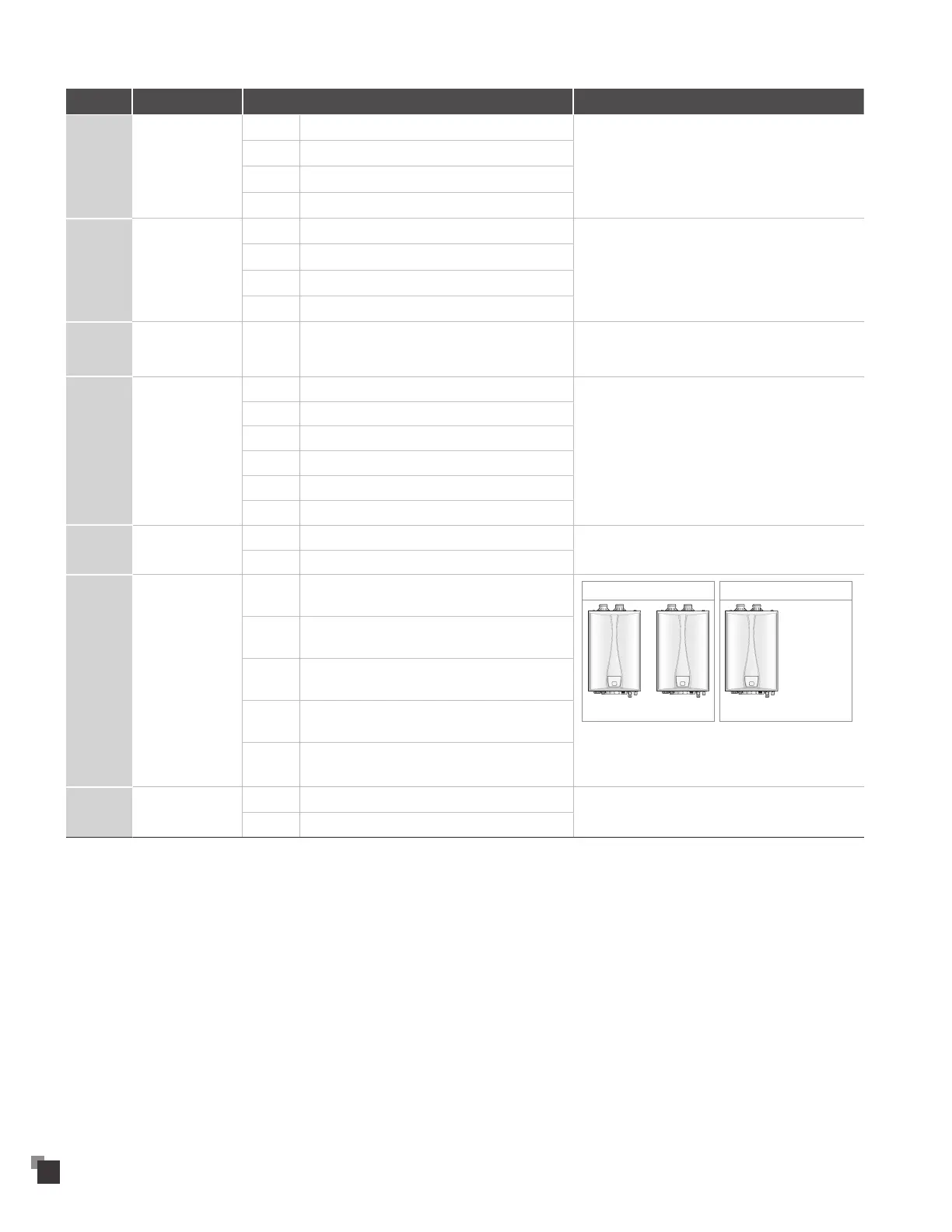
Data Function Setting Remark
P2 Lime Alarm
0 Disable
Displays a "E1" error when the set time period has been
reached to indicate a flush or service is necessary.
1 6 months
2 12 months
3 24 months
P6 High Altitude
50 0–1,999 ft
Above 2,000 ft (610 m), the water heater will de-rate by
4% for each 1,000 ft (305 m) of altitude gain.
55 2,000–5,399 ft
5A 5,400–7,799 ft
5F 7,800–10,100 ft
PC
Cascade Water
Flow
20–55 20 (2.0 liter = 0.53 gallon)–55 (5.5 liter = 1.45 gallon)
Stop the combustion when a change in the flow rate
1.5 seconds after the change is detected matches the
set flow rate when linked with CASCADE.
PD Cascade Standby
3 Set 3 stand-by units
Set 3 to 8 stand-by units when connecting 5 or more
units.
* Set the number of stand-by units from 7" monitor
when linked with 7" monitor.
4 Set 4 stand-by units
5 Set 5 stand-by units
6 Set 6 stand-by units
7 Set 7 stand-by units
8 Set 8 stand-by units
LA High & Low
LALO 98~140 °F (Residential)
LAHI 98~180 °F (Commercial)
LE Cascade Group
1 Set 1 Group
1 Group
Set 1 Set 1
2 Group
Set 2 Set 2
• • •
* Each group can make up to 8 units.
* Set the group for CASCADE linked with the unit IoT
and the 7” monitor controller.
2 Set 2 Group
3 Set 3 Group
4 Set 4 Group
5 Set 5 Group
LF IoT & 7" Monitor
0 Disable
1 IoT or 7" monitor


 To Next Page