61
Appendix
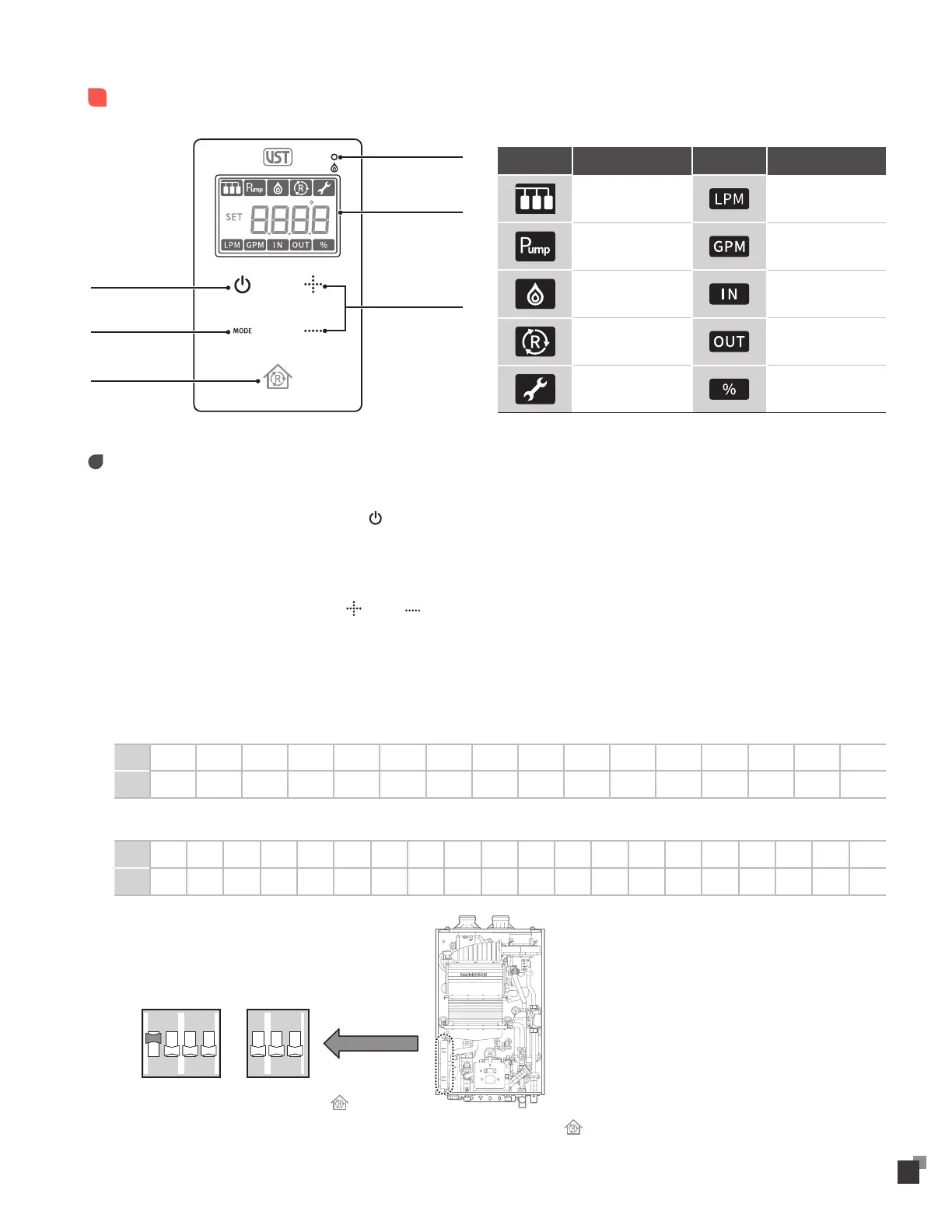
Remote Controller - VD-100 (optional)
Temperature
Setting
Combustion
Display
Power
Mode
“R” Button
(Re-Circulation Ready)
Icon Purpose Icon Purpose
Cascade Liter per Minute
Pump operation Gallon per Minute
Combustion
Cold water
Temperature
Re-Circulation
Hot water
Temperature
Maintenance Load Capacity
Operation Instruction
• Turning the Water Heater On or Off
- To turn the water heater on or off, press the button.
- When the water heater is on, the most recent temperature setting is displayed.
• Setting the Water Temperature
- To set the water temperature, press the (Up) or (Down) button for the desired temperature setting.
- 98 °F(37 °C)–120 °F (50 °C), Temperature can be set in increments of 2 °F.
- 120 °F(50 °C)–140 °F (60 °C), Temperature can be set in increments of 5 °F.
- 140 °F(60 °C)–180 °F (80 °C), Temperature can be set in increments of 10 °F.
(For additional temperature setting refer to the operation/installation manual.)
- Temperature range (Residential)
°F 98 100 102 104 106 108 110 112 114 116 118 120 125 130 135 140
°C 37 38 39 40 41 42 43 44 45 46 48 50 52 55 57 60
- Temperature range (Commercial)
°F 98 100 102 104 106 108 110 112 114 116 118 120 125 130 135 140 150 160 170 180
°C 37 38 39 40 41 42 43 44 45 46 48 50 52 55 57 60 65 70 75 80
• “R” Button
- Applicable for VRP models Only
※ Re-Circulation Piping must be installed.
※ Proper Dip Switch Setting is required.
- To initiate re-circulation mode, Press Button.
- During operation of re-circulation, Pump can be manually stopped by pressing Button.
1 2 34
ON
1 2 3
ON


 To Next Page