Commissioning
Inserting and removing tools 8.4
29
[en-US] | 10/2022 | 5100056183 | BH | Operator’s Manual
8.4 Inserting and removing tools
CAUTION
Danger of burns from hot tools and guide cylinder!
► Use protective gloves.
CAUTION
Risk of crushing!
Danger of crushing on the tool holder when mounting the tool.
► Use protective gloves.
CAUTION
Risk of injury!
Risk of injury and danger from increased exposure to dust, vibration and
noise when using impermissible tools.
► Only use permitted tools. For information about the tool holder see
Technical Data on page 45
Insert tool
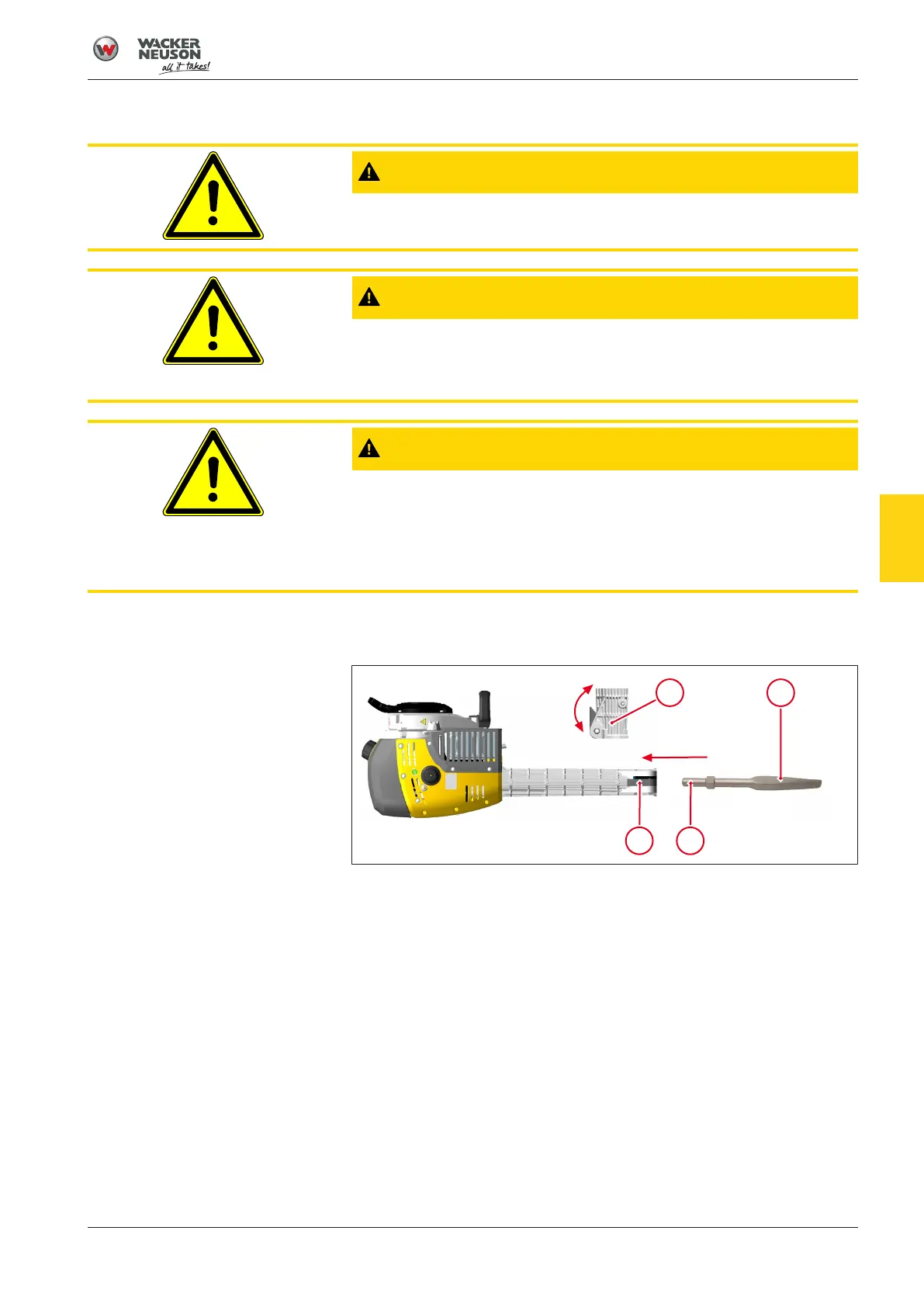
1. Clean tool insert 2.
2. Press handle 3 on the tool holder 4.
3. Turn tool 1 into the position that is most favorable for the work
planned.
4. Push the tool into the tool holder as far as it will go.
5. Lock the handle on the tool holder.
ð The handle locks the tool in the tool holder.
6. Pull the tool to check the lock.
ð Locking is carried out correctly if the tool is axially movable and
can no longer be pulled out.
ð Tool is in use.
▪ Operate the machine only with the tool properly locked in place.
8




 To Next Page