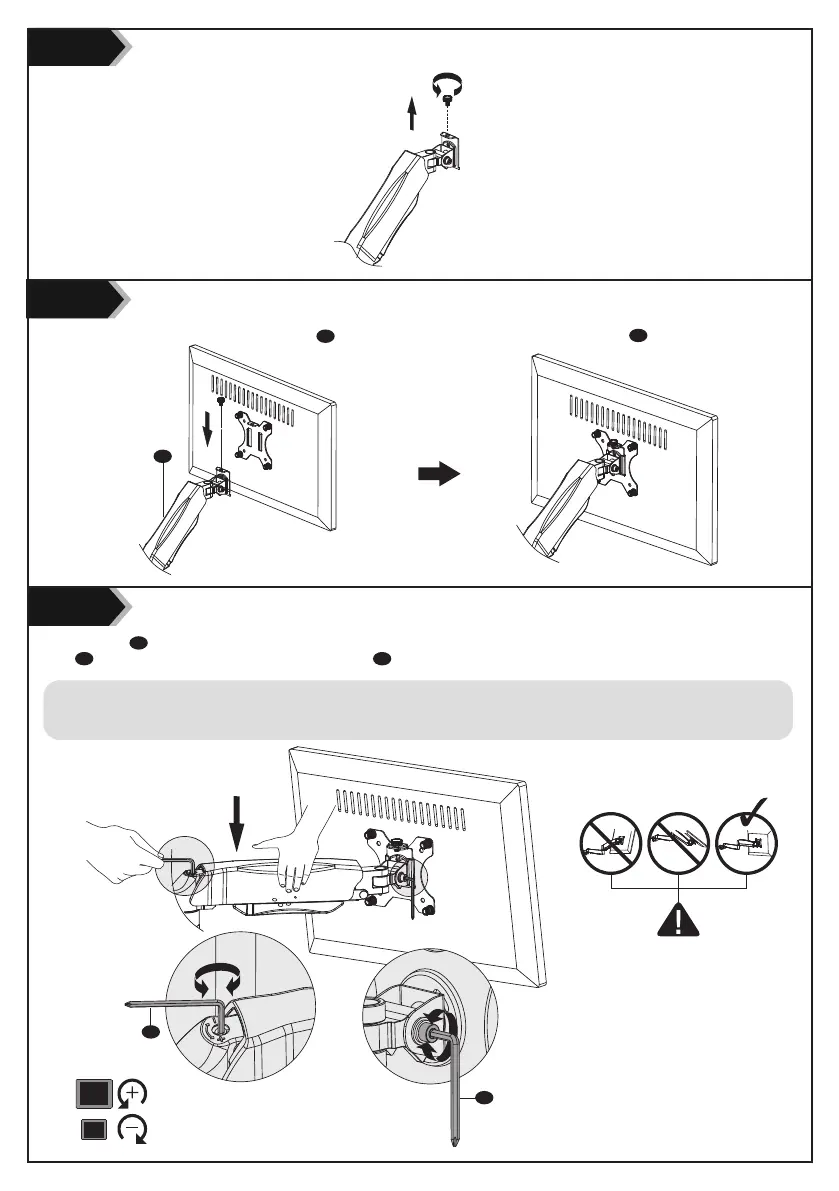
Step 4
Step 5
Step 6
6
D
D
Put the assembled TV/Monitor onto the Arm A and ensure the stability, tighten the VESA Plate B using Top Screw.
Detach the Top Screw by threading it counterclockwise.
Press the Arm A on horizontal level as image shown, adjust gas spring tension to your personal preference using Allen Key
5mm
D . Adjust the tilt tension using Allen Key 5mm D .
For Heavier Monitors
For Lighter Monitors
· Insert the 5mm Allen Key into the adjusting hole and turn clockwise (-) to reduce gas spring tension, suitable for lighter screens.
· Insert the 5mm Allen Key into the adjusting hole and turn counter-clockwise (+) to increase gas spring tension, suitable for heavier screens.
· Please take note it may take numerous turns for gas spring tension adjustment.
A


 To Next Page