Owner’s Manual 9
Wanco® Metro™ Message Sign
3 Assembly
Before using your Wanco Metro Message Sign for the first time, it might be necessary to
install the drawbar. The drawbar may be removed before shipment from the factory. To
install the drawbar, follow these steps:
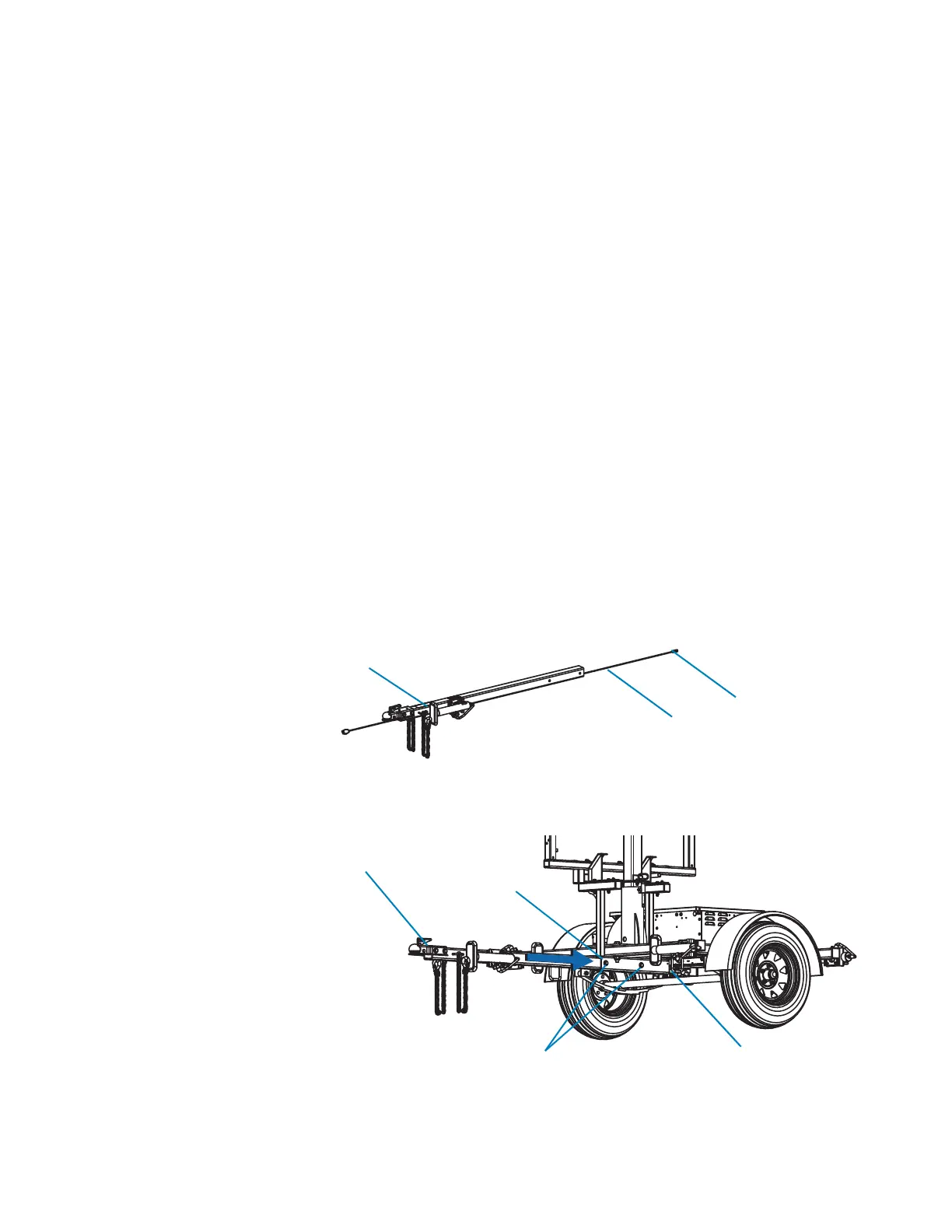
1. The drawbar includes wiring for the trailer lights. Before installing the drawbar, ensure
the wiring and harness are hanging out of the drawbar, as indicated in Figure 3-1.
2. Refer to Figure 3-2 and install the drawbar and wiring:
a. Locate the receiving sleeve, centered under the trailer frame.
b. Carefully insert the wiring and harness into the sleeve, followed by the drawbar.
c. Align the holes in the sleeve and drawbar.
d. Attach the drawbar to the trailer with two sets of bolts, washers, and nuts. Tighten
the nuts fully.
e. Connect the wiring harness to the receptacle under the trailer frame. Before
towing, ensure the trailer brake lights, taillights, and directional/turn indicators are
functioning properly.
Figure 3-1. Wiring and harness
Figure 3-2. Drawbar installation
Bolts
Drawbar
Receiving
sleeve
Wiring receptacle



 To Next Page