EasyManua.ls Logo

Wang 5536 - Page 18

Default Icon
112 pages
Print Icon
To Next Page IconTo Next Page
To Previous Page IconTo Previous Page
Loading...
3402
Memory
locations
are
sequentially
displayed
by
addressing
memory
with
"column"
(character)
and
"row"
Cline)
counters.
Extended
rows
are
accommodated
by
indexing
the
column
counter
with
an
offset
value
supplied
by
the
CPU.
The
display
initially
presents
all
80
characters
in
the
top
row.
When
the
last
character
has
been
displayed,
the
row
count
is
incremented
and
the
next
row
of
80
consecutive
locations
is
displayed.
When
the
last
character
of
the
last
row
is
reached,
the
cycle
is
repeated.
Sixty
screen
displays
occur
per
second.
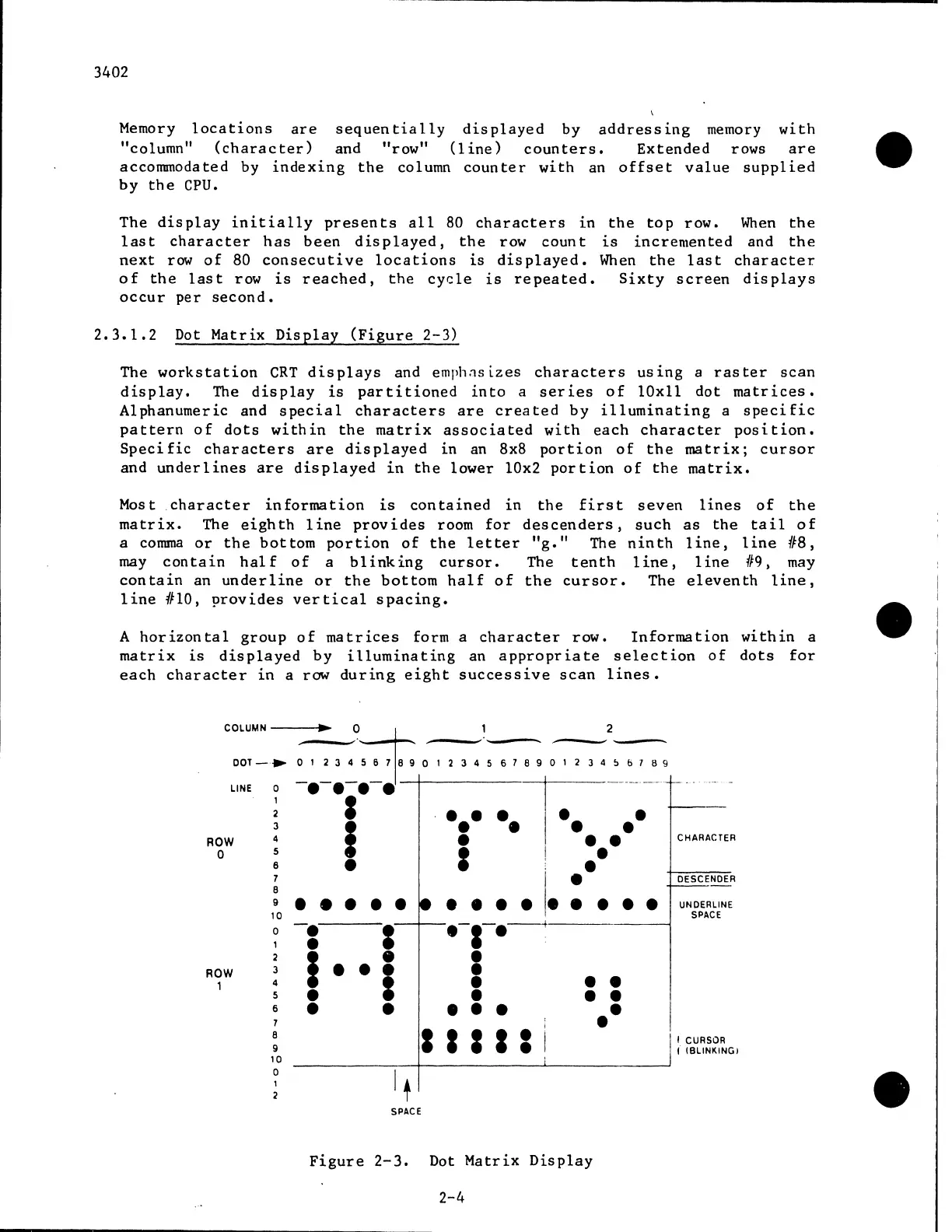
2.3.1.2
Dot
Matrix
Display
(Figure
2-3)
The
workstation
CRT
displays
and
emph.1s i.zes
characters
us
1ng
a
raster
scan
display.
The
display
is
partitioned
into
a
series
of
lOxll
dot
matrices.
Alphanumeric
and
special
characters
are
created
by
illuminating
a
specific
pattern
of
dots
within
the
matrix
associated
with
each
character
position.
Specific
characters
are
displayed
in
an
8x8
portion
of
the
matrix;
cursor
and
underlines
are
displayed
in
the
lower
10x2
portion
of
the
matrix.
Most
character
information
is
contained
in
the
first
seven
lines
of
the
matrix.
The
eighth
1
ine
provides
room
for
descenders,
such
as
the
tail
of
a
comma
or
the
bottom
portion
of
the
letter
"g."
The
ninth
line,
line
118,
may
contain
half
of
a
blinking
cursor.
The
tenth
line,
line
119,
may
contain
an
underline
or
the
bottom
half
of
the
cursor.
The
eleventh
line,
line
#10,
provides
vertical
spacing.
A
horizontal
group
of
matrices
form
a
character
row.
Information
within
a
matrix
is
displayed
by
illuminating
an
appropriate
selection
of
dots
for
each
character
in
a
raw
during
eight
successive
scan
lines.
2
12345678901234~6789
COLUMN---
...
~
0-+
DOT-•
D1
234~~J~D
""
l
-.-
•••
-.
-+--.-.-.-.-.-~-:~·-+
..
ROW
4 I . I CHARACTER
a 5 I ,
6 :
I
, DESCENDER
ROW
,
7
8
9
10
0
,
2
3
4
5
6
7
8
9
10
0
je
-.
I
I
1
UNDERLINE
SPACE
.-,-.__.
i
••
••
I
CURSOR
I IBLINKINGI
I I I I I
SPACE
Figure
2-3.
Dot
Matrix
Display
2-4

Related product manuals