EasyManua.ls Logo

Wang 5536 - Page 60

Default Icon
112 pages
Print Icon
To Next Page IconTo Next Page
To Previous Page IconTo Previous Page
Loading...
3402
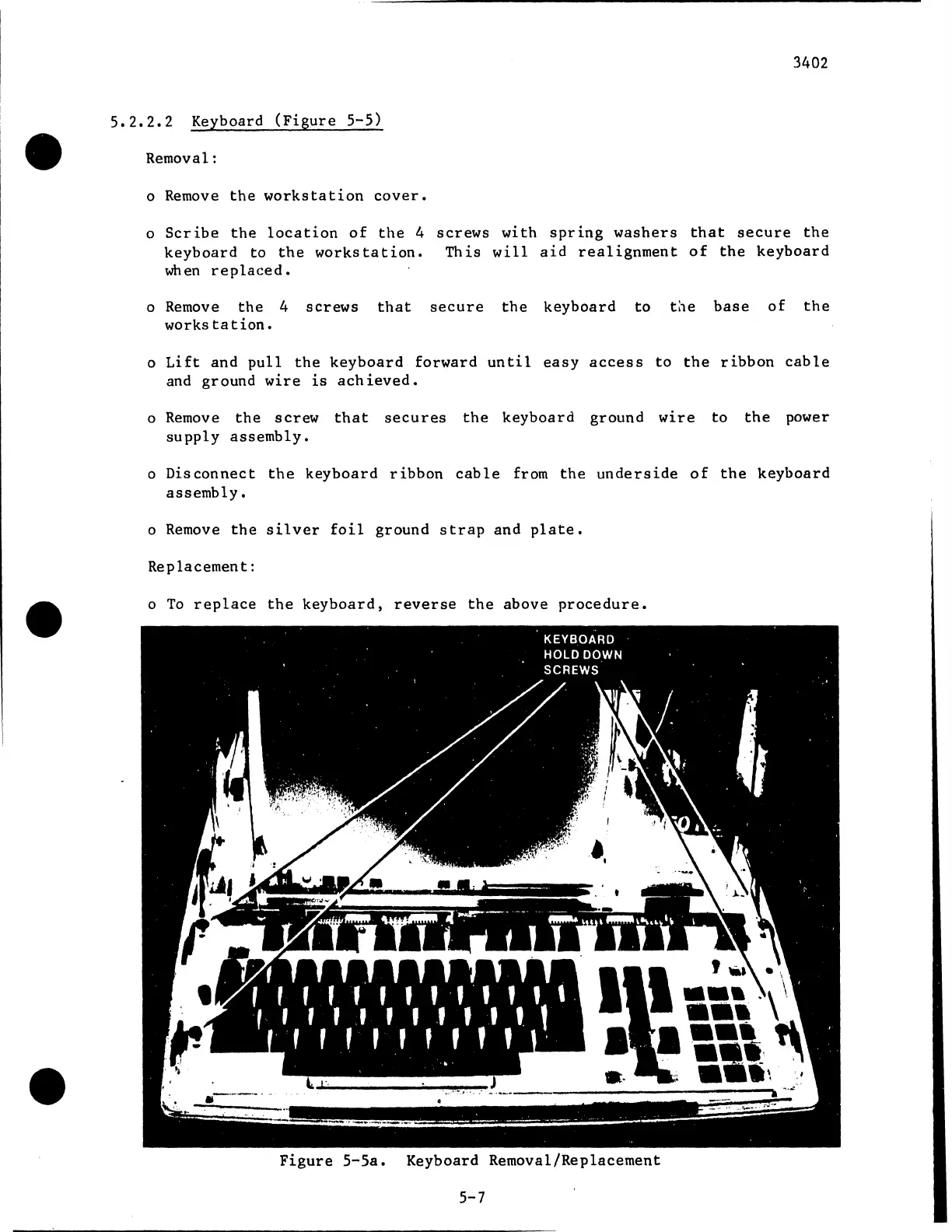
5.2.2.2
Keyboard
(Figure
5-5)
Removal:
o Remove
the
workstation
cover.
o
Scribe
the
location
of
the
4
screws
with
spring
washers
that
secure
the
keyboard
to
the
workstation.
This
will
aid
realignment
of
the
keyboard
when
replaced.
o Remove
the
4
screws
that
secure
the
keyboard
to
t:1e
base
of
the
workstation.
o
Lift
and
pull
the
keyboard
forward
until
easy
access
to
the
ribbon
cable
and
ground
wire
is
achieved.
o
Remove
the
screw
that
secures
the
keyboard
ground
wire
to
the
power
supply
assembly.
o
Disconnect
the
keyboard
ribbon
cable
from
the
underside
of
the
keyboard
assembly.
o Remove
the
silver
foil
ground
strap
and
plate.
Replacement:
o
To
replace
the
keyboard,
reverse
the
above
procedure
Figure
5-5a.
Keyboard
Removal/Replacement
5-7

Related product manuals