Section 4 Auto-Zone Plus
4-8 Start-Up and Troubleshooting
1.3 Troubleshooting
1.3.1 Checking the CommLink II Network Loop
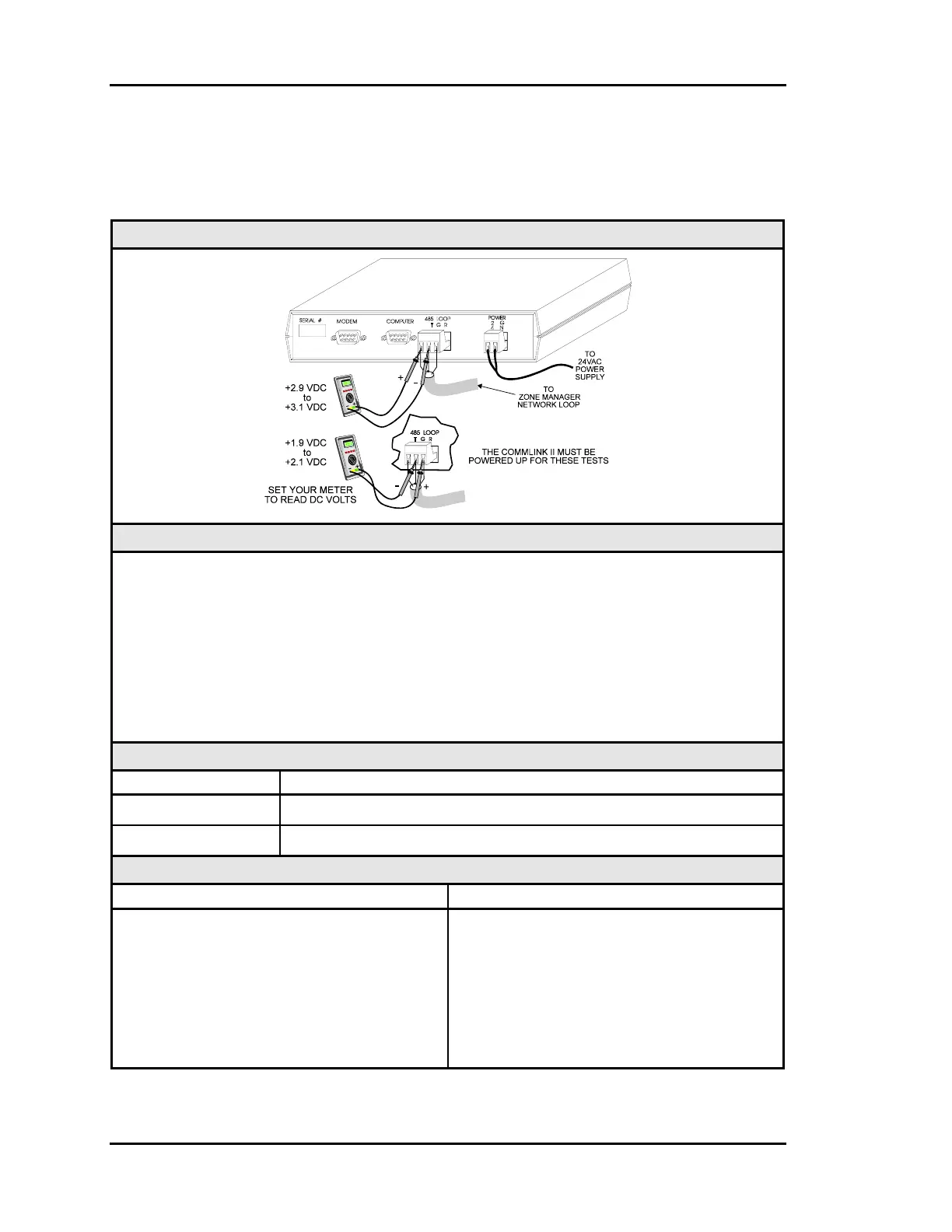
Diagram
Overvie
This test checks for proper Network loop voltages at the CommLink II.
Tip The Loop LED (located on the front panel) should “flicker” when the CommLink II is
attempting to communicate. The Loop LED will flicker more noticeably for a few
seconds when first powered up. If the Loop LED does not flicker, the unit is defective.
Proper loop voltages are essential for reliable communications. It is normal to see
fluctuations at this point on the CommLink II. The average value should be close to the
acceptable range described below. Values will vary upon initial powerup for about 10-15
seconds as the unit attempts to communicate.
Measurements
Network Loop Acceptable Range
T - G (SHLD) 2.9 - 3.1 Volts DC
R - G (SHLD) 1.9 - 2.1 Volts DC
Action
Condition Action
If voltages are too high or too low on either
side
1. Unplug the Network loop from the
CommLink II and Check for proper
loop voltages. If a problem exists,
disconnect each Zone Manager Network
Loop until the problem is isolated.
2. Check the CommLink II Driver chip.
Replace the driver chip if necessary.



 To Next Page