Auto-Zone Plus
Section 2
Design Guide 2-25
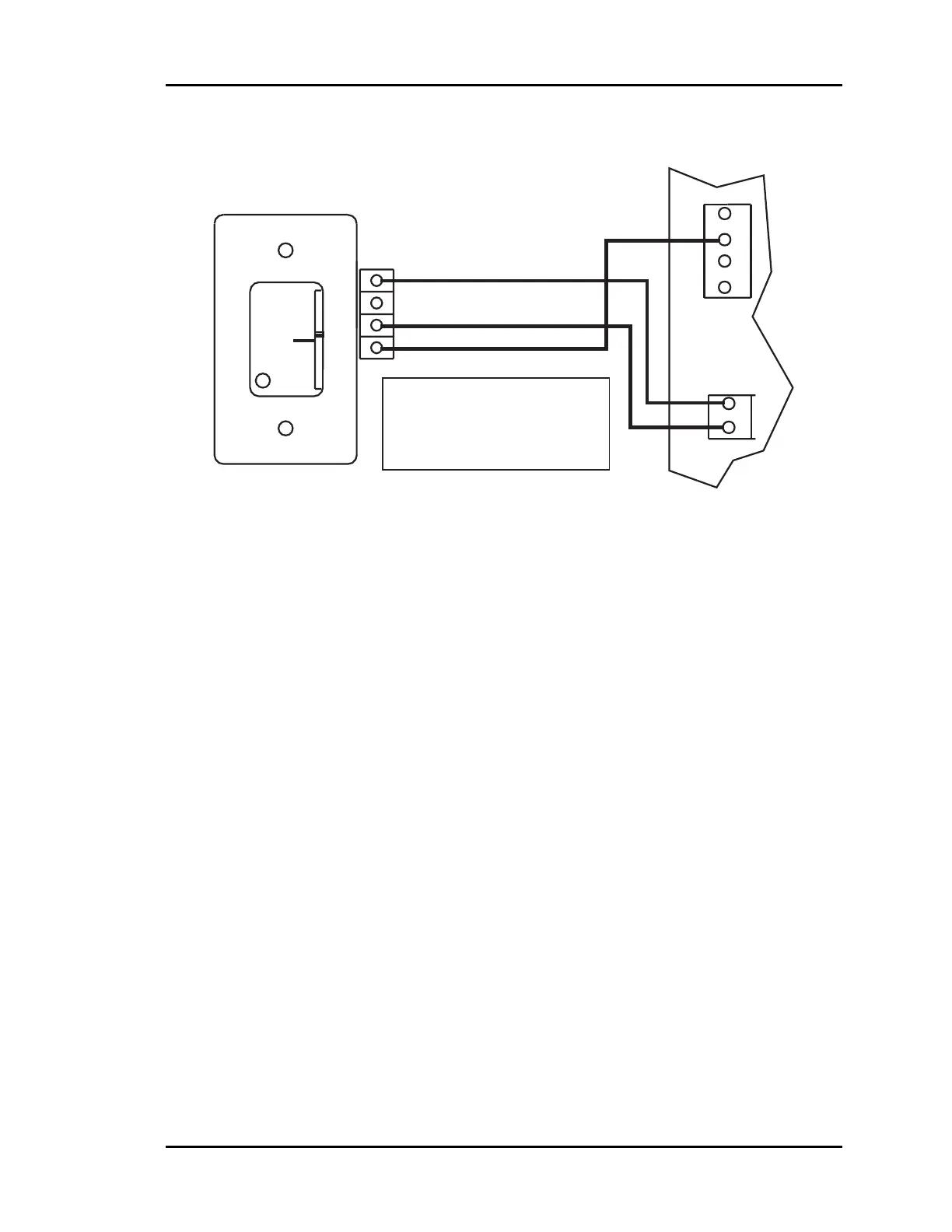
Figure 2-19: Room Sensor Wiring
Connect the terminal labeled GND on the zone sensor to the terminal labeled GND on the
Zone Controller terminal block for the TEMP SENSOR. Connect the terminal labeled
TMP on the zone sensor to the terminal labeled TEMP on the Zone Controller terminal
block for the TEMP SENSOR. If the zone sensor has a setpoint adjust slider, then
connect the sensor terminal labeled AUX to the Zone Controller AUX terminal block
labeled AUX1.
GND
AUX
TMP
OVR
R
E
L
O
C
R
E
M
R
O
A
W
Room Sensor
Zone Controller
AUX
TEMP
GND
GND
AUX1
+VS
AUX2
TB2
++
TB1TB1
Connection To AUX
Terminal Required Only
When Sensor Is Specified
With Slide Adjust Option



 To Next Page