• Power on/off the board
The power button on the board is a touch switch.
Power on: Press the power button until the indicators light up in turn.
Power off: Press the power button until the indicators turn off.
Caution:
The board cannot be turned off manually as usual after the safe lock is enabled. For
more details, please refer to the safe lock user guide.
• Charge the board
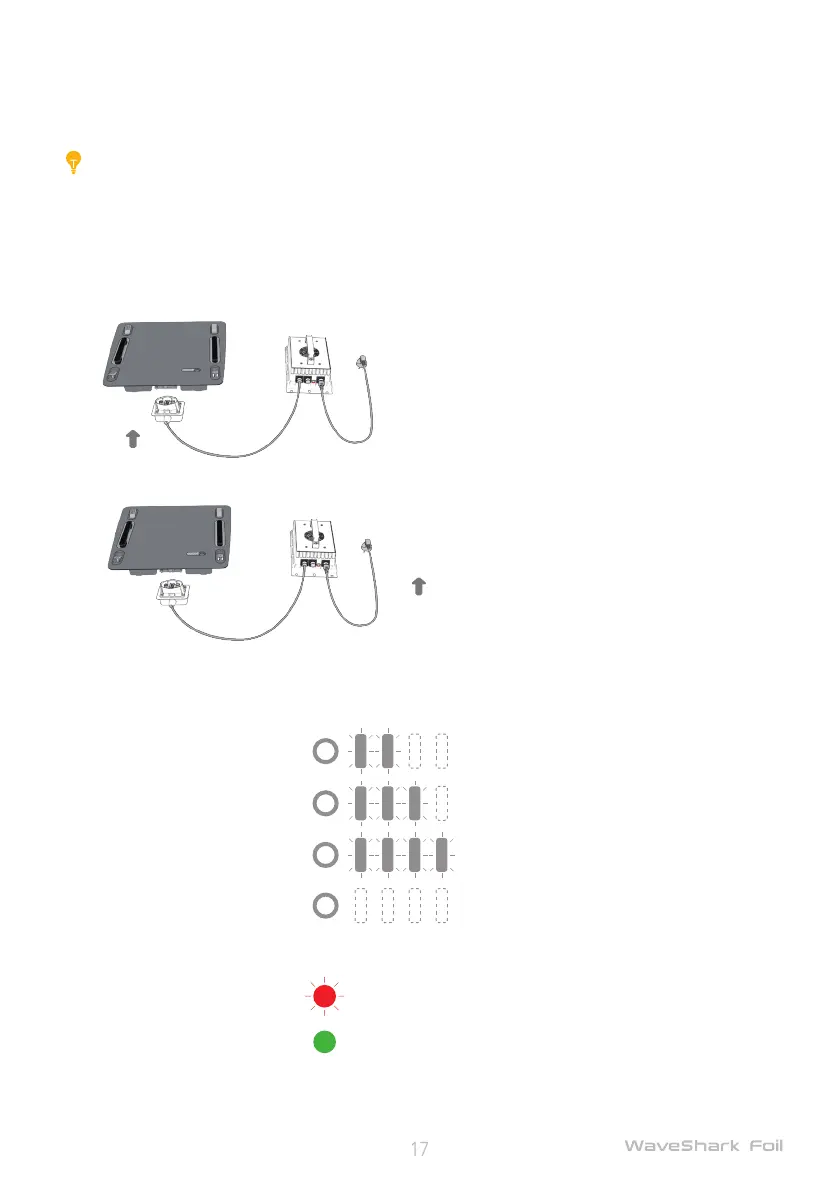
The charger has been installed with a port cover prior to delivery. Please remove it before rst use,
and restore the charger port cover if for long-term storage.
1) Put the battery and charger in a dry place and keep clear of re or inammable objects;
2) Connect the charger interface to the battery interface;
3) Connect the AC cable of the charger to the socket outlet;
During charging, the charger and battey indicators work as below:
Battery level Battery indicator
0%-50%
50%-80%
80%-99%
Fully charged
Charging status Charger indicator
Charging (Blinking)
Fully charged (Soild)
4) The charger will be automatically turned off after the battery is fully charged. It takes about 2.5
hours to fully charge a battery.


 To Next Page