2. Power off the board and remote controller manually as usual.
Other
In case of any remote controller damage or low battery power which stops disabling the safe lock,
the board will go into the standby mode for 10 minutes and force the remote controller to exit from
the safe mode automatically afterwards. Then, users can power off the board manually. It is strictly
forbidden to remove the battery when the board is not shut down.
Pair remote controller with board
The rst time you use the board, or when the remote controller fails to connect with the board, or the
remote controller needs replacing, it is required to pair the remote controller with the board.
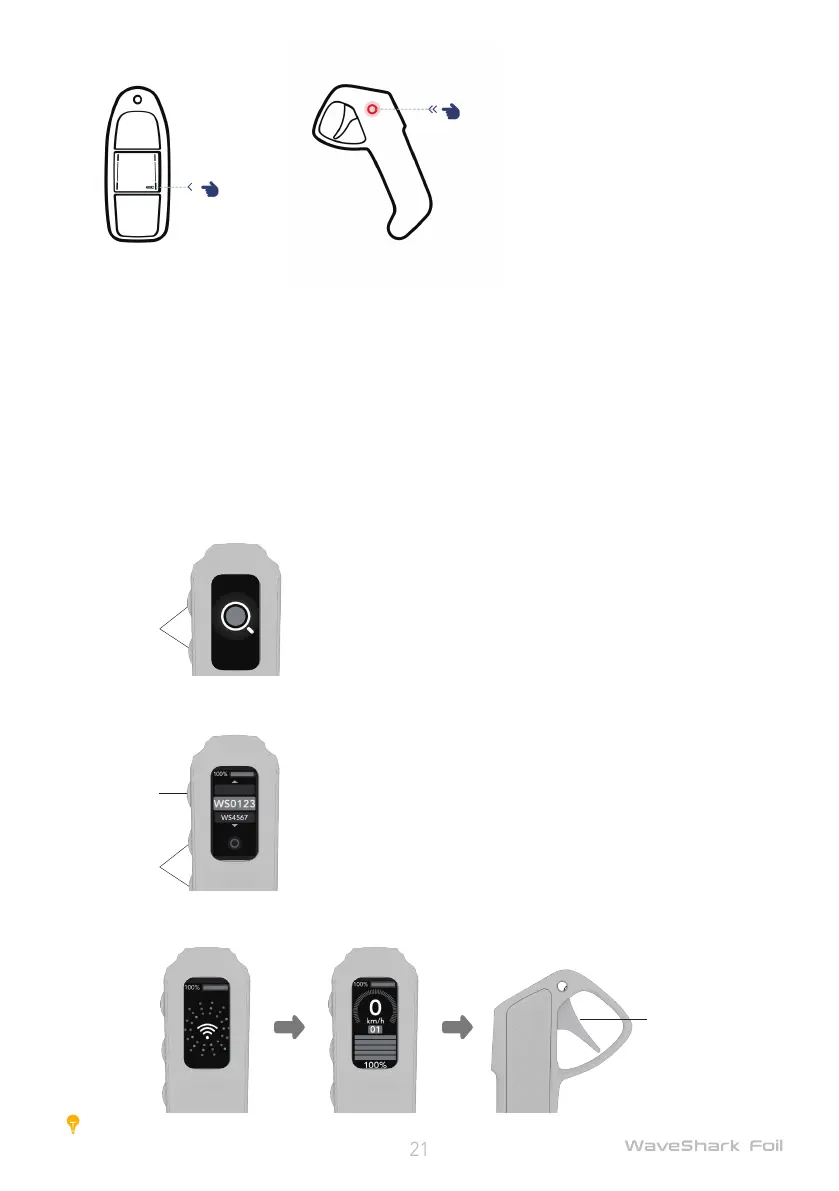
1. Turn on the board by pressing the Power button;
2. With the remote controller turned off, activate the pairing mode by pressing the Power button and
Upshift botton simultaneously until the remote controller is on and displays auto-searching;
3. According to the onscreen instructions, press the Upshift and Downshift buttons to select the corre-
sponding board, and press the Power button for conrmation;
4. After successful connection, the remote controller will automatically go to the home screen. Gently
touch the trigger of the remote controller. Pairing is successful if the propeller works normally.
Caution:
Do not touch the trigger of remote controller over 5 seconds outside the water.
①
②
③
④


 To Next Page