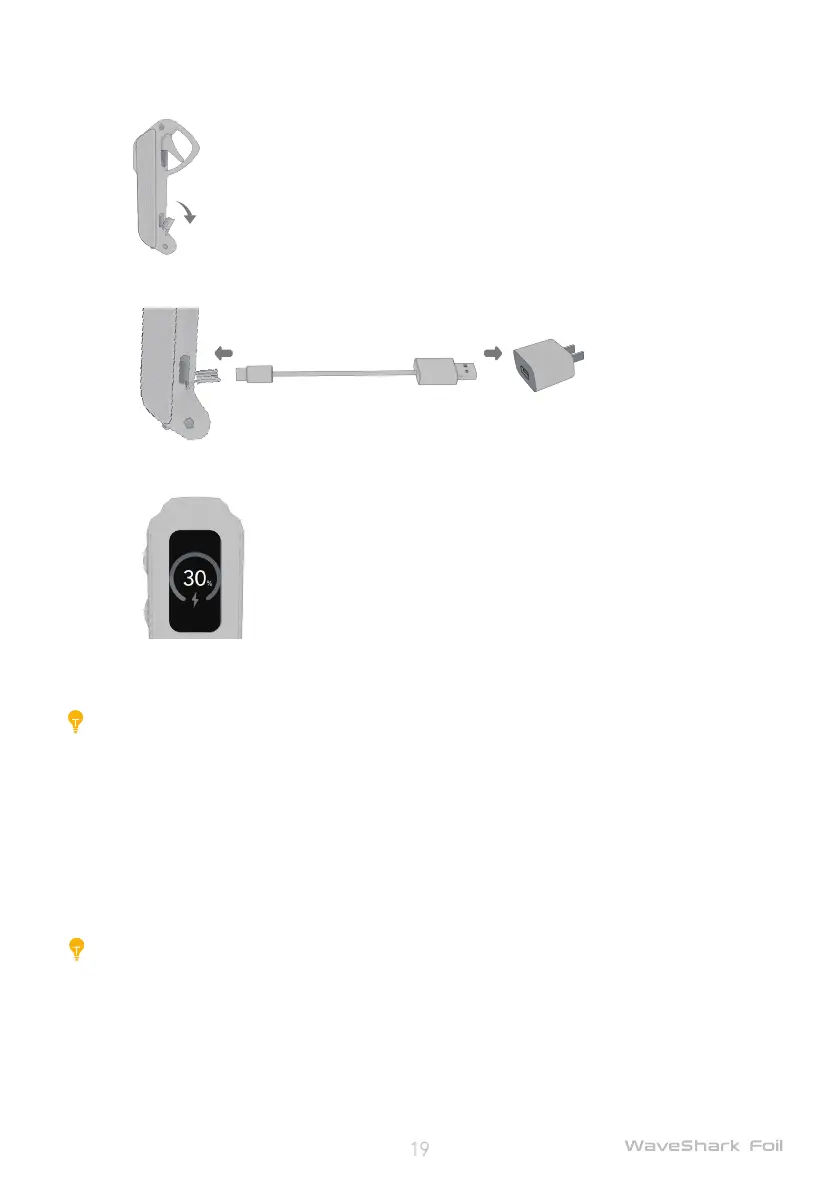
Charge the remote controller
1) Open the rubber-plug on the charging port of the remote controller;
2) Connect the remote controller to the socket outlet with the USB charging cable (supplied) and a
compatible power adapter (sold separately);
3) The screen of the remote controller will automatically light up and display the charge icon during
charging;
4) After the battery is fully charged, unplug the charging cable, and re-attach the rubber plug onto
the charging port.
Caution:
Always maintain at least 50% of battery level for the remote controller before each use;
Ensure that the rubber plug is rmly attached to the charging port of the remote controller before
each use. Otherwise, this may lead to corrosion due to water exposure.
Safe lock user guide
Safe lock aims at protecting the surfboard battery from being powered off by mistake, ensures the
safety of each ride.
Caution:
After enabling the safe lock, the operation of powering off the board manually will not
work. Before you can do that, you have to press the power button twice on the remote
controller to disable the safe lock.
Before each ride
1. Connect remote controller and surfboard successfully;


 To Next Page