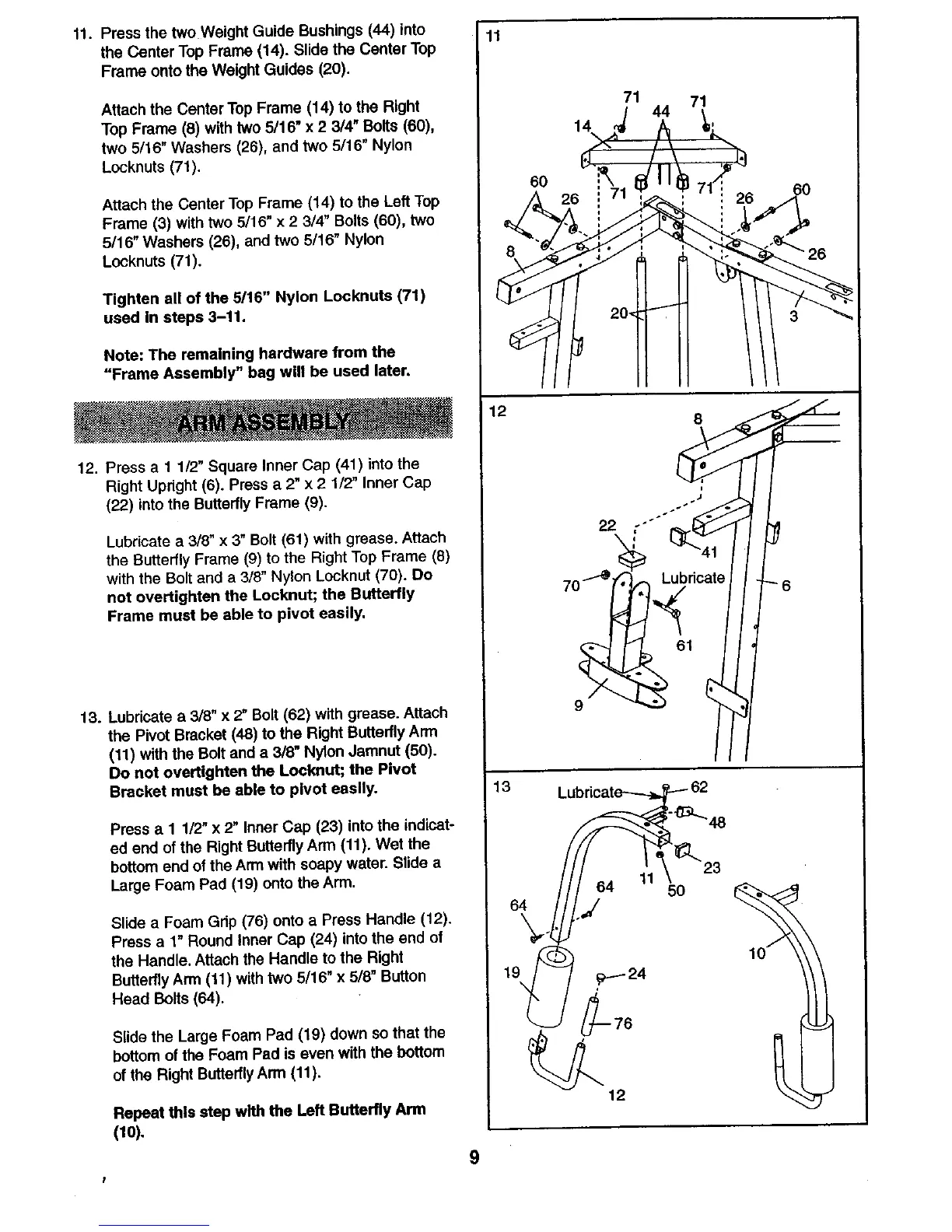
11. Press the two Weight Guide Bushings (44) into
the Center Top Frame (14), Slide the Center Top
Frame onto the Weight Guides (20).
Attach the Center Top Frame (14) to the Right
Top Frame (8) with two 5116"x 2 3/4" Bolts (60),
two 5/16" Washers (26), and two 5/16" Nylon
Locknuts (71).
Attach the Center Top Frame (14) to the Left Top
Frame (3) with two 5/16" x 2 3/4" Bolts (60), two
5/16" Washers (26), and two 5/16" Nylon
Locknuts (71).
Tighten all of the 5/16" Nylon Locknuts (71)
used In steps 3-11.
Note: The remaining hardware from the
"Frame Assembly" bag will be used later.
12. Press a 1 1/2" Square Inner Cap (41) into the
Right Updght (6). Press a 2" x 2 1/2" Inner Cap
(22) into the Butterfly Frame (9).
Lubricate a 3/8" x 3" Bolt (61) with grease, Attach
the Butterfly Frame (9) to the Right Top Frame (8)
with the Boit and a 3/8" Nylon Locknut (70). Do
not overUghten the Locknut; the Butterfly
Frame must be able to pivot easily.
13. Lubricate a 3/8" x 2" Bolt(62) with grease. Attach
the Pivot Bracket (48) to the Right Buttedly Arm
(11) with the Bolt and a 3/8" Nylon Jamnut (50).
Do not overtighten the Locknut; the Pivot
Bracket must be able to pivot easily.
Press a I 1/2" x 2" Inner Cap (23) into the indicat-
ed end of the Right Butterfly Arm (11). Wet the
bottom end of the Arm with soapy water. Slide a
Large Foam Pad (19) onto the Arm.
Slide a Foam Gdp (76) onto a Press Handle (12).
Press a 1" Round Inner Cap (24) into the end of
the Handle. Attach the Handle to the Right
Butterfly Arm (11) with two 5/16" x 5/8" Button
Head Bolts (64).
Slide the Large Foam Pad (19) down so that the
bottom of the Foam Pad is even with the bottom
of the Right ButterflyArm (11).
Repeat this step with the Left Butterfly Arm
(10),
11
13
60
64
71 71
44
14
8
11
5o
60
9
t








 To Next Page