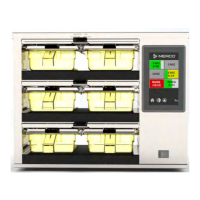
The UHCTHD Touch Holding Cabinet, manufactured by Frymaster, LLC, is a commercial food service appliance designed to streamline kitchen operations by allowing menu components to be cooked in advance and then gently stored in holding bins until an order is received. This approach enables operators to serve food to order, enhancing speed of service and maintaining high product quality standards. The cabinet is intended for professional use in various commercial settings such as restaurants, canteens, hospitals, bakeries, and butcheries, but not for continuous mass production of food.
Function Description:
The primary function of the UHCTHD is to hold cooked food products at optimal temperatures, ensuring they remain hot and fresh until ready for assembly into an order. The cabinet features a touch screen interface that is pre-configured for routine menu operations, making it ready for use right out of the box. It is equipped with multiple holding rows, capable of accommodating various product tray sizes, including 1/3-size plastic, 1/3-size wire, full-size plastic, 2/3-size plastic, and 1/2-size plastic trays. Each row can hold up to three trays of product. The system incorporates a timer for each product, which helps manage hold times and alerts operators when a product is nearing or has exceeded its programmed hold time. This ensures food quality and minimizes waste. The cabinet also offers an ECO mode to temporarily lower heating temperatures in unused slots, promoting energy efficiency.
Usage Features:
The UHCTHD is designed for intuitive operation through its touch screen user interface.
- Power Switch: Located on the front of the cabinet, it allows for easy power on/off.
- Press & Go Screen: Upon startup, the unit initiates zone pre-heating, and the "Press & Go" screen is displayed. This screen provides quick access to product buttons associated with specific holding locations.
- Product Loading and Timers: When trays are loaded, operators press the corresponding product button to start a timer. The display shows the remaining hold time, with green indicating active time and yellow for warning time. If a product is held past its programmed time, the timer turns red, and a "DISCARD!" alert is displayed, accompanied by an alarm.
- Timer Management: Timers can be reset or canceled. Pressing a product button again within two seconds while it's highlighted black reduces the time by five minutes, useful for transferring products.
- First-In, First-Out (FIFO) Management: For identical products, the system highlights the item with the least time remaining in green, guiding operators to use older products first.
- Menu Customization: The unit allows for extensive menu customization, including adding, editing, and deleting products. For each product, operators can set a name, hold temperature, maximum hold time, and warning time.
- Group Management: Products can be organized into groups, provided they share the same lid type, zone split, and hold temperature. This simplifies menu organization and daypart assignments.
- Daypart Assignments: The system supports five dayparts (Breakfast, Change Over, Lunch, and two custom options), allowing operators to quickly switch menus for all rows or individual rows.
- ECO Mode: Individual slots can be switched to ECO mode to conserve energy when not in use, temporarily lowering their heating temperature.
- Turning Off Slots: Slots can be individually turned off if not needed.
- Temperature Screen: Operators can monitor the upper and lower temperatures of each slot.
- Language Selection: The interface supports multiple languages, with headings and descriptions changing accordingly.
- Zone Diagnostics: This screen allows monitoring of current heating element temperatures. For service tests, a passcode is required to change set temperatures or run factory-determined tests.
- Sound & Screen Tests: Built-in tests allow verification of sound and screen functionality.
- Errors Log: The system maintains an error log, which can be refreshed or cleared (with a service passcode).
- Password Settings: The manager passcode can be changed, and there's a quick reset option to revert to the factory default.
- System Information: This screen displays cabinet serial number, model number, and current firmware versions.
- Utilities Screen: This screen offers advanced features like demo mode (which turns off heaters and simulates operation at lower amp draw), exporting/importing menu files via USB, and clearing all holding information.
Maintenance Features:
Regular maintenance is crucial for the UHCTHD's performance and longevity.
- Cleaning Procedures:
- Every Four Hours: Plastic and wire trays should be removed, washed in a hot McD All-Purpose Super Concentrate (APSC) solution, rinsed, and then sanitized in McD Sink Sanitizer (HCS) solution for at least one minute before air drying.
- Daily: At the end of the operating day, all holding times must be completed or canceled. The unit then enters a "Clean Mode," which first cools down to a "Safe to Clean" temperature.
- Cabinet Cleaning: A dedicated cabinet cleaning brush should be used to remove buildup from slot surfaces. Only the provided brush should be used to avoid damaging the cabinet slots.
- Approved Cleaners: Only McD All-Purpose Super Concentrate (APSC) should be used for cleaning the cabinet. Caustic cleaners, acid-based solutions, high-pressure water jets, steel wool, scrapers, or wire brushes are strictly prohibited as they can cause permanent damage to surfaces and control components.
- Preventative Maintenance: The manual emphasizes that maintenance procedures are the responsibility of the equipment owner and are not covered by the warranty. It also highlights the importance of using appropriate safety equipment during maintenance.
- Service Personnel: All service, installation, and repairs must be performed by qualified, certified, licensed, and/or authorized Frymaster service personnel. Unauthorized repairs will void the warranty.
- Electrical Safety: Before any maintenance, the power must be disconnected at the main power supply. All utility connections and fixtures must comply with local and national codes.
- Troubleshooting Chart: A comprehensive troubleshooting chart is provided to help identify and resolve common issues, such as the cabinet not running or display errors, by suggesting causes and corrections (e.g., replacing fuses, checking power cords, or replacing heater pads).

 Need help?
 General

 To Next Page