3-2
Operation Section 3
User Interface
PASSWORD
• A user can access all necessary screens for daily
operation without a password.
• The factory default manager password is 1955.
Press & Go Screen Icons
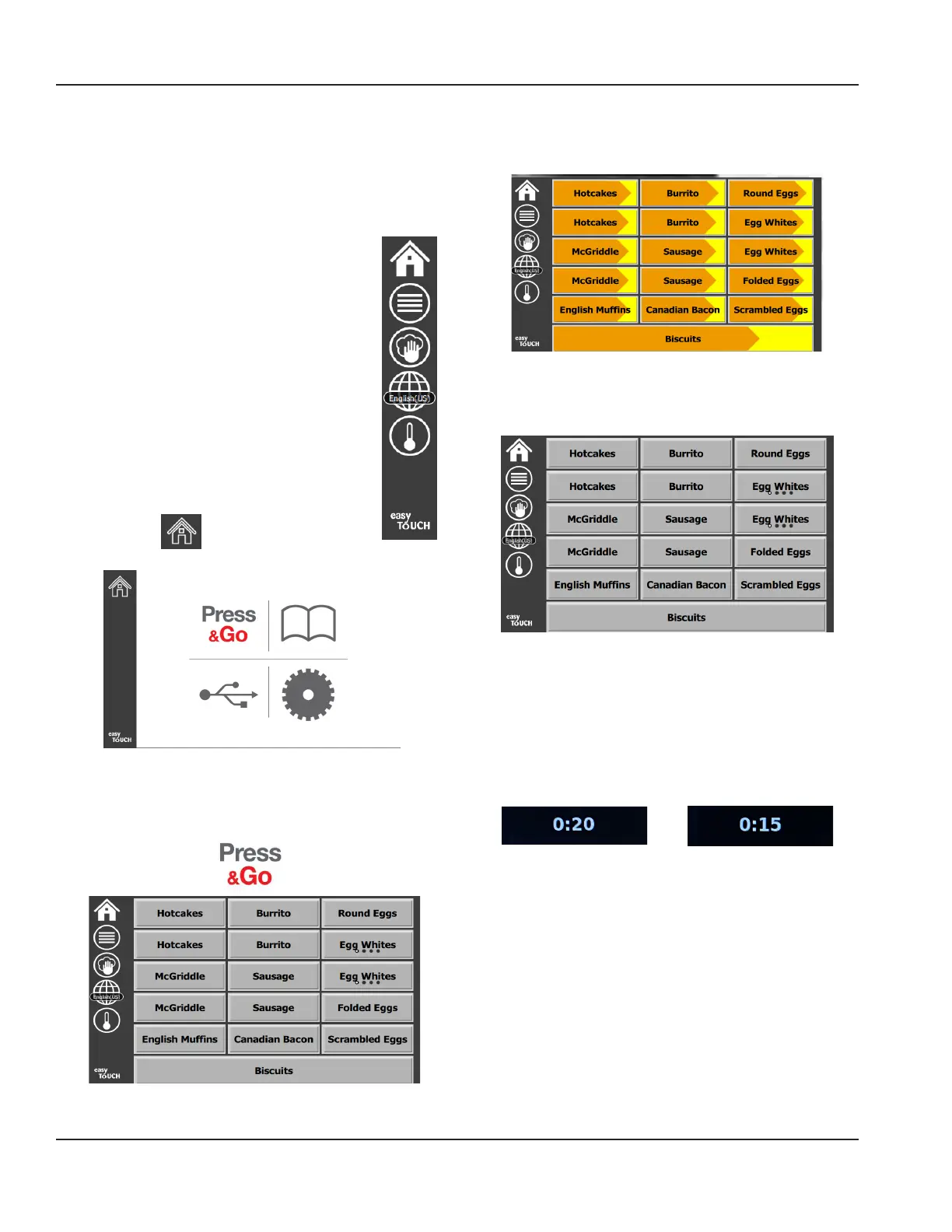
On the press and go screen are five icons:
• Home
• Row Management
• Clean
• Language
• Temperature
Select the home icon to bring up the home
screen.
Home Icon
Home Screen
From the home menu selecting the Press & Go icon to
return to the press and go screen.
Press & Go Screen
PRESS & GO SCREENS
When the unit is turned on zone pre-heating will begin. The
press and go screen will be displayed.
Press & Go Screen Pre-Heating
The unit will beep signaling that all holding zones are at
set-point and ready for use.
Press & Go Screen
As the trays are loaded, press the product button
associated with the location. Pressing the product
button again within two (2) seconds while it is highlighted
black, will reduce the time by 5 (five) minutes, each time
the button is pressed. This is useful when transferring
products to another location.
Green
Press & Go
Screen Five
Icons



 To Next Page