DMP900 User Guide
1
Part 1 Panel Overview
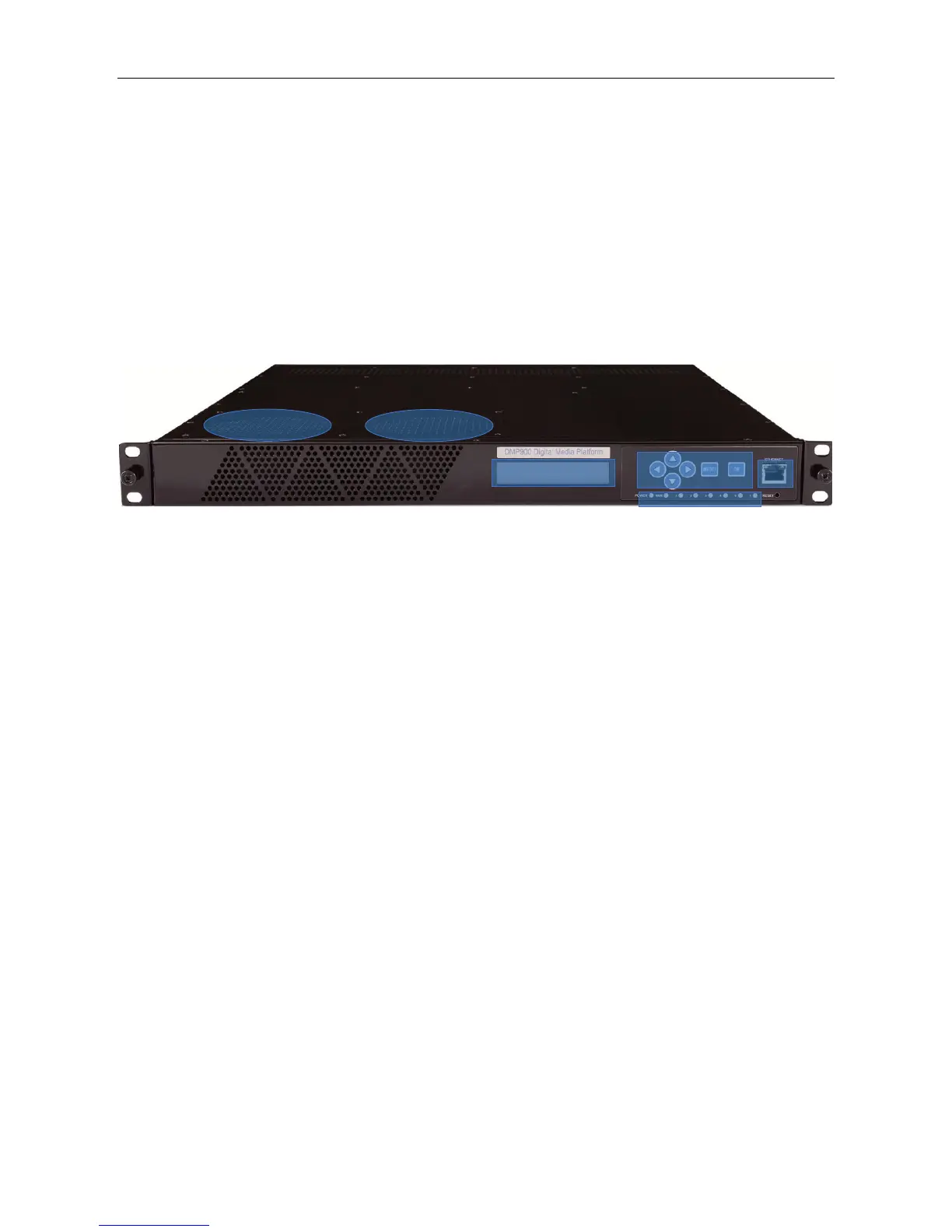
1.1 Front Panel
DMP900 is a powerful, platform-based and multipurpose video-processing product. Equipped with
six hot-swappable modules, DMP900 supports almost any video delivery requirement with any
combination of receiving, de-scrambling, transcoding, re-multiplexing/grooming, scrambling,
modulating and IP/ASI turn around for service providers.
1. Cooling Air Intake
2. LCD Screen
3. RJ45 Management Port
4. Power Alarm Indicator
Flashing red - One of the Power Supply Unit is disconnected or malfunctioning
Green - Normal running status
Mainboard communication status indicator
Red - Mainboard loading failure
Flashing Red - Alarm for high temperature inside the chassis
Green - Normal running status
Module Status Indicators for slot 1 to slot 6
Flashing green - Initializing this module
Green - Normal running status
Red - Initialization Failure due to hardware defection, software missing (when a new
module is inserted, and there is no software for this module in the chassis), or other
malfunction conditions.
5. Up, Down, Left, Right, Menu, OK buttons



 To Next Page