DMP900 User Guide
9
3.2 Basic Operations
3.2.1 Configuring Network
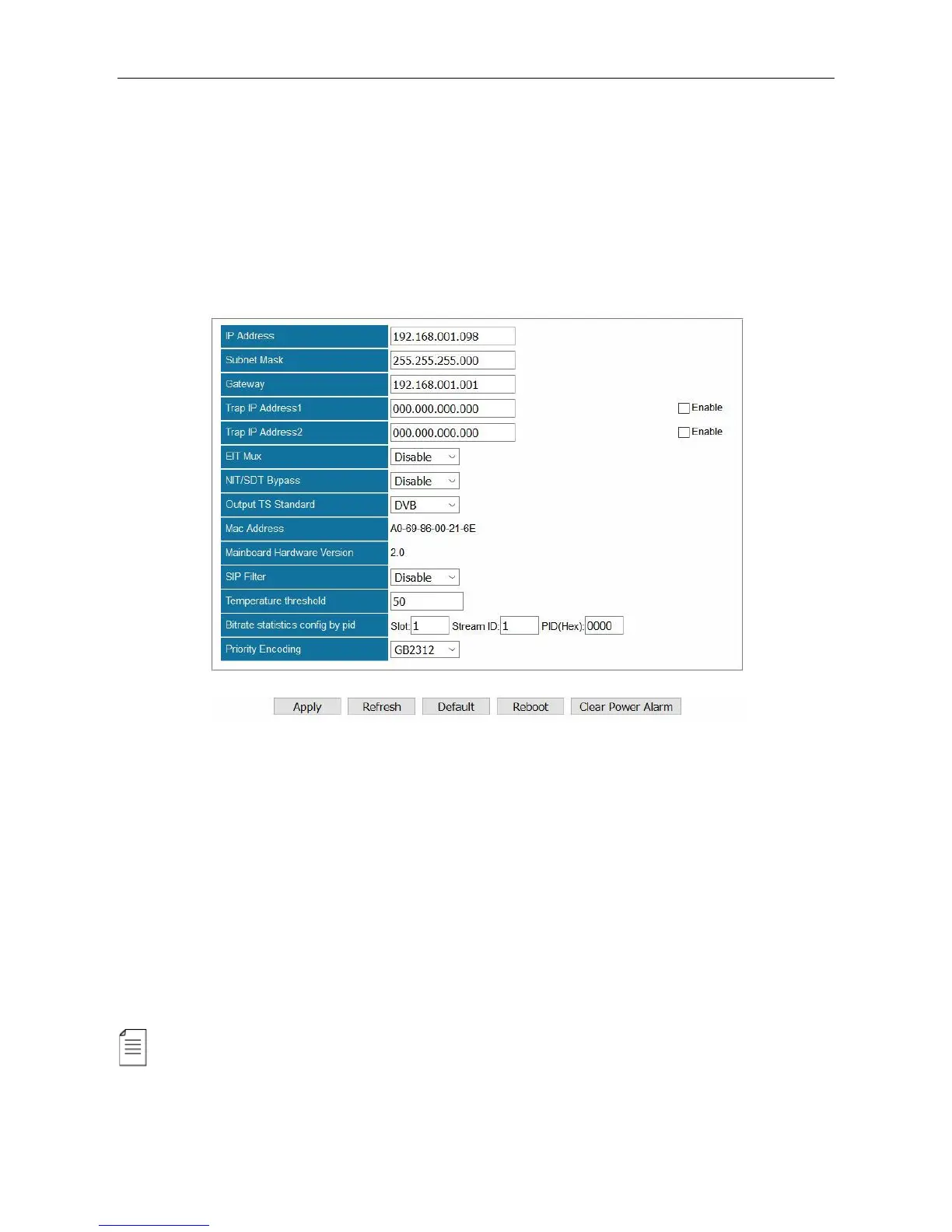
Configuring the network parameters is the always the first step to configure a head-end unit. Go to
Equipment Configuration > System. As you can see in the following image, you are able to
assign a static IP address to DMP900.
Click Apply to activate settings in this page.
Click Refresh to acquire the system settings that is applied.
Click Default to restore factory settings. The unit will reboot by itself after factory setting is done.
And only the management IP address will remain after reboot. You may also find Default buttons in
other pages. Click these buttons to perform factory settings for a module seperately If you do not
want to factory set the whole unit. You should always click Reboot after Default is done.
Click Reboot to restart this unit. You may also find Reboot in other pages. Click these buttons to
reboot a module seperately.
Click Clear Power Alarm to clear the alarm for power supply.
If you change the IP address of the DMP900 in System page and click Apply, this unit will restart
itself to activate the new IP address.



 To Next Page