User Guide
1. Overview
1.7 LEDs
Component Part Number
CMA Lite Cable Tray 1EX1603
CMA Cable Tray 1EX1119
3.5 in. Drive Carrier, Qty=1 1EX0438
3.5 in. to 2.5 in. conversion Drive Carrier, Qty=1 1EX0439
3.5 in. Drive Blank, Qty=1 1EX0429
Power Cable for PDU, C13-C14, 18AWG, 3m, Qty=1 1EX1158
HD Mini-SAS to HD Mini-SAS, 3m, Qty=2 1EX1533
1.7
LEDs
1.7.1
Front and Rear IO LEDs
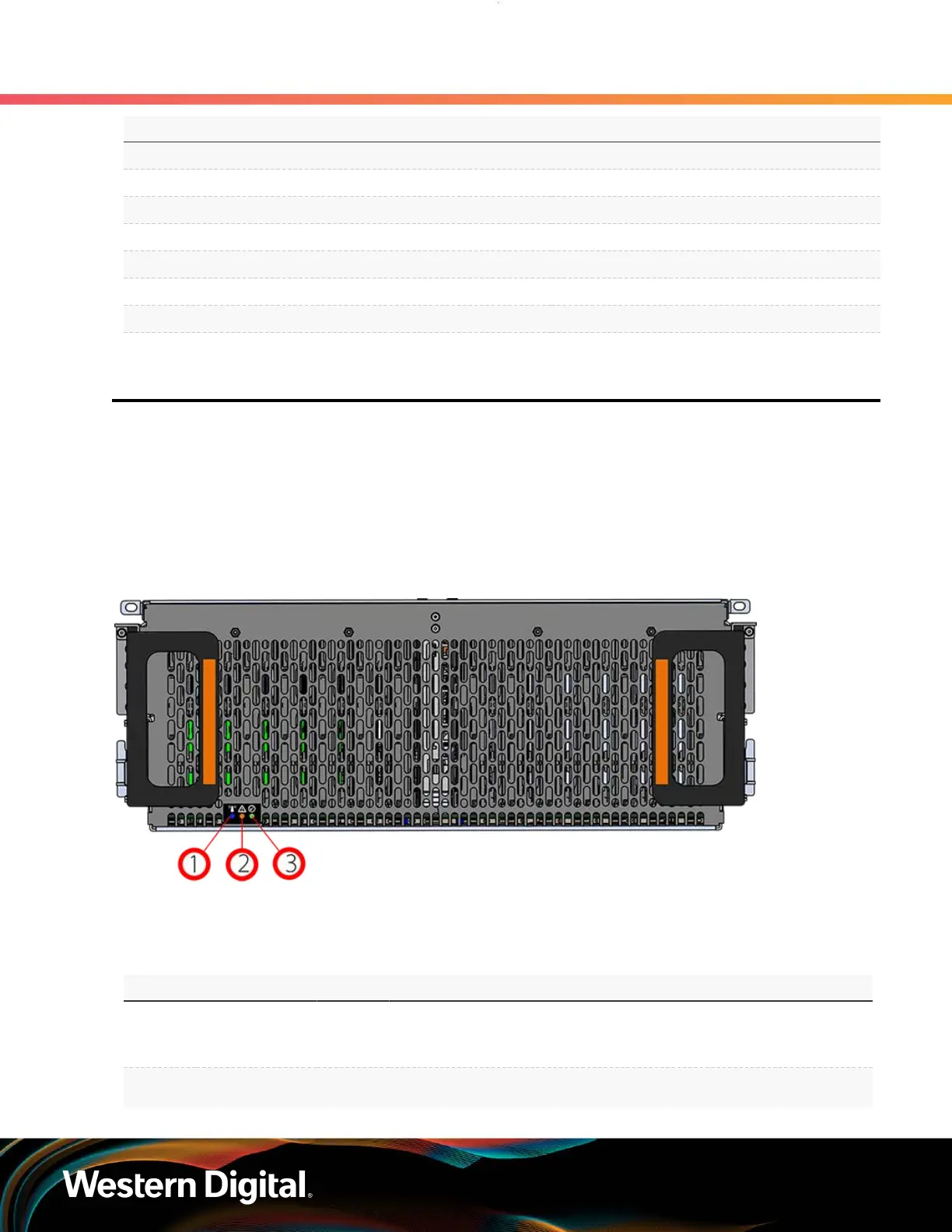
The Ultrastar Data102 has a number of LEDs on the exterior of the enclosure that display various system
statuses. There are three on the front and three on the rear that mirror each other and provide general
status. This allows the status of the enclosure to be visible from either side of the rack.
Figure 6: Front LEDs
From the rear there are the three enclosure status LEDs and LEDs on the Ethernet and SAS ports.
Table 7: Front LED Identification
Number LED Name Color Behavior
1 Identify Blue
Blink @ 1 Hz (50% duty cycle) – Blinks only
when Identification has been activated. Will
blink when any component is identified.
2 Fault Amber Blink @ 1 Hz (50% duty cycle) – Enclosure has a fault
8















 To Next Page