Lit. No. 95748/95749, Rev. 04 20 January 1, 2017
MAINTENANCE
CONVEYOR BELT TENSION
The conveyor drive roller can slip inside the conveyor
belt for a number of reasons, including (1) material
trapped/frozen between the conveyor belt and the
vehicle bed surface, (2) frozen material in the hopper
and (3) improper belt tension. Before adjusting
conveyor belt tension, verify that material is not
trapped/frozen between the conveyor belt and the
vehicle bed surface and that frozen material is not
preventing the belt from operating properly. In either
of these situations, either the drive roller will slip or
the spreader control will sense an overload and will
shut down, signied by the diagnostic indicator light
ashing three times. See Operating the Spreader –
Cab Control section for details on the control and the
diagnostic indicator light.
1. Fully load the hopper with the material that will be
regularly used.
2. Briey test the spreader. If the drive roller slips
inside the conveyor belt or the conveyor belt does
not move, immediately turn the spreader OFF. If
the drive roller is not slipping and the conveyor
belt is moving, the conveyor belt tension is correct.
NOTE: Stop the spreader immediately if the drive
roller is slipping inside the conveyor belt. Running
the spreader when the drive roller is slipping can
damage the conveyor belt.
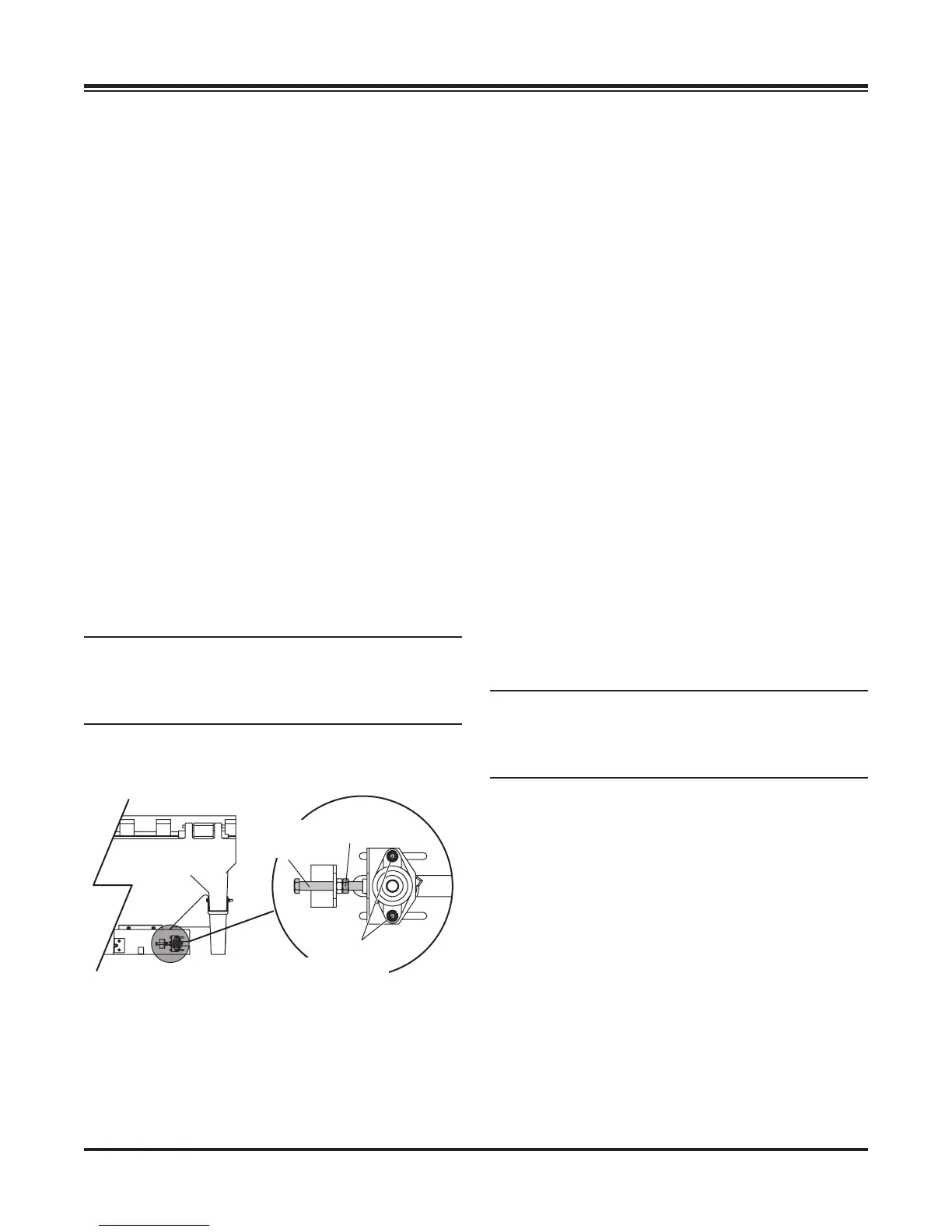
3. Loosen the two bearing mounting bolts on each
side of the conveyor idler roller.
4. Loosen the jam nut on one of the take-up bolts,
then tighten (clockwise) the take-up bolt one full
revolution. Repeat evenly on the other side.
5. Start the unit to determine if conveyor tension is
correct. If tension is not enough to restart the load
or if the conveyor drive roller slips, immediately
turn the spreader OFF and repeat the steps above
until the load restarts and the conveyor drive roller
does not slip.
6. Run the load for a few minutes and check the
conveyor idler pulley to determine if the conveyor
belt is running closer to one side than the other.
If the belt tracking is centered and the belt is not
rubbing on the side of the sills, retighten the jam
nuts and the bearing mounting bolts on both sides
of the conveyor idler roller.
7. If the conveyor belt is tracking off center, tighten
the take-up bolt on the side that the belt is tracking
towards. Sometimes it is necessary to overtighten
this side to make the belt track back toward center,
then loosen the take-up bolt slightly to maintain
center tracking of the belt. Once the belt tracking
is centered and the belt is not rubbing on the side
of the sills, retighten the jam nuts and the bearing
mounting bolts on both sides of the conveyor idler
roller.
NOTE: The conveyor belt may relax or stretch
after the rst few loads of material and may
require readjustment. Check belt tension after the
rst few loads and adjust as necessary.
Jam
Nut
Idler
Take-Up
Bolt
Bearing
Mounting
Bolts


 To Next Page