4-19
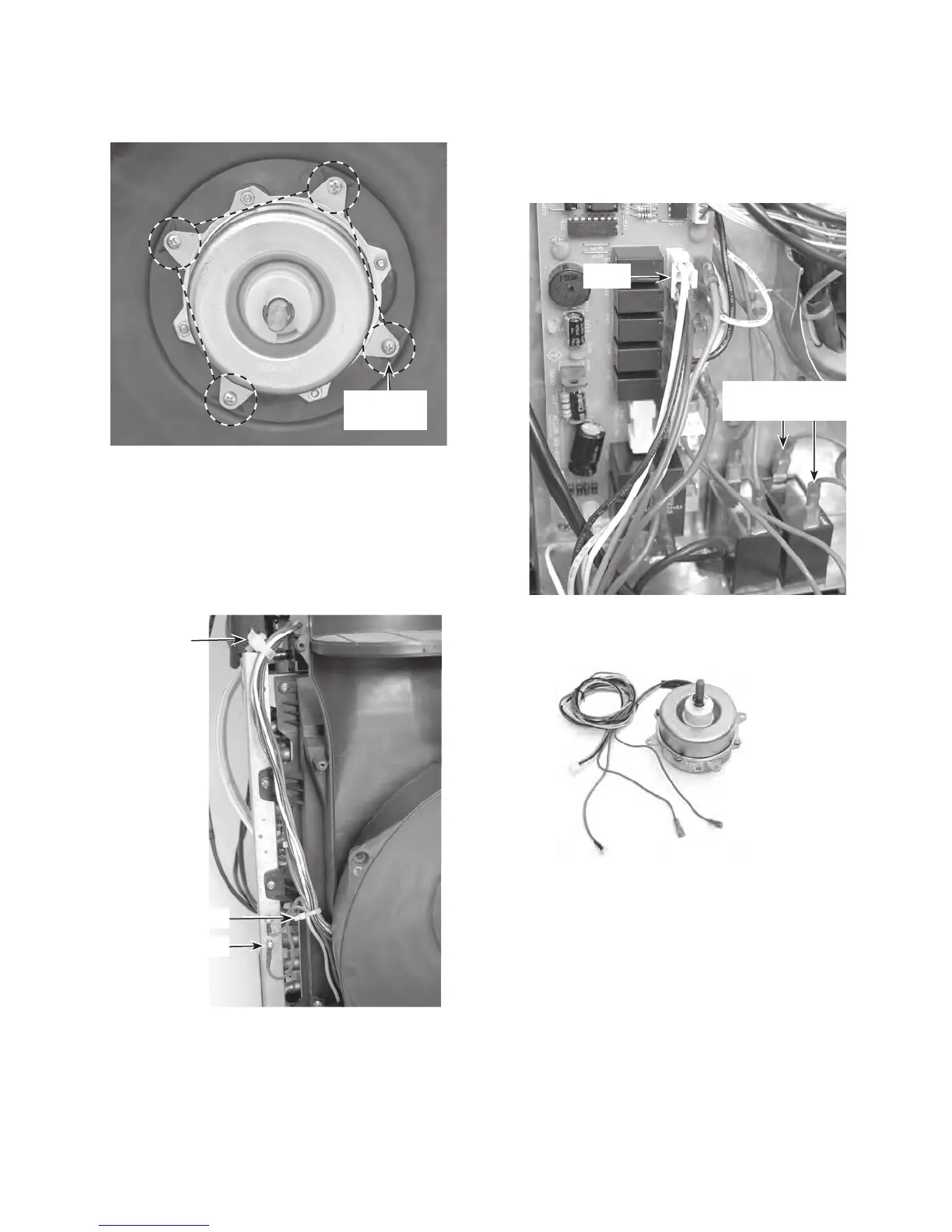
7. Remove the screw from the condenser
fan motor green ground wire.
8.
Raise the locking tab on the wire tie
standoff, and pull the strap and wires out
of the standoff.
9. Cut the indicated wire tie from the wires.
11. Disconnect the two red wires from the termi-
n
als of the condenser fan motor capacitor.
12. Unlock and disconnect the 3-wire con-
nector from the control board at CN21.
10.
Cut the remaining wire ties that are nec-
essary to remove the condenser fan mo-
tor wires from the chassis.
6.
Remove the four screws from the con-
denser fan motor
.
Fan Motor
Screws
Standoff
Motor Ground
Wire Tie
CN21
Cond. Fan Motor
Capacitor Wires
13. Pull the condenser fan motor wires
through the cover.
REASSEMBLY NOTE: Be sure to replace all
of the wire ties that you removed with new
ties, (see page 4-13 for the locations), and
secure the wires neatly together.
Condenser Fan Motor



 To Next Page