3-3
PORTABLE AIR CONDITIONER USE
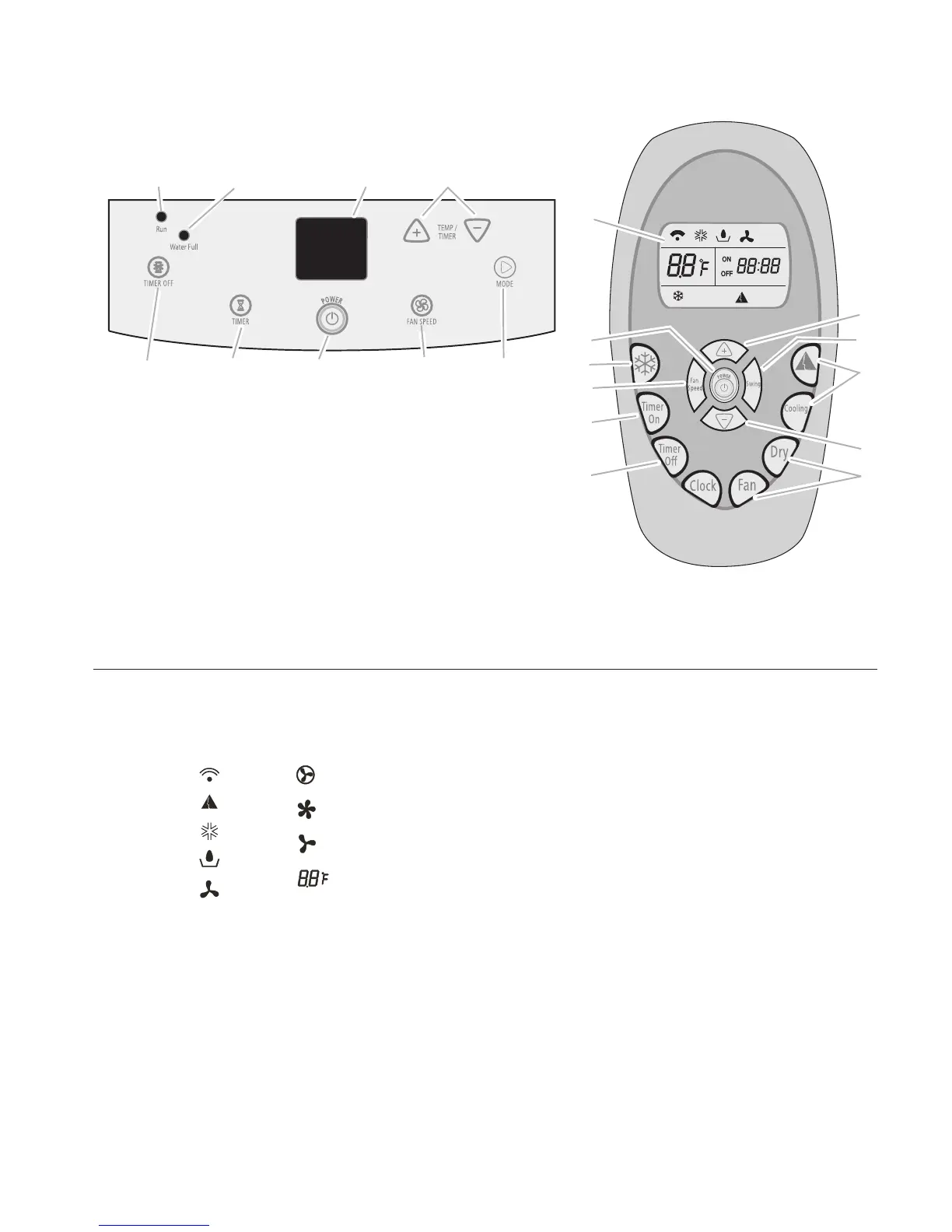
Display Symbols
A. Remote control
signal transmit
indicator light
indicator light
indicator light
B. ComfortMode
C. Cooling mode
D. Dry mode indicator
light
E
. Fan only mode
indicator light
indicator light
indicator light
indicator light
F. Auto fan speed
G. High fan speed
H
. Low fan speed
I. Display set
temperature
F
G
H
I
A
B
C
D
E
TM
NOTES:
The air conditioner display shows the current
room temperature and 24 hour clock.
In
the event of a power failure, your air con-
ditioner will operate at the previous settings
when the power is restored.
W
hen changing modes while unit is operating,
the compressor will stop for 3 to 5 minutes
before restarting. If a button is pressed dur-
ing
this time, the compressor will not restart
for another 3 to 5 minutes.
In
Cooling or Dry mode, the compressor and
fan will stop when room temperature reaches
set temperature.
•
•
•
•
A. RUN indicator light
B. WATER FU
LL indicator light
C. Display
D. TEMP/TIME plus and minus buttons
E. TIMER OF
F button
F. TIMER on b
utton
G. POWER button
H. FAN SPEED button—choose Auto, High or Low
I. MODE button—choose ComfortMode
™
control,
Cooling, Dry or Fan Only
J. RapidCool
™
mode control
K. SWING a
ir direction control
B
C
G
E
H I
D
F
A
C
D
D
E
F
G
H
I
I
J
K
NOTES:
Remote control may vary in appearance.
Two AA batteries (not included) power the remote control. Do not
use rechargeable batteries. Replace batteries after 6 months of
use, or when the remote control starts to lose power.
To operate the air conditioner with the remote control, aim the
remote control at the signal receptor from no more than 23 ft
(7 m) away.
•
•
•
USING THE CONTROL PANEL



 To Next Page