75
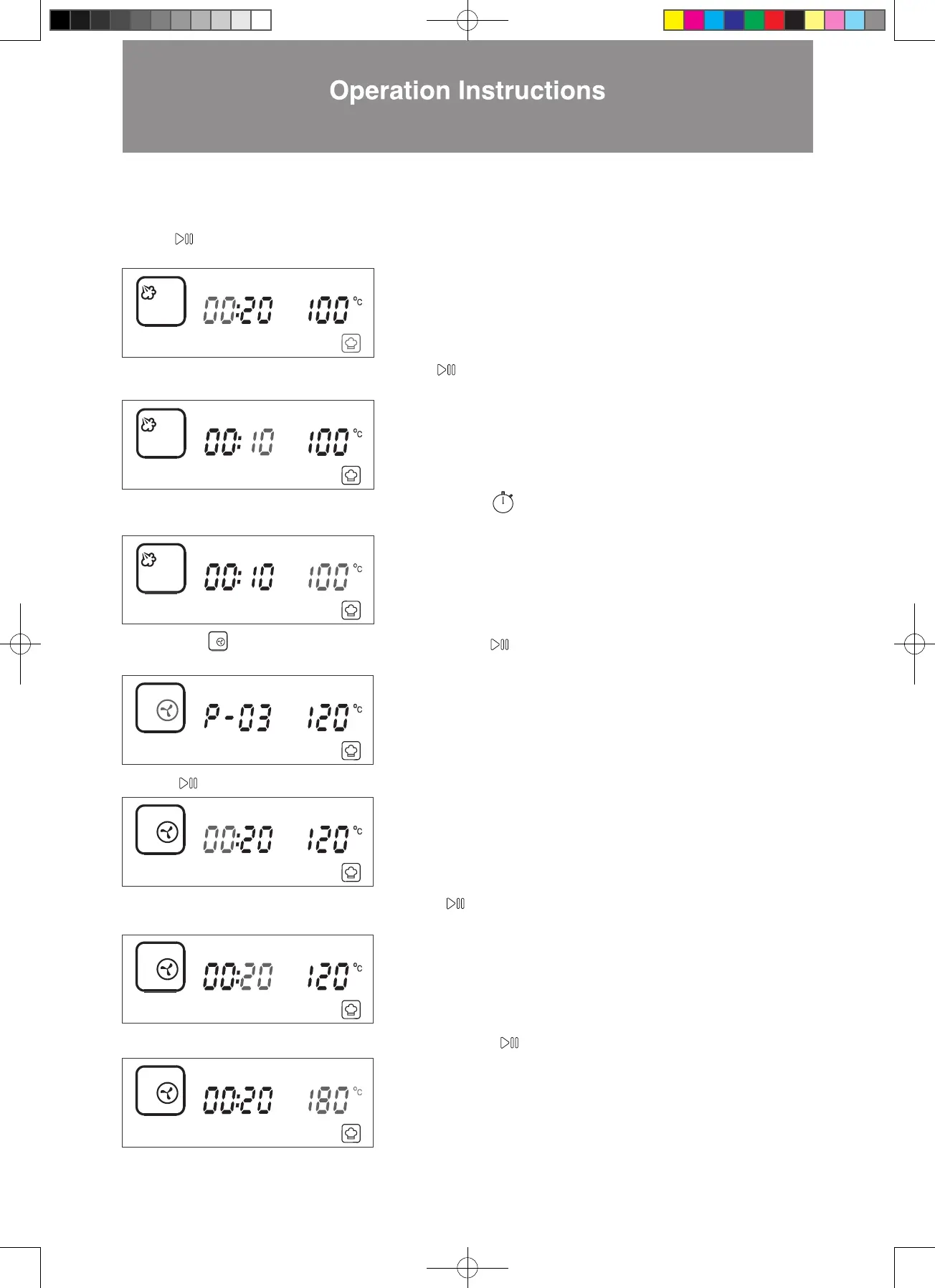
7. Press to confirm the 00 hour setting (as shown in the diagram below). The display will jump to minute setting
automatically.
8. Press < > until the minute display shows 10. Press to confirm (as shown in the diagram below). The display will
jump to temperature setting automatically.
9. Press < > until the temperature display shows 100°C. Press to confirm the 2nd cooking function setting and
jump to next cooking function setup. ( as shown in the diagram below).
10. Press > to Forced Air mode. The icon will flash. Press to confirm cooking mode (as shown in the diagram
below). The display will jump to hour setting automatically.
12. Press < > until the minute display shows 20. Press to confirm (as shown in the diagram below). The display will
jump to temperature setting automatically.
13. Press < > until the temperature display shows 180°C. Press to confirm the 3rd cooking function.
14. Setting is complete. The combi steamer will start cooking.
11. Press to confirm the 00 hour setting (as shown in the diagram below). The display will jump to minute setting automatically.
W3MS450_18Jan2022_OL.indd 75W3MS450_18Jan2022_OL.indd 75 18/1/2023 上午12:0718/1/2023 上午12:07




 To Next Page