79
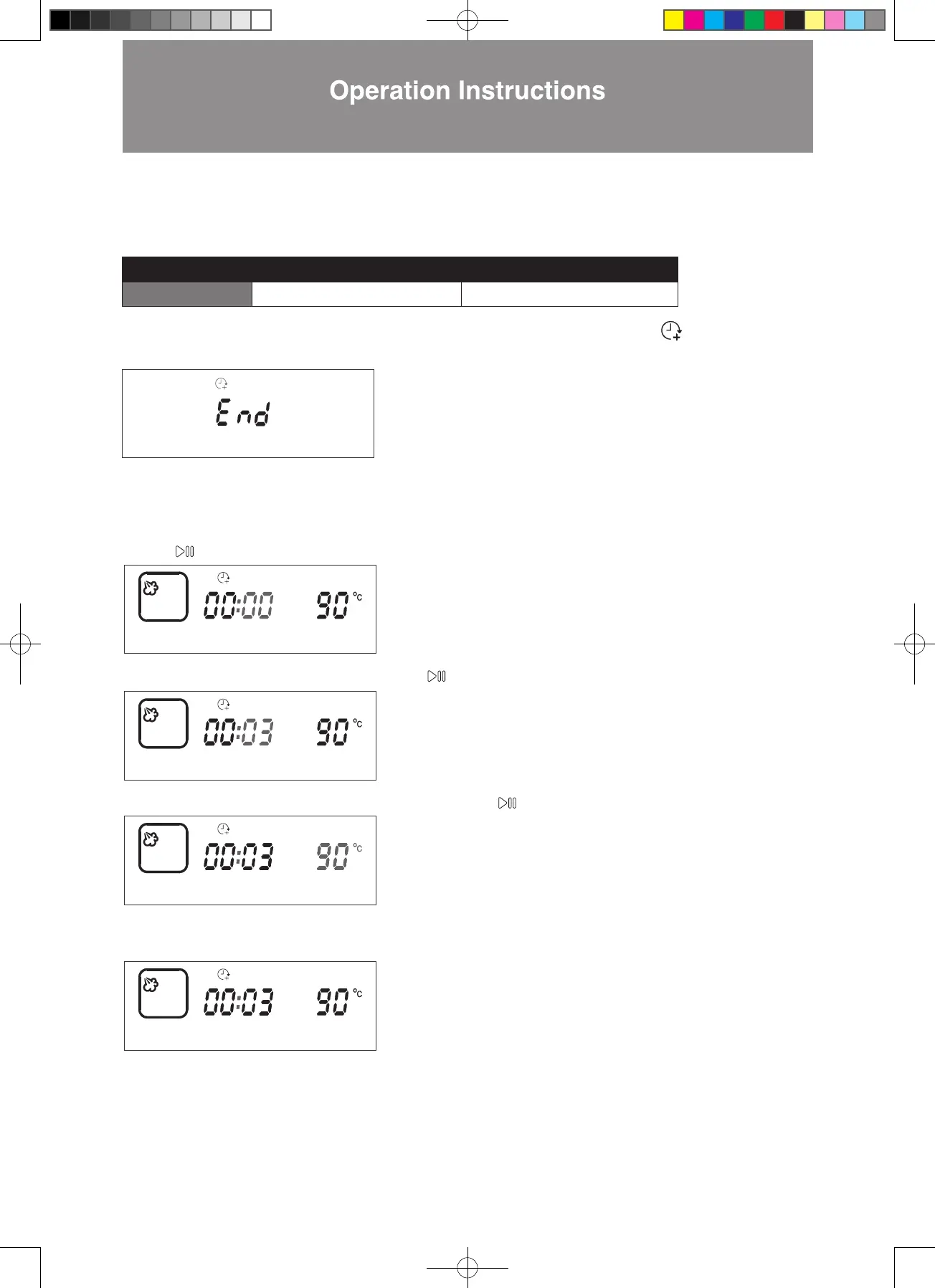
B. Increase the cooking time after cooking is completed
You can increase the cooking time after cooking is completed. Temperature cannot be adjusted.
When cooking is completed, the “END” will be shown on display and an audio tone sounds. The
“Extended Cooking
Time” icon will light up on the display.
To increase the cooking time, follow the steps below:
Example: Cooking is completed and need to increase the cooking time by 3 minutes, cooking temperature is 90°C.
Steps:
3. The display will jump to temperature setting automatically. Press to confirm (as shown in the diagram below).
1. Press to confirm to increase the cooking time, the display will jump to minute settting automatically.
2. Press < > until the minute display shows 03. Press to confirm (as shown in the diagram below).
4. Setting is complete. Cooking will resume with added cooking time under previous settings (as shown in the diagram
below).
Temperature Time
Setting Range Cannot be adjusted 1 – 59 mins
Note: If no action is taken within 3 minutes after cooking is completed, the combi steamer will return to standby mode.
W3MS450_18Jan2022_OL.indd 79W3MS450_18Jan2022_OL.indd 79 18/1/2023 上午12:0718/1/2023 上午12:07




 To Next Page