Gather tools
Required tools:
Small Phillips or Flat-head screwdriver
Small pliers (needle-nose)
Drill with 3/16” (4 mm) b
Optional tools:
Wire cutters/stripper
Hammer (for wall anchors)
THERMOSTAT DETAILS
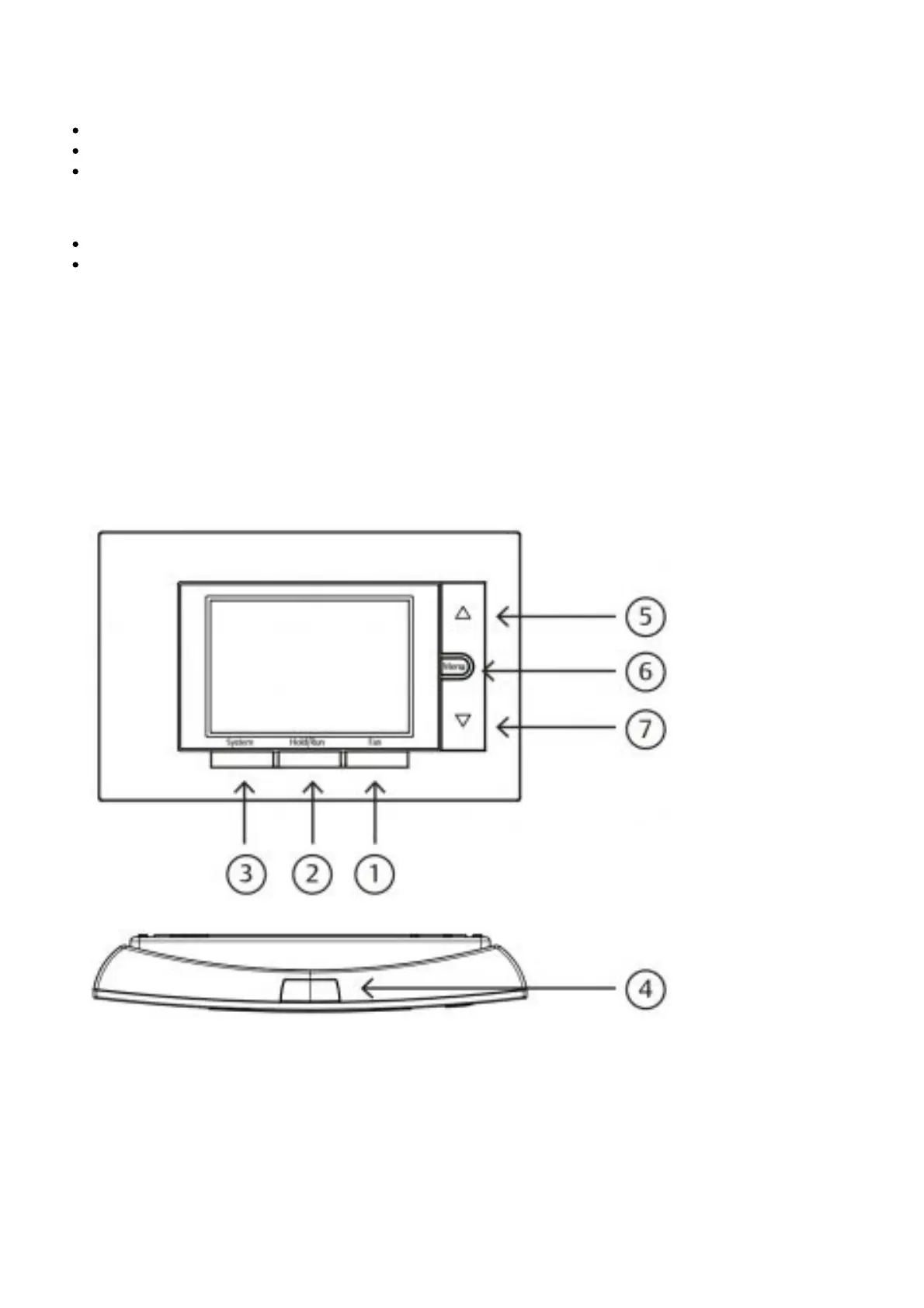
The thermostat buttons and switches
1. Fan button
2. Hold a permanent temperature, or release the hold to return to the programmed schedule
3. System button
4. Backlight button
5. Raises temperature setting
6. Access menu options
7. Lowers temperature setting
The display
1. Next (Menu button) is used to navigate within a menu
2. Set the correct time, access the schedule and customise thermostat settings.
3. Back (Fan button) is used to navigate within a menu
4. Exit (Hold/Run button) returns to the home screen
5. Thermostat is protecting the equipment from short cycling (5-minute delay)
6. Indicates that the system is running in Cool, Heat or Auxiliary mode. (Heat Pump Only -The
auxiliary will run in Heat mode when the heat pump cannot maintain the set temperature.)
7. SEE TROUBLESHOOTING














 To Next Page