Williams Concerto
Digital Piano Users Manual
6
The Connectors
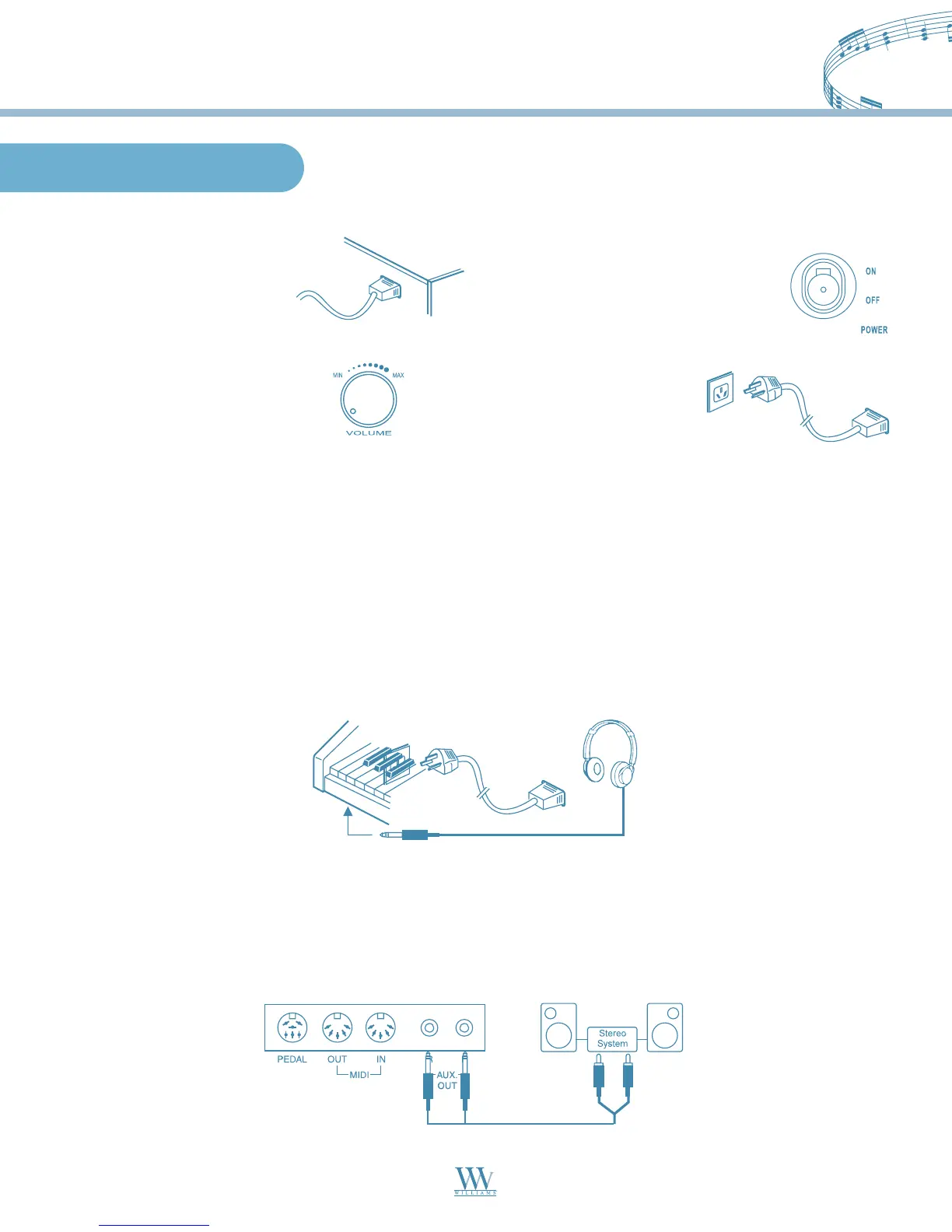
Using the AC Power Jack
Using Headphones
An optional set of stereo headphones can be connected to the headphones jack located on the left underside
of the piano body. When a pair of headphones is connected to the jack, the internal speakers will switch
off automatically.
CAUTION: Never use the headphones with high volume, as it may damage your sense of hearing. To prevent
damage to the speakers, ensure that the volume is set to the minimum level before connecting the power and
other devices.
Using the AUX.OUT jack
Connect the rear-panel AUX.OUT jack to amplified speakers, amplifiers or domestic hi-fi units for
external amplification.
Note: Connect both left (L) and right (R) channels for the stereo result. If you only connect either one of the
channels, the connected channel will only take effect.
Connect the power cable
to the AC power jack on the
underside of the piano body.
Ensure the piano is turned
off when connecting and
disconnecting the power.
Turn the volume switch
counter-clockwise to reach
the minimum volume level.
Plug the power
cable into an AC
power outlet.
If you have done the above procedures you are now safe to turn on the piano.
CAUTION: When the piano is not in use or during a thunderstorm, disconnect the power.
Williams_Concerto-2_Q5.qxd 8/3/04 11:03 AM Page 6


 To Next Page