www.williamspianos.com
Digital Piano Users Manual
’
7
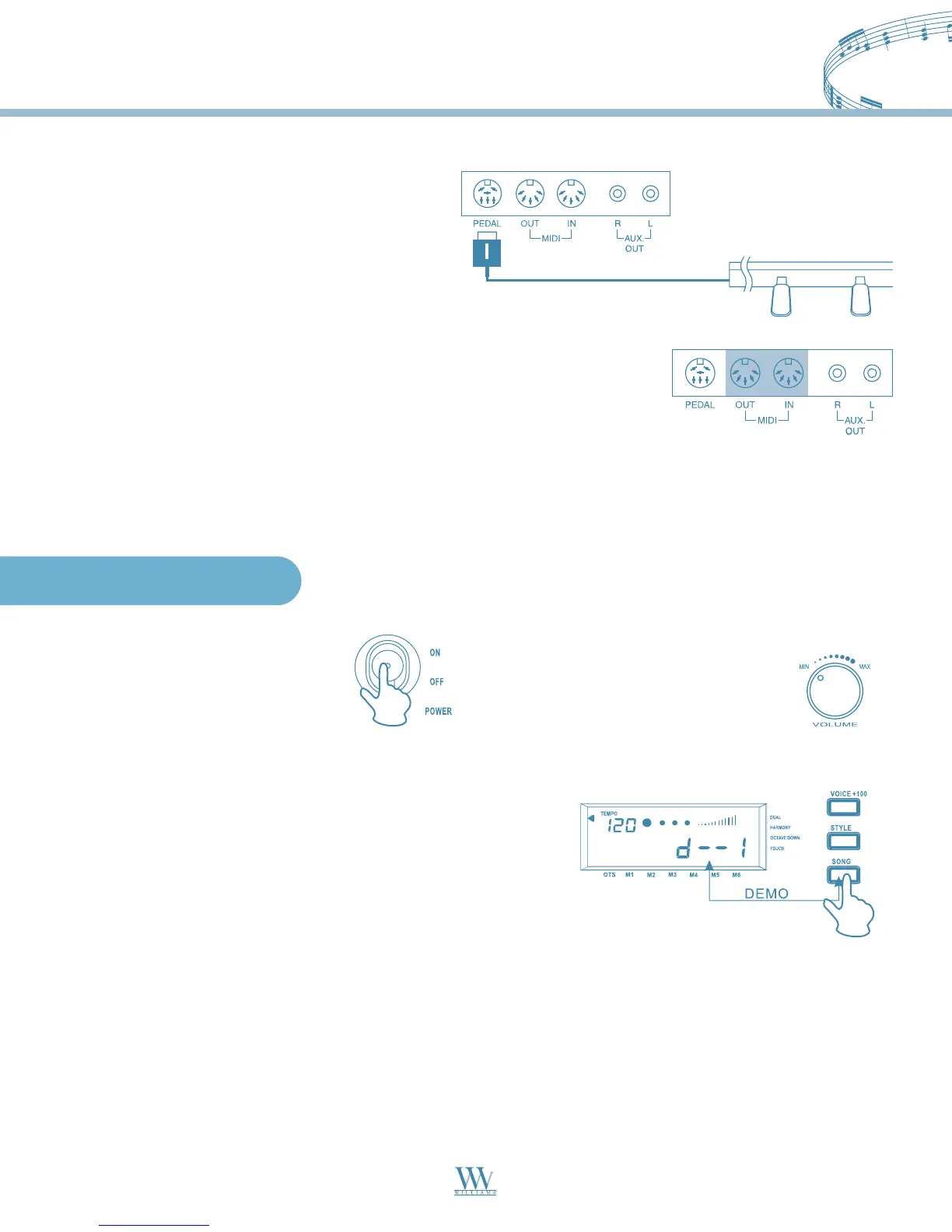
Connect the plug of the foot pedal unit to
the pedal jack on the rear panel.
MIDI IN: Data transmitted from other MIDI instrument via MIDI, is received at this terminal.
MIDI OUT: Data produced by the Digital Piano is transmitted to other MIDI instruments via MIDI from
this terminal.
Basic Operation
Using the Foot Pedals
MIDI stands for Musical Instrument Digital Interface. MIDI is a worldwide
standard that makes it possible for various electronic musical instruments to
communicate with other MIDI devices.
Using the MIDI IN/OUT Jack
2. Demonstration
This Digital Piano comes with 10 demo songs for showing
you the possibilities of the piano. To playback the demo
songs, follow the instructions below:
DEMO
Press the SONG button, the demo song start to play back.
There are 10 demo songs and they can play continually.
When you press the SONG button during
playback, the song playing currently will stop and will skip
to the next song. During the playback you can use the
numeric keypad or the (+) and (-) keys to select the songs.
To stop playback, press the START/STOP button.
1. Power Switch & Volume
Turn the POWER switch on.
The LCD display lights up.
Use the volume control
switch to adjust the volume to
your desired level
Note: During the demo song playback, the digital piano is unable to play.
Williams_Concerto-2_Q5.qxd 8/3/04 11:03 AM Page 7


 To Next Page