Williams Concerto
Digital Piano Users Manual
8
Voices and Effects
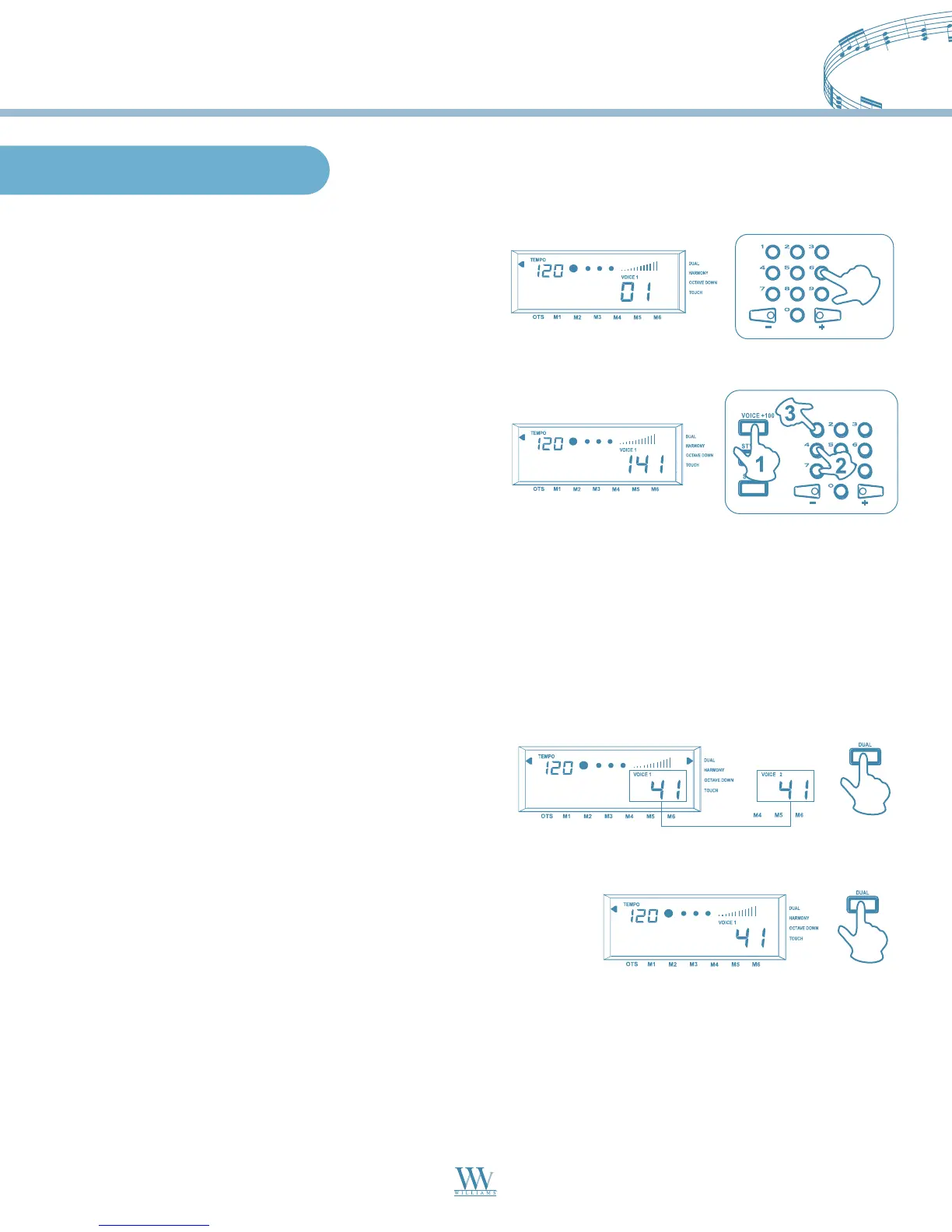
The Voice Select mode is the default mode every time
the piano is turned on and VOICE 01 is selected. At
this time you can use the numeric keypad or the (+)
and (-) keys to select another voice.
Select a Voice
When you are choosing Voice 01-99 at the status of
VOICE 1 or VOICE 2, you can use the numeric keypad
to input the number of your desired voice directly.
Three digits voice number are entered by first pressing
the +100 button, then press the remaining two digits
in sequence.
1. When VOICE 1 is showing on the display, press the
DUAL button, and VOICE 2 appears in the display.
Now input the second voice digits.
Dual Voice
2. Press the DUAL button again to turn this function off.
This digital piano features dual voice option which allow you to hear two different sounds for every note played.
NOTE: Dual Voice function only works with full keyboard playing or right-hand playing.
Williams_Concerto-2_Q5.qxd 8/3/04 11:03 AM Page 8


 To Next Page