www.williamspianos.com
Digital Piano Users Manual
’
Metronome
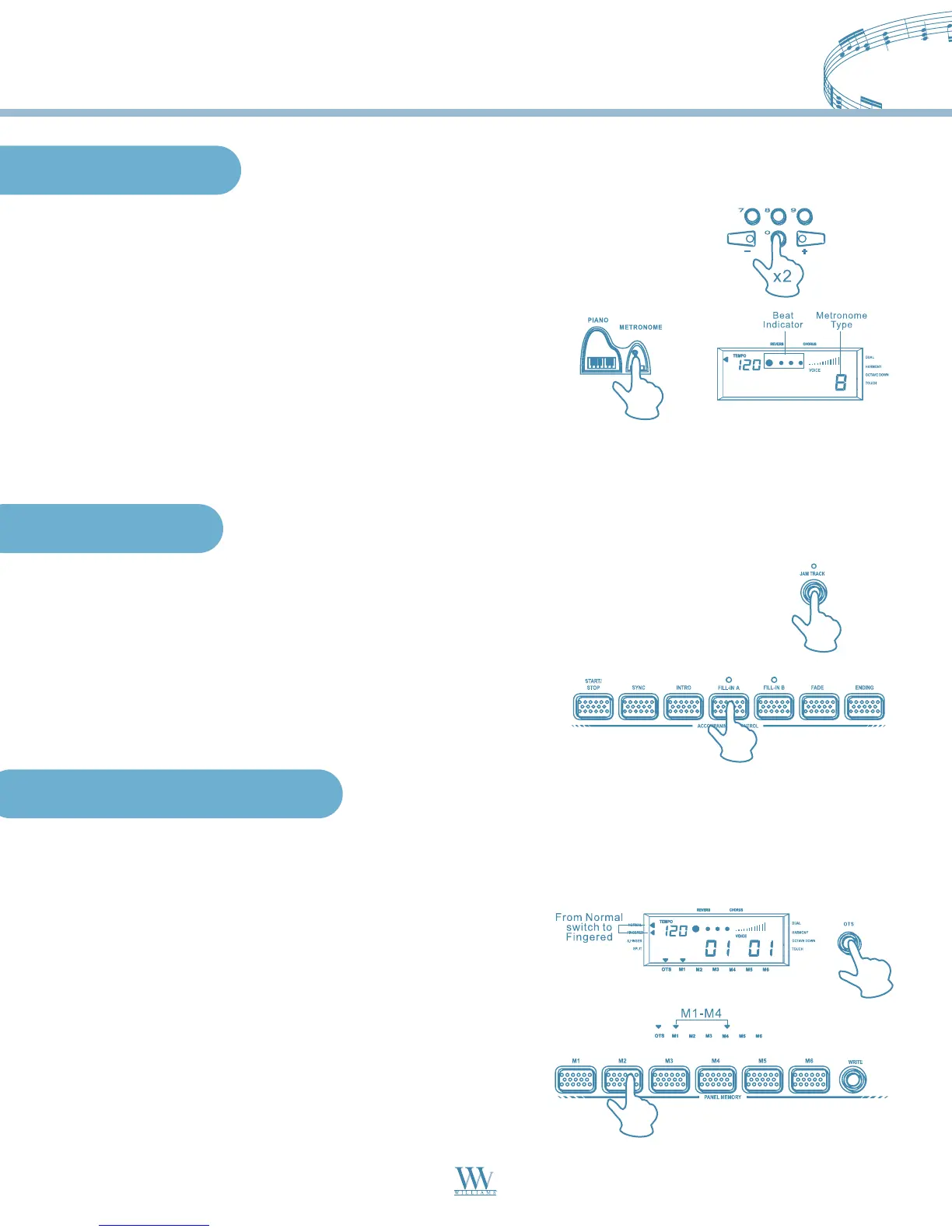
1. To activate the Metronome, press the STYLE button and insert the value “00”.
At any time, you can activate the METRONOME for practicing purposes.
2. Press the START/STOP button to start the Metronome.
You can choose the metronome type (0, 2-9) by pressing the
METRONOME button.
3. When the Metronome is playing, you can adjust the speed by
pressing the TEMPO (+)/(-) buttons.
4. To stop the Metronome, press the START/STOP button.
Jam Track
1. While the electronic keyboard is playing the auto accompaniment, you press the JAM TRACK
button and the indicator lights up. In this case, the electronic keyboard will play the chord of the
style according to the previous setting. Press the JAM TRACK button again, the JAM TRACK
indicator turns off, and the electronic keyboard will return to normal mode.
2. In the JAM TRACK accompaniment pattern by pressing the
FILL-IN A or the FILL-IN B button, the JAM TRACK function
will cancel automatically.
One Touch Setting
The One Touch Setting is a quick and easy way of reconfiguring voices of Upper and Lower sections of a style by
pressing only one button while you are playing.
1. Select a Style using the methods already described.
2. Press the OTS button. The display shows the select indicator
pointing to the OTS. Make sure one of the two chord recognition
modes is selected.
Selecting the One Touch Setting
3. Press the START/STOP button to play the selected style.
While playing the style, you can press one of the ONE
TOUCH SETTING buttons - [M1], [M2], [M3], [M4] to select
the appropriate setting.
15
Williams_Concerto-2_Q5.qxd 8/3/04 11:03 AM Page 15


 To Next Page