www.williamspianos.com
Digital Piano Users Manual
’
The Chord Recognition Modes
1. Choose a style that you desire (01-99).
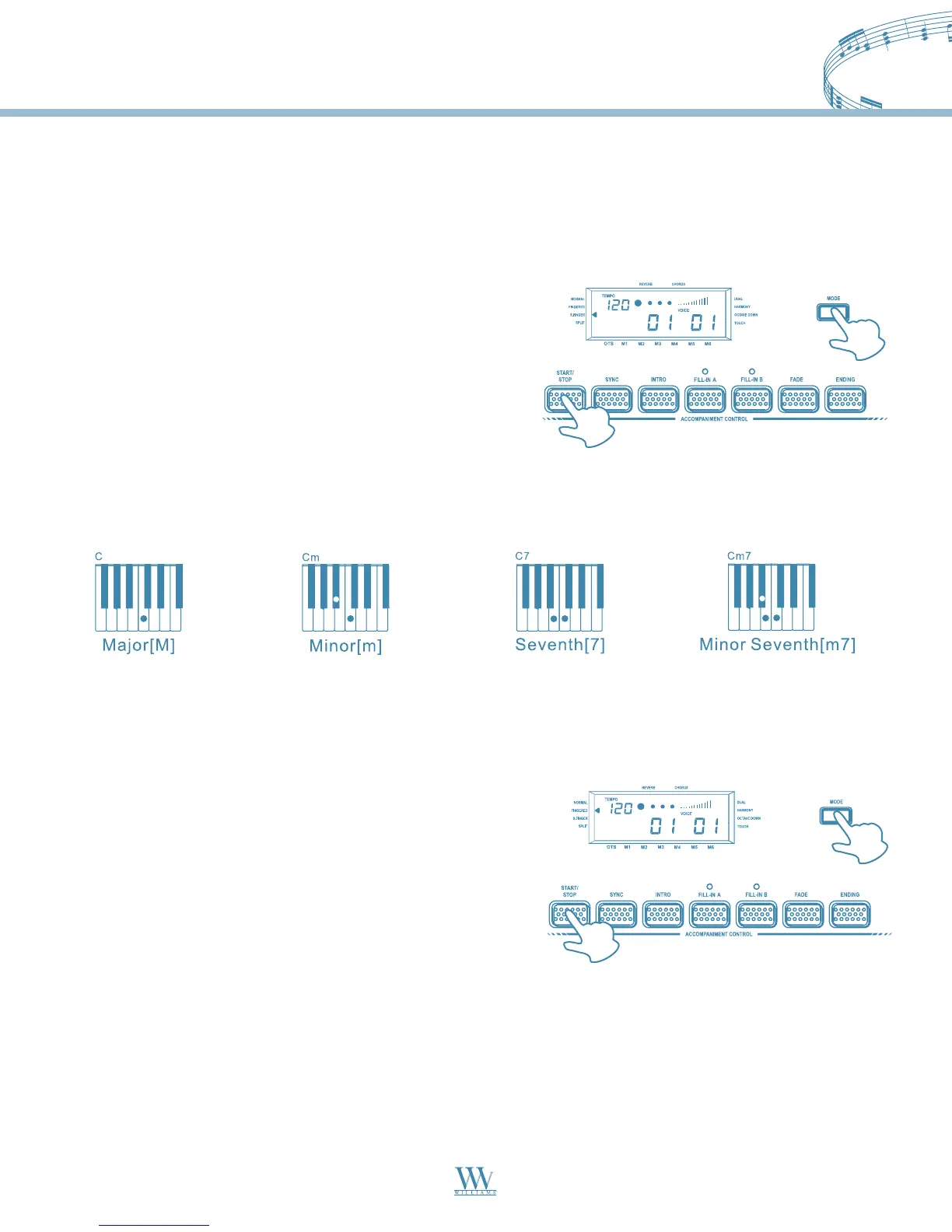
2. Press the MODE button until the select indicator points
to “S.Finger”.
The digital piano allows you to choose between two different Chord modes:
Single Finger mode:
4. Follow the Single Finger Chord table in the appendix section and play the chord that you want.
The following shows C, Cm, C7 and Cm7 as the examples of the S.Finger Chord playing method:
13
Fingered mode:
In this mode, play the keys on the left of the Split point to play the Fingered Chord that you want.
1. Choose a style that you desired (01-99).
2. Press the MODE button until the select indicator points
to “Fingered”.
3. Press the START/STOP button to start to playback the style.
Accompaniment Control
This digital piano provides a wide variety of automatic functions that make it very easy to play. The functions are
found in the Accompaniment Control section.
3. Press the START/STOP button to start to playback the style.
Williams_Concerto-2_Q5.qxd 8/3/04 11:03 AM Page 13


 To Next Page