English | 4 | Software
20 | 89014383; Version 2 | Operating instructions UC-Serie
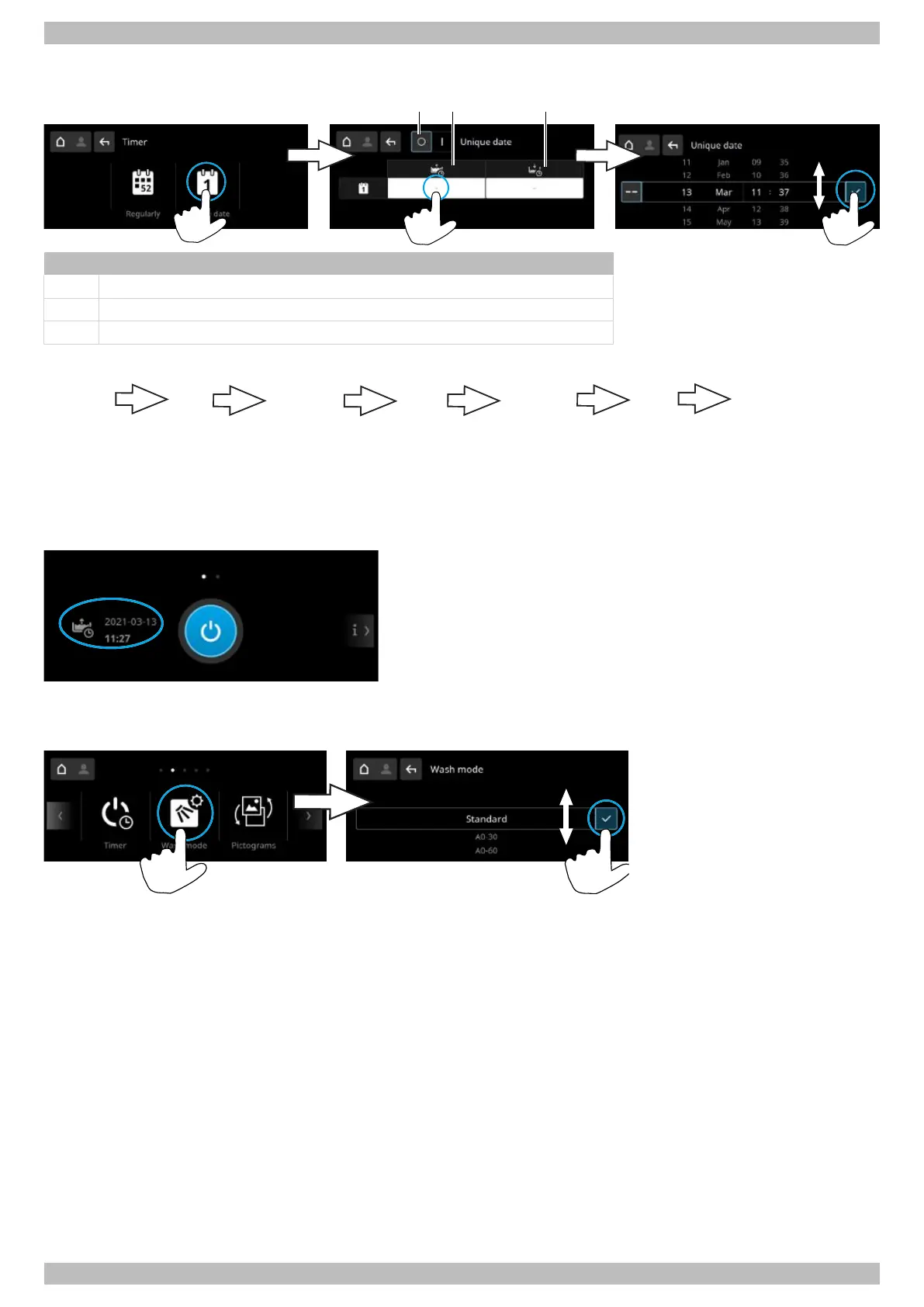
Setting a non-recurring date
Item Name
1 Switch the timer off/on
2 Date and time for automatic start-up
3 Date and time for automatic switch-off
Automatic switch-off sequence
Sequence
of sounds
Sequence
of sounds
Sequence
of sounds
The self-cleaning
programme empties
and switches off
warewasher.
10 s
pause
10 s
pause
10 s
pause
If the door is open during the automatic switch-off, the warewasher is pumped empty and switched off, but is not cleaned
on the inside.
Showing the programmed time
4.2.6 Wash mode
In this menu, the wash mode can be set.
Standard
In the standard wash mode, the washing programmes are adjusted to the wash items. All additional programmes can be
selected.
A0-30 and A0-60
Note:Not possible with activated external energy management or with Cool option warewashers.
In the A0-30 and A0-60 wash modes, the washing programmes are adjusted to the A0 requirements by means of in-
creased temperature and an extended wash time. The modes can thus result in higher energy consumption and a longer
wash time. If the A0 values are not fulfilled, the washing process stops after 20 minutes. The Intensive, Silence, ECO and
Short programmes cannot be selected.




 To Next Page