EasyManua.ls Logo

Winterhalter UF-L - Resetting the Water Back-Flow Counter

Winterhalter UF-L
44 pages
Print Icon
To Next Page IconTo Next Page
To Previous Page IconTo Previous Page
Loading...
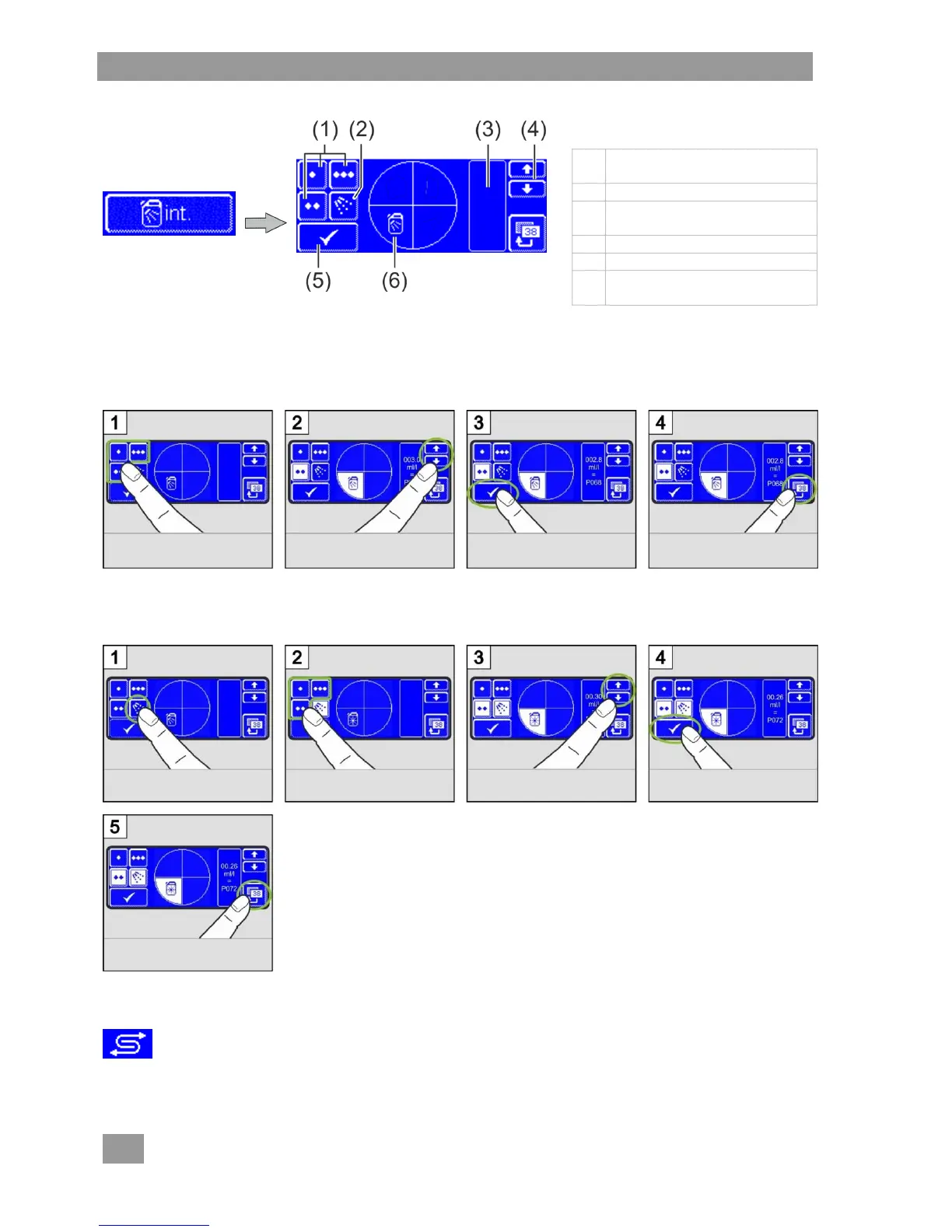
PIN menu
20
Opening the menu
1
Standard washing
programmes
2
Switch to rinse cycle
3
Dosing amount and internal
name (e.g. P003)
4
Scroll keys
5
Confirm input
6
Symbol for detergent or rinse
aid
INFO The dosing amounts for each individual washing programme can be set differently.
Changing the detergent dosing amount
Changing the rinse aid dosing amount
7.7 Resetting the water back-flow counter
The water back-flow counter needs to be reset if, on machines with TE or full demineralisation
cartridge, the accompanying symbol is flashing on the display.
Contact an authorised service technician to have the TE or full demineralisation cartridge exchanged.
Select washing
programme.
Change dosing
amount.
Save.
Exit the menu.
Select rinse cycle.
Select washing
programme.
Change dosing amount.
Save.
Exit the menu.

Other manuals for Winterhalter UF-L

Related product manuals