6.3 Menu levels
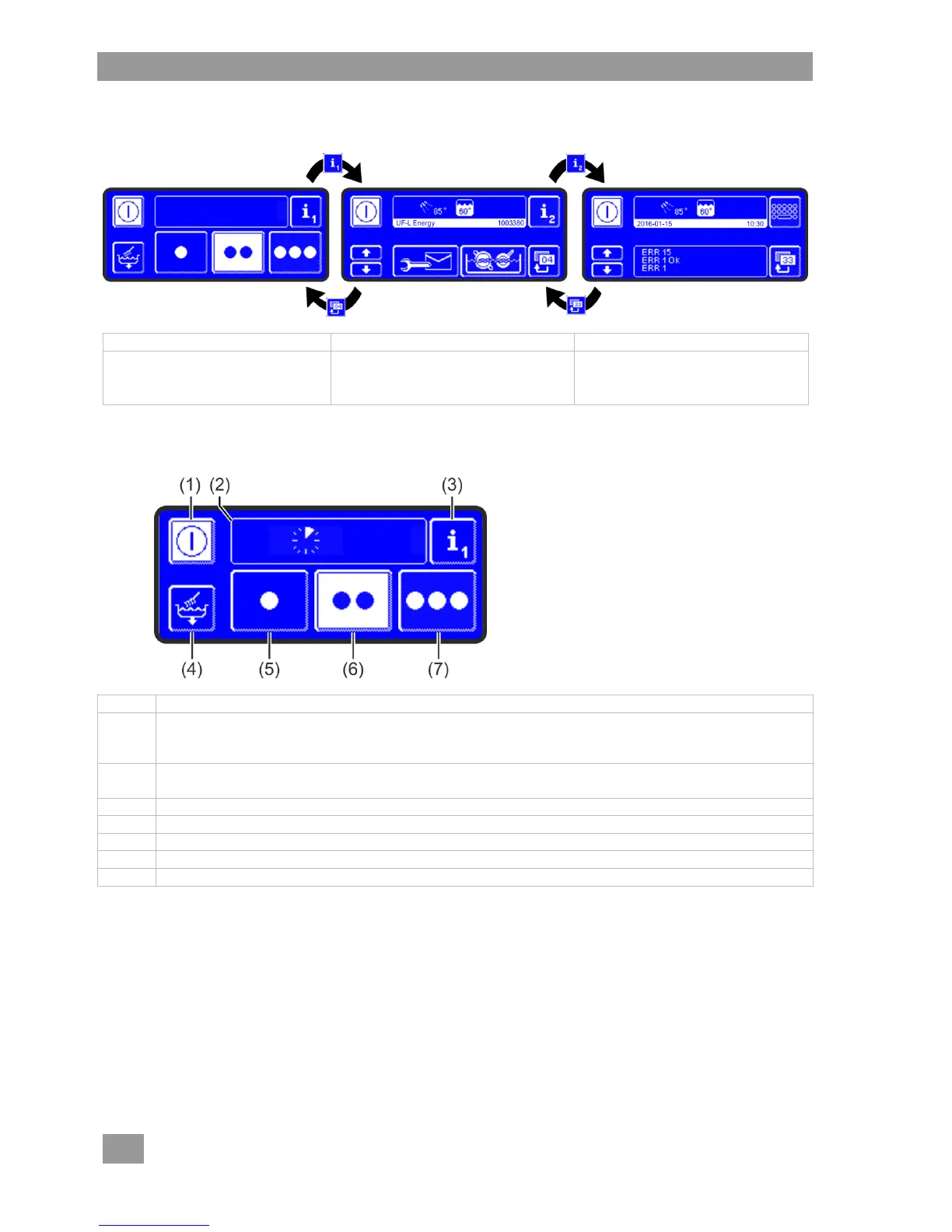
Operating personnel have access to the following 3 levels:
Standard washing
programmes
Info field
Show temperatures
Activate additional programme
Priming the dosing devices
List of events and
malfunctions
Access to the PIN menu
6.3.1 Main level
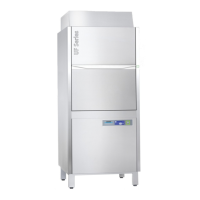
The main level appears automatically when the machine is ready for operation.
On/Off button
IMPORTANT Once the machine has completed operation, drain with the self-cleaning
programme ( 10.1.1)
Info field
Display of activated additional programmes and error pictograms
Switch to Info level 1 ( 6.3.2)
Switch to tank water exchange programme ( 9.3.6) and self-cleaning programme ( 10.1.1)
Standard washing programme 1 for slightly dirty wash items
Standard washing programme 2 for medium dirty wash items
Standard washing programme 3 for heavily soiled wash items
The 3 standard washing programmes differ in their various properties (e.g. time and cleaning pressure) and
are thus suited to wash items with different levels of soiling. Programme 2 is already pre-selected when the
machine is ready.
INFO The display of standard washing programmes on your warewasher may differ. The service
technician chooses the pictogram optimally suited to the wash items and level of soiling from a
large selection of images.
At your request, the service technician can also hide programmes.



 To Next Page