Product: Latera
Version: 01
9.1.1 Central STOP Button
The central STOP button immediately interrupts all bed movements.
When the central STOP button is pressed, the electronic stops all bed movements immediately.
9.1.2 Activating GO Button
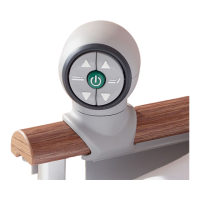
The GO button activates the keypads on all control panels.
The GO button is included on a number of different control elements. The function of the GO button is identical on
all control elements.
After pressing the GO button, the keypad remains active for 3 minutes.
During this time you can:
Adjust individual mattress platform elements by pressing the corresponding function buttons.
Disable individual functions with the lock buttons.
Each time you press a function button, the keypad will remain active for another three minutes.
9.1.3 Function Buttons
You can set different positions, for example the height and tilt of the mattress platform, adjust individual mattress
platform elements, etc., with function keys 3, 6, 9, 12, 14 and 16.
NOTE If you press two function buttons at the same time, the controller will recognise this as an error. The
controller immediately interrupts all bed movements.
Set the position as follows:
Activate the keypad by pressing the GO button.
Press and hold the function button until the desired position is reached.
9.1.4 Lock Keys
Disable individual functions with the lock keys 5, 8, 11 and 13 on the Supervisor.
To disable functions:
Activate the keypad by pressing the GO button.
Press the lock button.
The respective LED 4, 7, 10 or 15 indicates the lock.
NOTE You cannot disable the CPR and Trendelenburg Position buttons.
To enabled disabled functions:
Activate the keypad by pressing the GO button.
Press the lock button.



 To Next Page