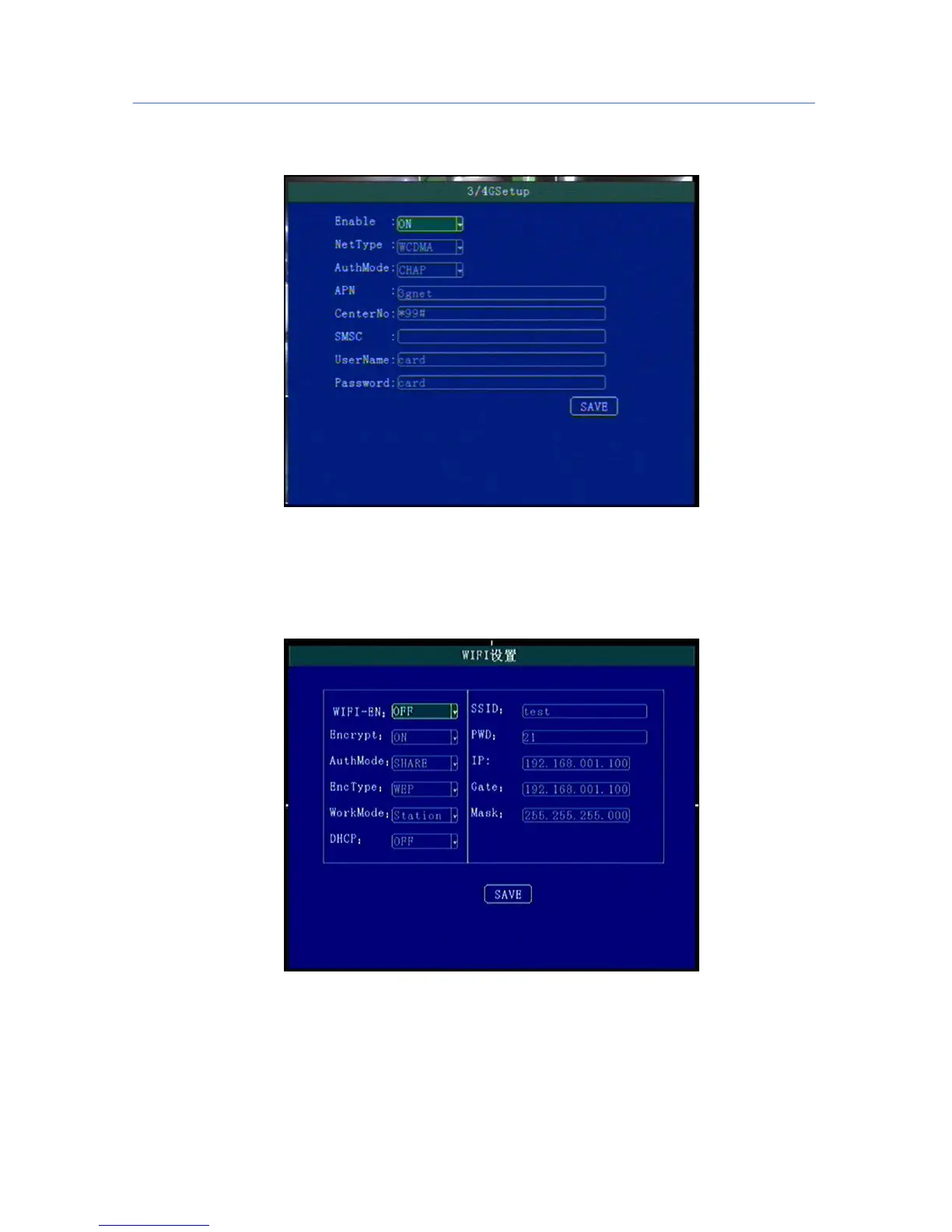
5.6.3 3G/4G Setup
3G/4G Network Configuration
“Enable”:3G/4G On/Off Setting,Press [OK] for choosing;
“Type”:3G/4G Type setting,WCDMA\EVDO\TD-SCDMA\TD-LTE , FDD-LTE, press [OK] for choosing,
“APN”:Set 3G/4G APN,Press [OK] Input, enter into input page to set the information
“User”, “Password”:SIM Card Network Operation User and Password, Press [OK] for setting ;
5.6.4 WIFI Setup
“WIFI-EN”:WIFI On/Off Setting,Press [OK] for choosing;
“Encr-EN”: WIFI encryption ON/Off Setting,press [OK] for choosing;
“Au-Mode”: WIFI Authentication mode setting,Please choose same one with your router,
“Enc-Type”: WIFI Encryption type setting,Please choose the one same with your router,
“IP”\“Mask”\“Gateway”:WIFI IP/Mask/Gateway setting
“SSID”: Input Your WIFI SSID,
“PWD”: Same with your WIFI password,



 To Next Page