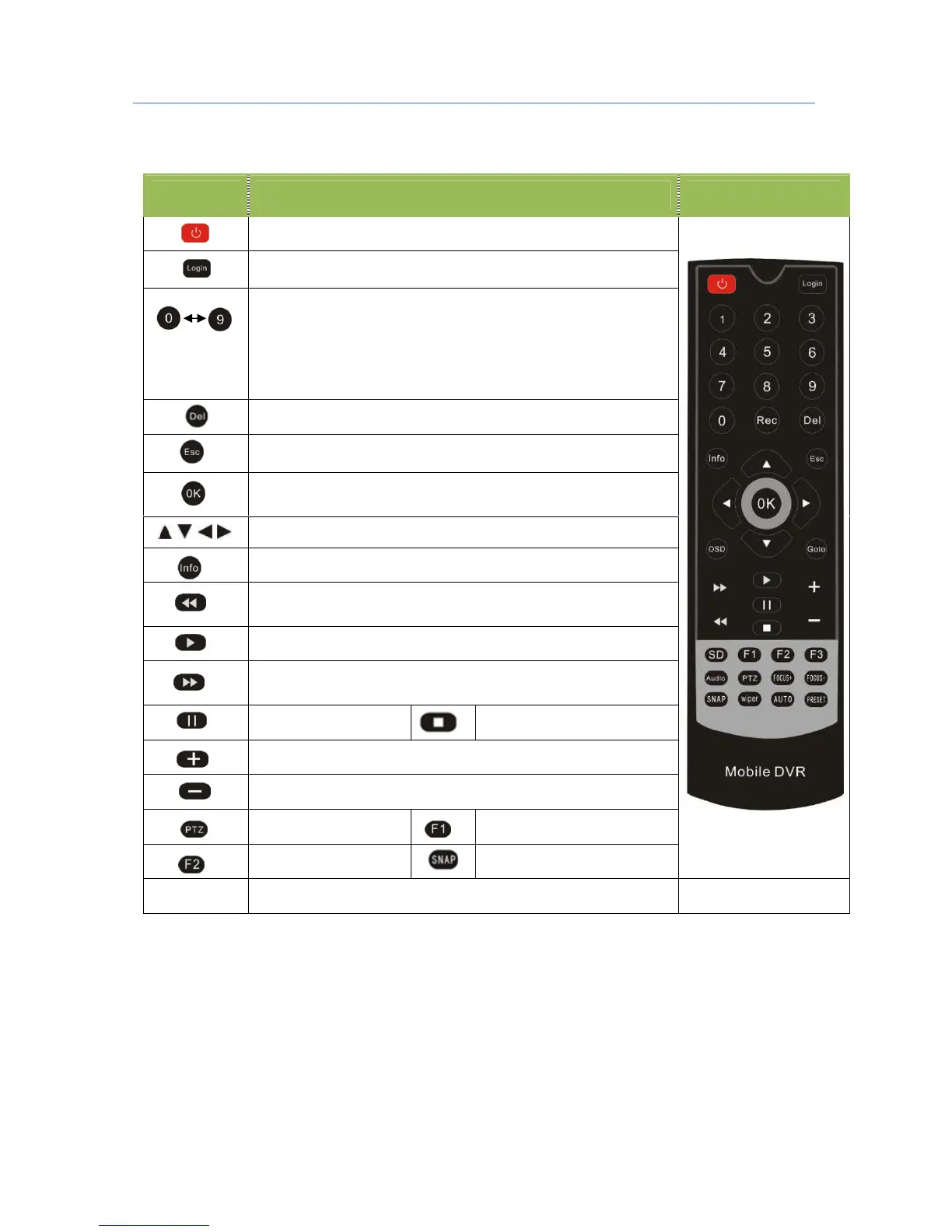
1.3 Remote Controller
Key Function Picture
Power and Standby Button,Reserved
To enter system settings.
[0-9] key:In the setting mode, 0-9 is used to select the number
of menu items. In playback mode, the key 1-8 to select 1-8 single
channel,
ESC Button is used to switch back to the original preview
interface .
Delete Button
Return to the preview picture or previous menu
Enter button: button for setting system parameter,
selecting,,switching and playing.
Direction Key:up, down, left, right
Display system info under monitoring mode
Rewind button. In play mode, press REW button to
select 2/4/8/16/,Press play button return to normal
Play Button
Forward button. In play mode, press this button to select
2/4/8/16/,Press play button for return normal
Pause button
Stop button
Playback Page\Forward to del param\Aperture larger Key
Playback Page\Back del param\Aperture reduce key
PTZ Function key
Calling Shortcut
Quickly setup
Snap pictures
[Others] Reserved



 To Next Page