10 VoIPNetworkServicesGmbH,Justus‐von‐Liebig‐Str.26,31535Neustadt
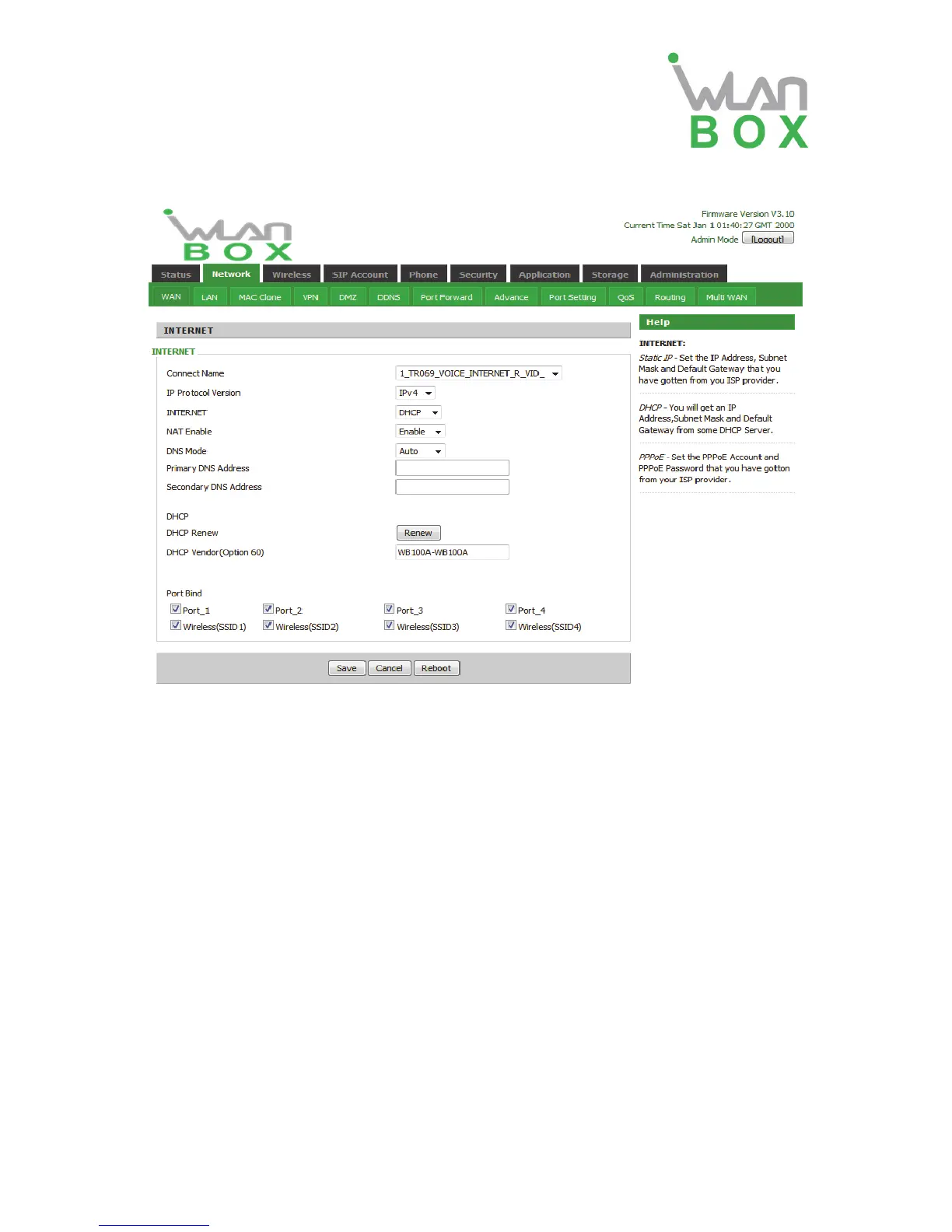
2. DHCP Mode
Field Name Description
Connect Name Use keywords to indicate WAN1-WAN5 port service model (the
parameters are defined in Network--> multi-WAN page)
IP Protocol Version Temporarily only one IPv4 option
Internet Choose DHCP
Route/Bridge Mode Set network working mode, options are route and bridge.
NAT Enable This requires multi-WAN port Page settings, please refer to 5.2.7
VLAN Mode This requires multi-WAN port Page settings, please refer to 5.2.7
DNS Mode From the automatic mode is selected and specify two DNS type.
DNS type to Automatic, the home gateway from the DHCP
server automatically obtain the preferred DNS and alternate
DNS.
DNS type is specified, the user should manually configure the
preferred DNS and alternate DNS.
Primary DNS Address The primary DNS of Internet port.
Secondary DNS Address The secondary DNS of Internet port.
DHCP Renew Refresh DHCP IP
DHCP Vendor(Option60) Specify DHCP Vendor field Display the vendor and product name
Port Bind Port bind is used for binding the service for different LAN ports and
SSIDs.


 To Next Page