11 VoIPNetworkServicesGmbH,Justus‐von‐Liebig‐Str.26,31535Neustadt
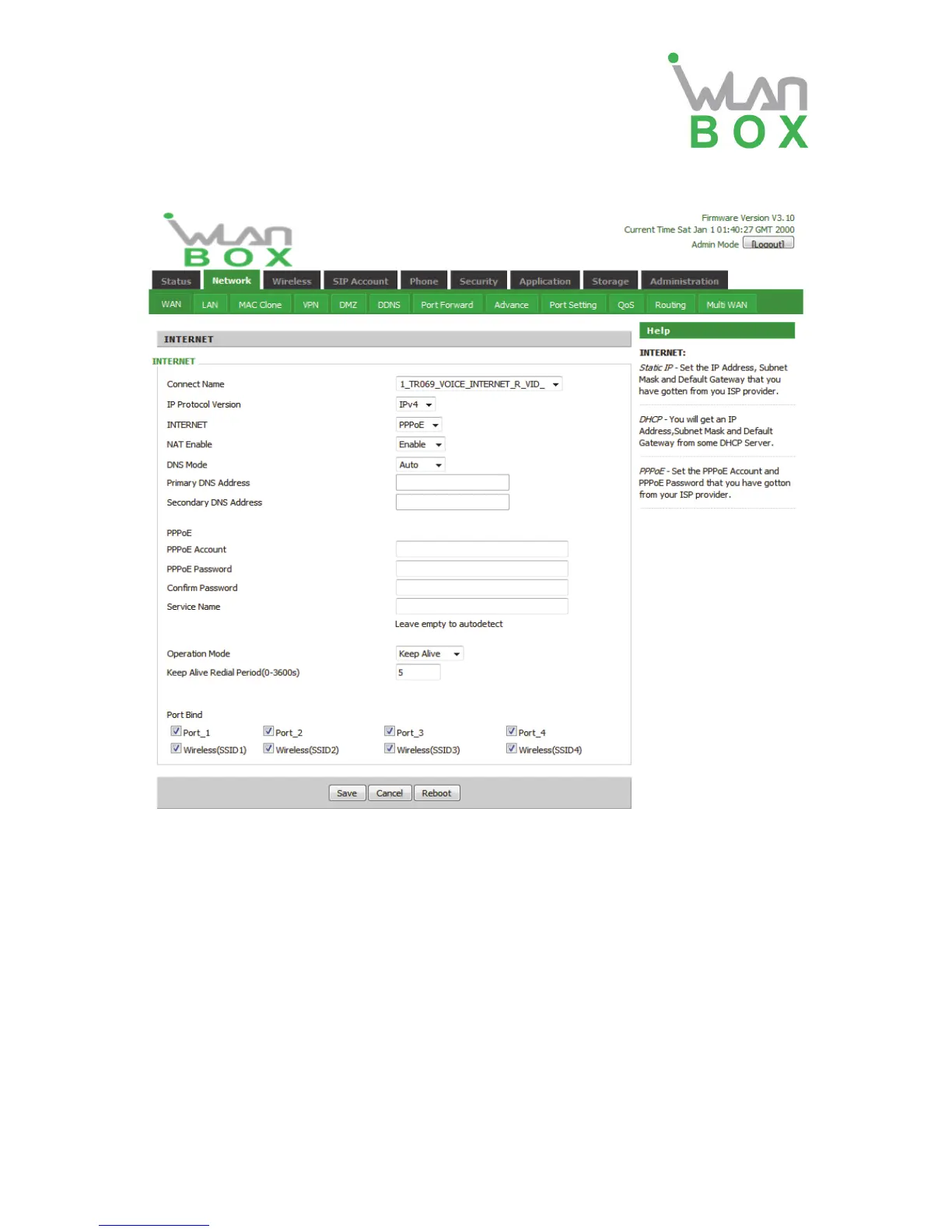
3)PPPOE Mode
Field Name Description
Connect Name Use keywords to indicate the WAN1~WAN5 service mode (set
relevant parameters in the WAN port settings page)
IP Protocol Version Currently, only one IPv4 option
INTERNET Choose PPPoE.
PPPoE Account Assign a valid user name provided by the ISP
PPPoE Password Assign a valid password provided by the ISP
Confirm Password Enter your PPPoE password again
Operation Mode Select the mode of operation, options are Keep Alive, On Demand
and Manual:
When the mode is Keep Alive, user need to set the 'keep alive
redial period' values range from 0 to 3600s, the default setting
is 5 minutes;
When the mode is On Demand, user need to set the 'on
demand idle time' value in the range of 0-60 minutes, the
default setting is 5 minutes;


 To Next Page