51
UserManualWMFespressoNEXT
Software | Beverages
4.4 Beverages
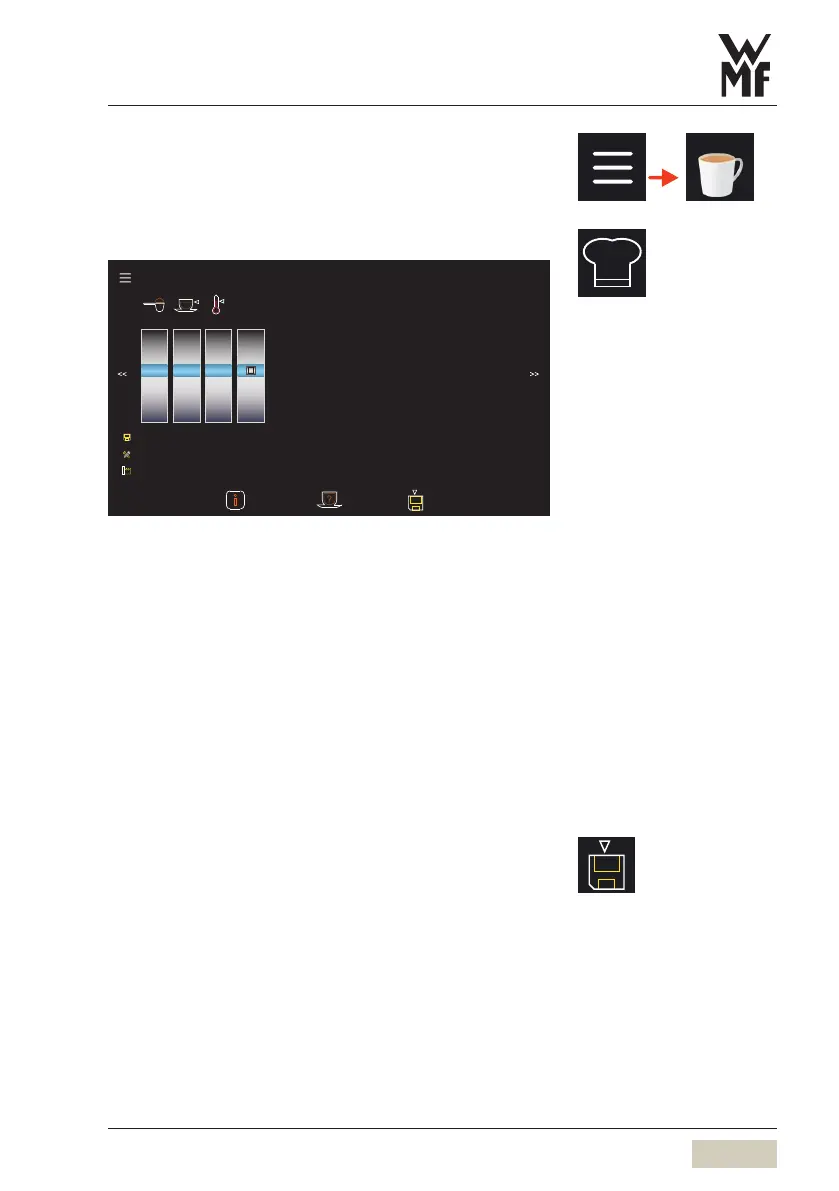
Change recipes
10.8
10.9
11.0
8.0
8.1
8.2
8.3
8.4
85
90
95
100
110
120
130
140
86
87
88
89
90
91
92
93
9.0 120 89
9.0 120 89
9.0 120 89
Right brewing group
Beverage settings Crème Small (r14, m 14, base 14)
Coee
g ml °C
Reference
beverage
No
Yes
Yes
The recipe name, recipe number, and type of portafilter
are displayed in the title. If several recipes with the
same name are saved you will be able to distinguish
them by recipe number.
The recipe is associated with the type of portafilter.
Tochange arecipe, the beverage of the corresponding
portafilter must be selected on the display.
✻ Touch the desired beverage button
The name of the beverage and the associated
portafilter are displayed.
✻ Adjust the recipe
✻ Dispense abrewing test if desired
✻ When the recipe has been adjusted as desired,
savethe recipe
Menu control pads
w Overview
page 47
Save recipes
w page 52


 To Next Page