75
UserManualWMFespressoNEXT
Care | Cleaning programs
✻ Touch
The customer care program starts.
✻ Touch System cleaning
Use the checkboxes to add or remove the desired
options for system cleaning.
✻ Select whether AutoSteam cleaning should also
berun
✻ Select whether the coffee machine should switch
off after cleaning
Note
If “Switch off after cleaning” is active, then
the coffee machine will switch off after the
cleaning cycle.
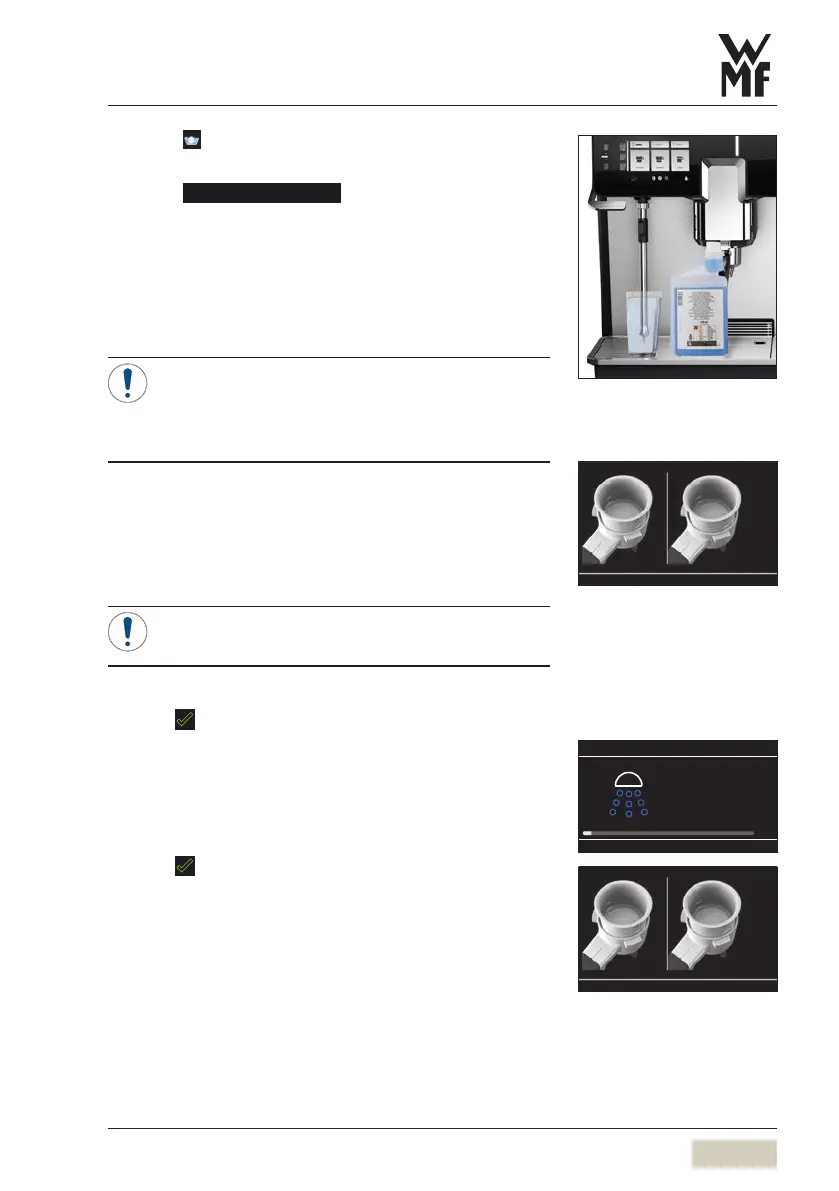
✻ Remove the portafilters
✻ Remove the brewing sieves from the portafilters
✻ Insert the blind sieves in the portafilters
✻ Place one WMFspecial cleaning tablet in each
portafilter
Note
Do not add any water.
✻ Insert the portafilters
✻ Press to confirm and continue
If not enough hot water was discharged via the boiler,
hot water will flow out of the hot water spout during
cleaning program.
The question of whether the cleaning tablets have
been inserted appears.
✻ Press
to confirm and continue
Cleaning begins. Abar graph and the remaining time
are displayed.
Steamer brush
w Accessories and spare parts
page 108
The program always cleans both
brewing groups at the same time,
even if only one has been in use. If
one brewing group has not been in
use, then there is no need to place
acleaning tablet in that portafilter.
However, the blind sieve must be
placed in both portafilters.
08:03
System cleaning
Clean the portafilters and sieves
manually.
w Clean the portafilters
page 83


 To Next Page