3064202_201602 9
Quick start keys/rotary selector
4 Quick start keys/rotary selector
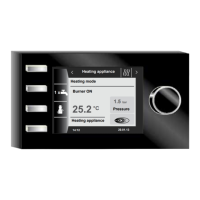
The 4 quick start keys and the rotary selector are used to program the BM-2.
The following settings can be congured using the quick start keys:
− Key 1 – without function display, no function
− Key 2 – variable functions (e.g. once-only DHW heating)
− Key 3 – variable functions (e.g. enabling emissions test)
− Key 4 – home key
Turn the rotary selector
to switch between the individual status pages.
− Heating appliances
− DHW
− Heating circuit
− Mixer
− Solar yield
− Ventilation unit
− Messages
The main menu of the display, default settings, time programs and contractor level are enabled by pressing the
rotary selector; the navigation is explained in the following chapter.
Activation and operation in the
main menu / submenu / menu item
Operating procedure:
Press the rotary selector to access the main menu page. Press the again to access the
submenu, and once more to access the menu item.
The following actions are possible:
Clockwise rotation Cursor moves down through the menu
Selected value is increased
Selected parameter is increased
Anti-clockwise rotation Cursor moves up through the menu
Selected value is decreased
Selected parameter is decreased
Press rotary selector Menu selection is conrmed or enabled
Selected value is conrmed or enabled
Selected parameter is conrmed or enabled
Selected function is executed or enabled
For visual orientation, a cursor is displayed that shows the current position in the display. Press the rotary selector
once to highlight the currently selected item for editing. Turn the rotary selector to change the value, parameter or
function. Press the selector again to conrm the value.


 To Next Page