Maintenance
Replacing stationary vertical cutter belt
Maintenance doc050624 5-12
5
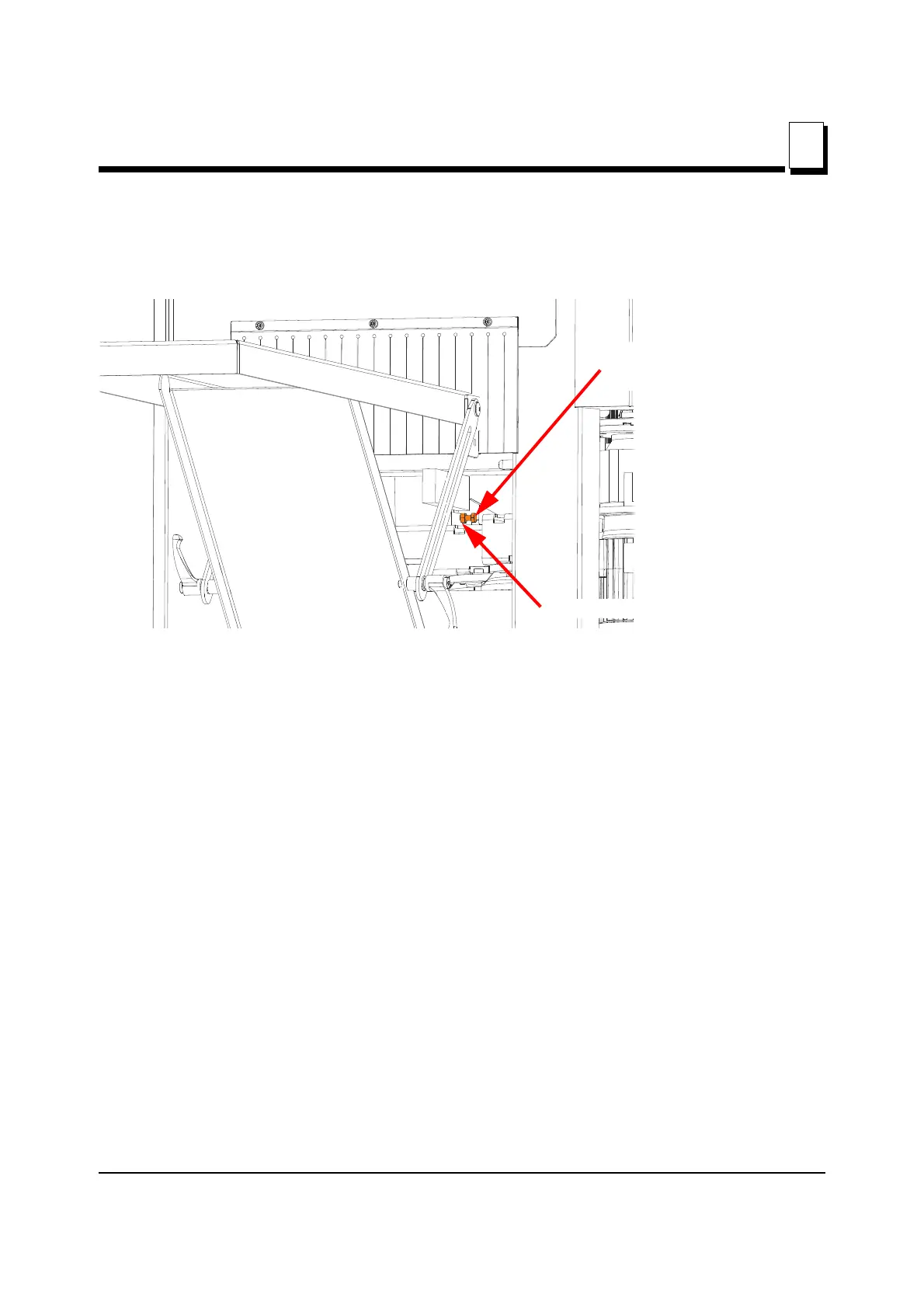
5. Loosen (do not remove) the belt tension adjustment bolt to remove the tension from the
drive belt.
See Figure 5-12. Viewed from outfeed side
6. Back out the tension adjusting bolt until the front of the bolt is flush with the front of
the belt tension bolt bracket, but do not remove the bolt from the bracket.
7. From the front of the machine, pull the motor mount assembly towards you.
NOTE: The motor mount assembly’s movement towards you is limited
to approximately ½ inch (13 mm) before the tension adjustment bolt
bracket makes contact with the cast iron table.
NOTE: The belt must be finessed over the top of the drive (motor) pul-
ley and under the bottom of the cutter pulley to come straight out. The
clearances are tight but it will come out.
8. Replace the belt in the reverse order of how you removed it.
9. Ensure the belt is aligned on both pulleys.
10. Push the motor mount back until there is sufficient tension on the belt for operation.
11. Set the belt tension adjustment bolt to hold the tension.
12. Set the belt tension adjustment bolt locking nut to secure the adjustment bolt.
FIG. 5-12
Belt tension adjustment bolt
Belt tension adjustment bolt
locking nut


 To Next Page