11
CAUTION: Remove the 2-in-1 water tank and empty it promptly aer a mopping task has been
completed. Then clean and dry the mop pad to prevent odor and mildew.
To only use the vacuuming function, remove the mop
assembly.
Pause
When the robot vacuum is running, press any buon to pause. Press the buon
to resume cleaning.
Note: The robot vacuum will enter sleep mode aer being paused or on standby for 10 minutes.
Press any buon to wake it up.
In the do not disturb (DND) mode, the robot vacuum does not resume cleanup,
perform scheduled cleanups, or play voice prompts, and the indicator of the
vacuum turns off aer 10 seconds of charging. The DND mode can be enabled or
disabled in the app.
Note: Please refer to the app for more functions. Details of each function are subject to the
app.
DND mode
During its working, press the buon to pause the robot vacuum, and press
the buon again to start docking.
When the robot vacuum is in standby mode and not connected to the charging
dock, press the buon to start docking.
When a task is completed or its baery is low, the robot vacuum automatically
returns to the dock to charge.
Docking
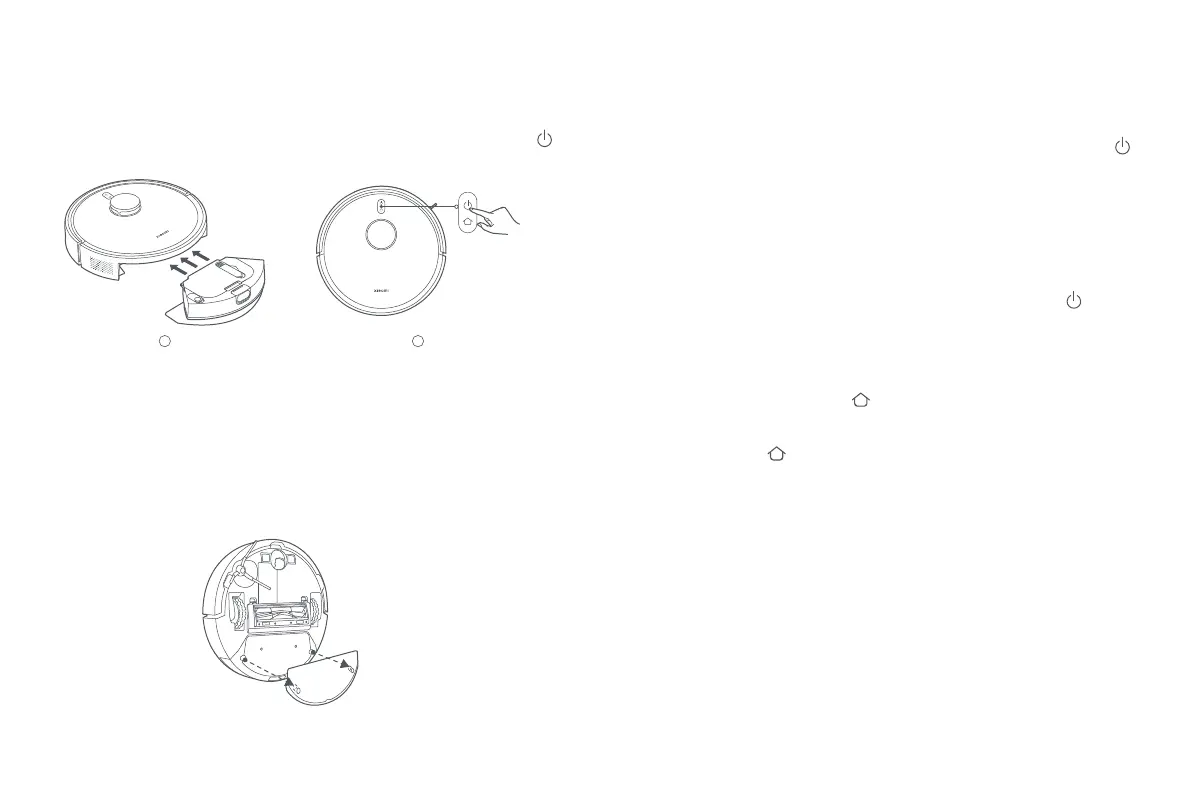
When the robot vacuum is working, pause it then remove the 2-in-1 water tank to
add water or clean the mop pad. Then reinstall it, and press the buon to
resume the task.
Adding water or cleaning the mop pad
3. Insert the 2-in-1 water tank with the mop assembly into the robot vacuum as
illustrated. It is properly installed when you hear a "click". Press the buon
to start vacuuming and mopping.
1
2






 To Next Page