- All further parameters are exactly the same as for the local CV/Gate FX column and so all
functions of the local tracks can still be used. The only difference are the probability settings
which belong now to several trigger outputs and FX.
PR12 belongs to the columns 1+2 (Trigger outputs 1+2 or 9+10)
PR34 belongs to the columns 3+4 (Trigger outputs 3+4 or 11+12)
PR56 belongs to the columns 5+6 (Trigger outputs 5+6 or 13+14)
PR78 belongs to the columns 7+8 (Trigger outputs 7+8 or 15+16)
The outputs for the columns are decided using the swap track function.
Additionally the same outputs on the drum-matrix are affected.
Page 3:
First of course again the sequencer row (up to 64).
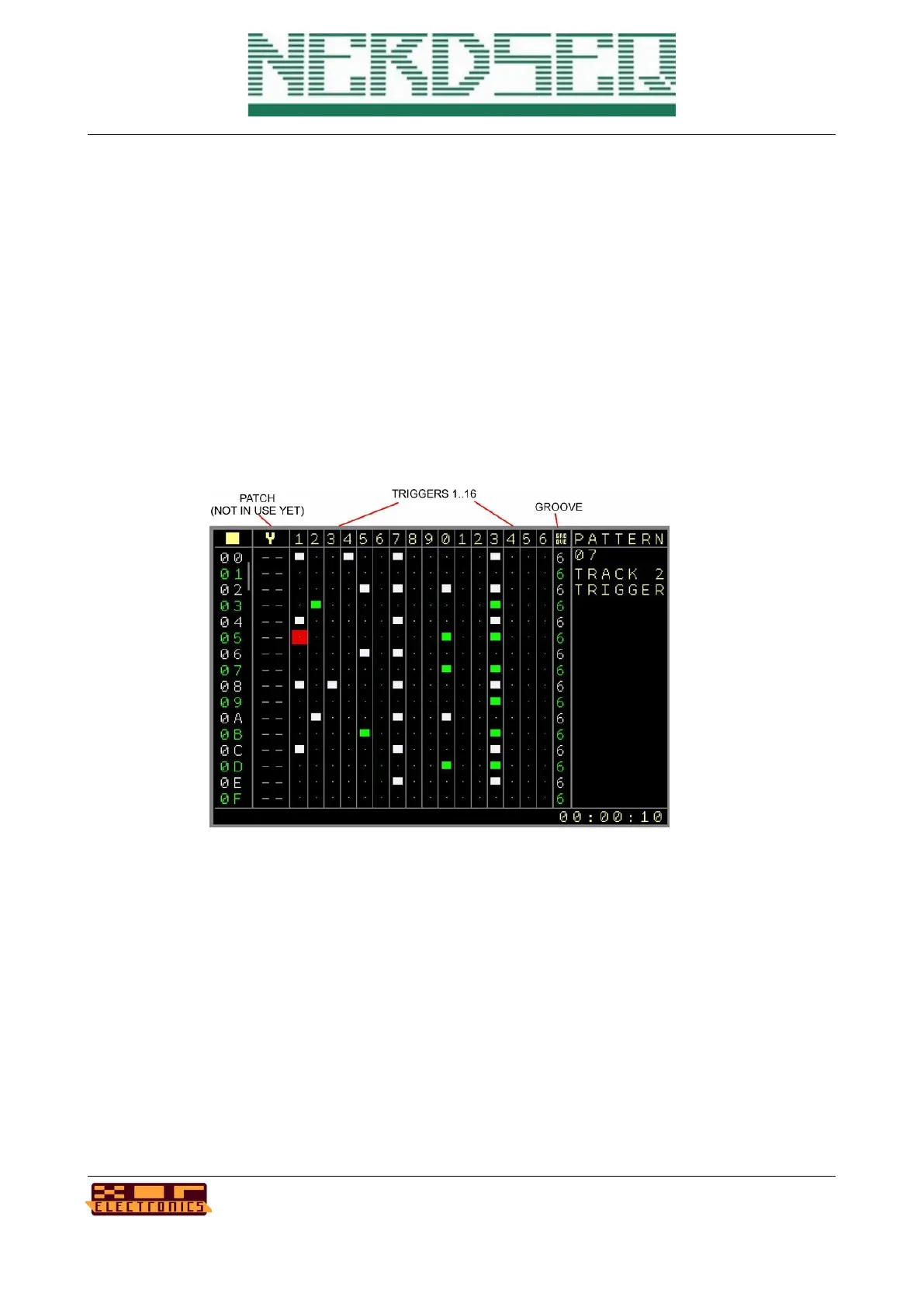
• Patch → Set patches for all FX parameters. Same usage as the Patch column in a
CV/Gate track.
• DrumMatrix → 16 columns for the 16 outputs. This is a classic view where you can set and
reset triggers in a matrix for all 16 outputs.
• Groove → Groove settings as known from the other tracks (see CV/Gate pattern screen for
further explanation
NerdSEQ – a tracker based Eurorack sequencer Page 52
User Manual Revision V1.26 for Firmware V1.26 12 July 2022



 To Next Page