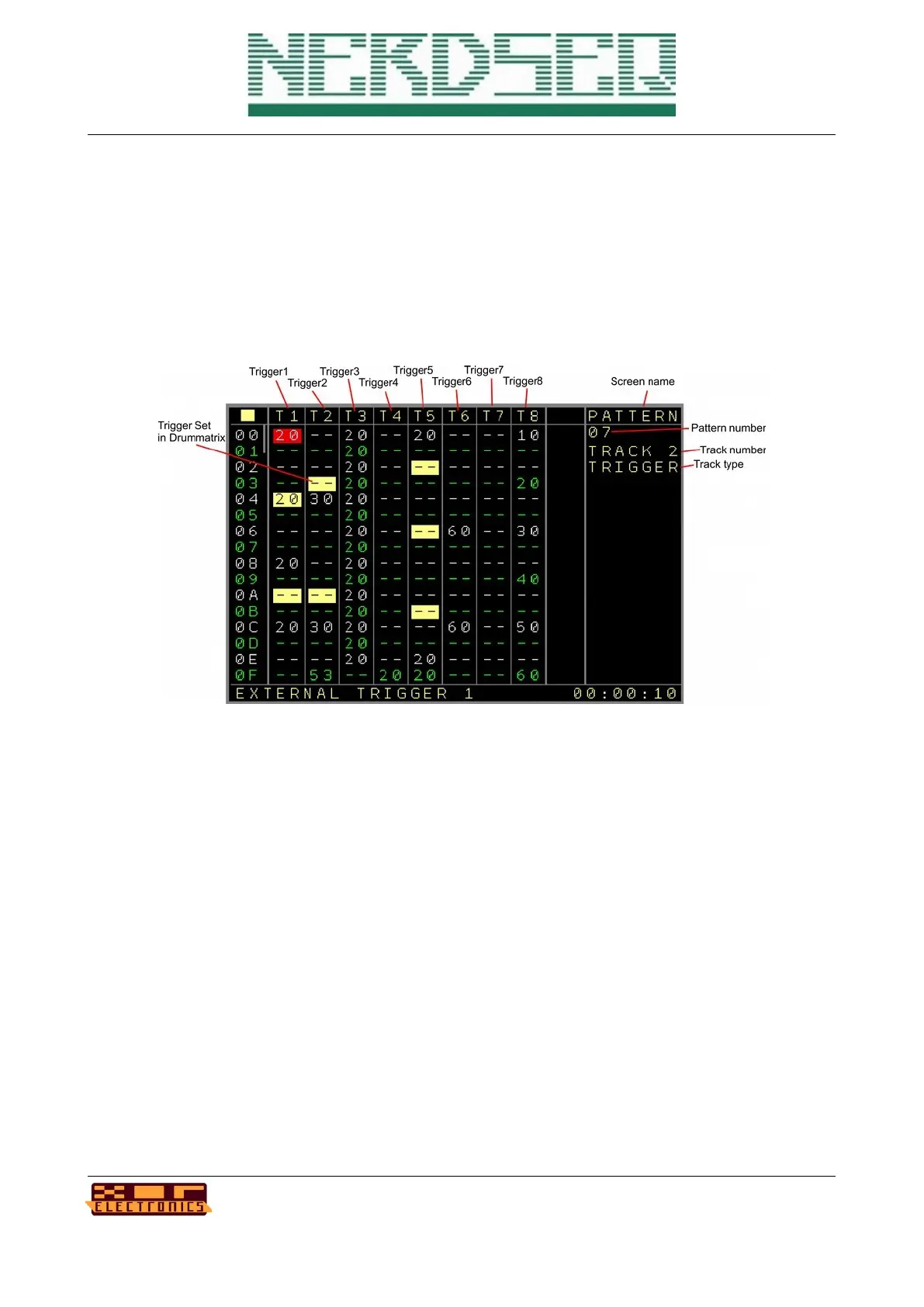
Pattern Screen (Trigger 16 Track)
This pattern screen is only available with a connected ‘More Triggers 16’ expander. You must
assign a track to be used together with the expander in the → Track Assign Screen.
As the pattern values don’t fit on one screen with this one, it is split into 3 pages.
Page 1:
First again the sequencer row (up to 64).
Then the following columns:
• TR1 .. TR8 Are the columns for the first 8 trigger outputs. The values are exactly the same
as on the local Trigger columns. (see CV/Gate Pattern screen for explanation)
As a side note, this can also be the Columns TR9 .. TR16. You can setup in the track
settings to use the 2
nd
part of the 16 outputs.
The trigger part is highlighted if a trigger is set up in the drum matrix for the same trigger
position.
NerdSEQ – a tracker based Eurorack sequencer Page 50
User Manual Revision V1.26 for Firmware V1.26 12 July 2022



 To Next Page