3.6 Description of the printer's status
Status of errors
Including overheating of the printing head, cover opening, paper lacking, cutter jam and paper jam, etc.
Standby status
No error, no printing, no paper feed, waiting for printing task of the printer.
Printing status
The process from start to end of printing the contents after the printing contents are received.
Paper-out status
The process from paper out to paper cutting after printing is over.
4、Installation and Use
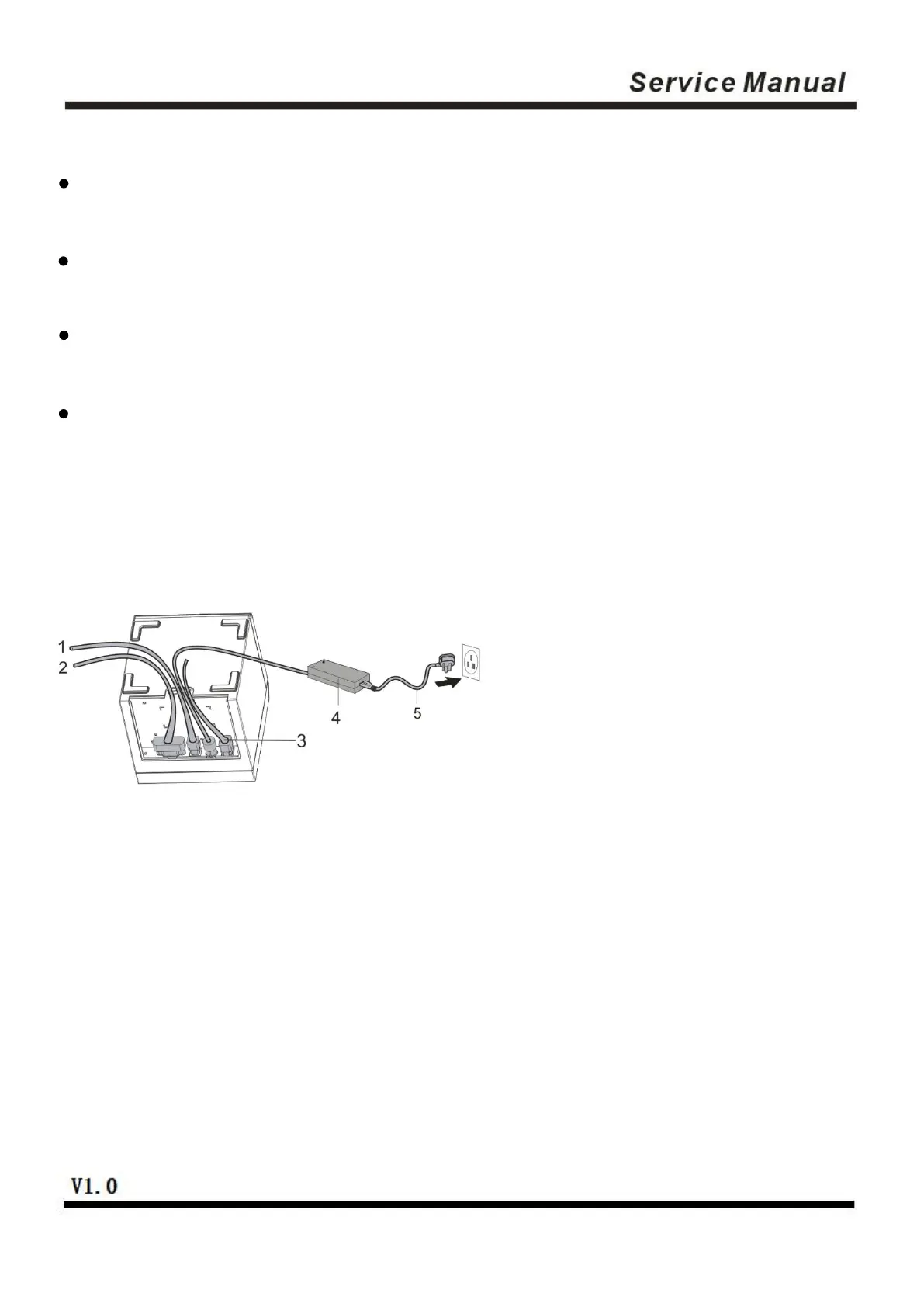
4.1 Connection of Interfaces
1.USB cable 2. Serial cable/network cable 3. Cash drawer cable 4. Power adaptor 5. Power cable
4.1.1 Connecting to power adaptor
1)Confirm that the power switch of the printer is in off state;
2)Insert the cable plug of the power adaptor into the power interface at the rear of the printer with the flat
and straight facing upwards;
3)Turn on the input power of the power adaptor;
4)Be cautious in inserting and pulling the power adaptor, or it is easily damaged.


 To Next Page