Xtreme Power Conversion Corporaon
TX91 3.8- 10kVA User’s Manual
Page 15
Uninterrupble Power Supply
CVCF mode ○ ● ○ ○
Baery Test ● ● ● ○
ECO mode ● ● ○ ○
Fault ○ ○ ○ ●
Note: ● means LED is lighng, and ○ means LED is faded.
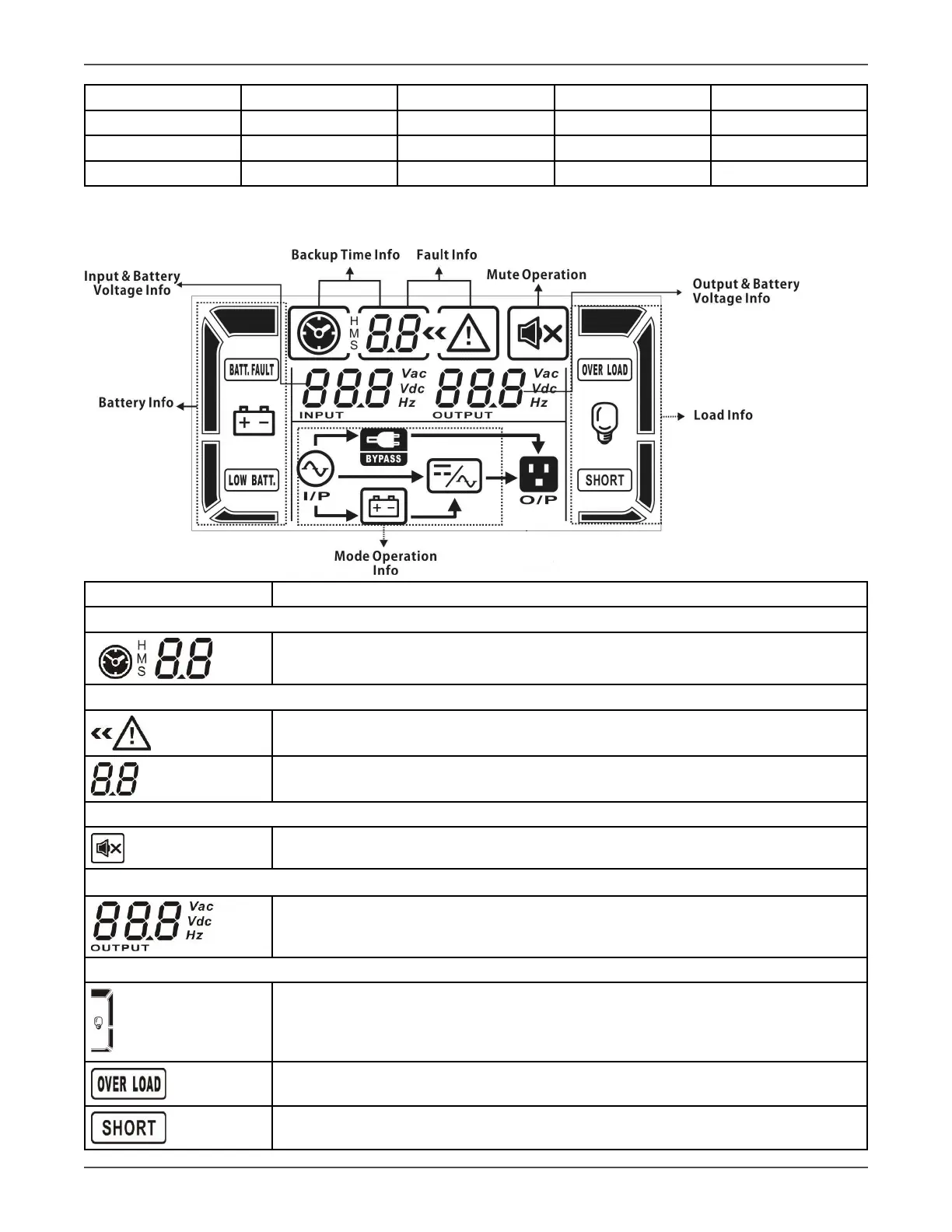
3.1.3 LCD Panel
Display Funcon
Backup me informaon
Indicates baery discharge me in numbers.
H: hours, M: minutes, S: seconds
Fault informaon
Indicates that the warning and fault occurs.
Indicates the fault codes, and the codes are listed in details in secon 3-9.
Mute operaon
Indicates that the UPS alarm is disabled.
Output & Baery voltage informaon
Indicates the output voltage, frequency or baery voltage.
Vac: output voltage, Vdc: baery voltage, Hz: frequency
Load informaon
Indicates the load level by 0-25%, 26-50%, 51-75%, and 76-100%.
Indicates overload.
Indicates the load or the output is shorted.



 To Next Page