Xtreme Power Conversion Corporaon
TX91 3.8- 10kVA User’s Manual
Page 10
Uninterrupble Power Supply
2.4 UPS Electrical Connecons/Installaon
Installaon and wiring must be performed in accordance with the local electric laws/regulaons and execute the
following instrucons by professional personnel.
1. Make sure the mains wire and breakers in the building are sized for the rated capacity of UPS to avoid
the hazards of electric shock or re.
2. Switch o the mains switch in the building before installaon.
3. Turn o all the connected devices before connecng to the UPS.
4. Prepare wiring based on the following table:
Model Wiring spec (AWG)
Input Output Non-isolated
Neutral
Ground
3.8K 8 8 8 8
5K 8 8 8 8
6K 6 6 6 6
10K 4 4 4 4
Model Recommended Input Overcurrent Protecon
3.8K 30A
5K 30A
6K 40A
10K 70A
NOTE: The selecons for size and color of wires should follow the local electrical laws and regulaons.
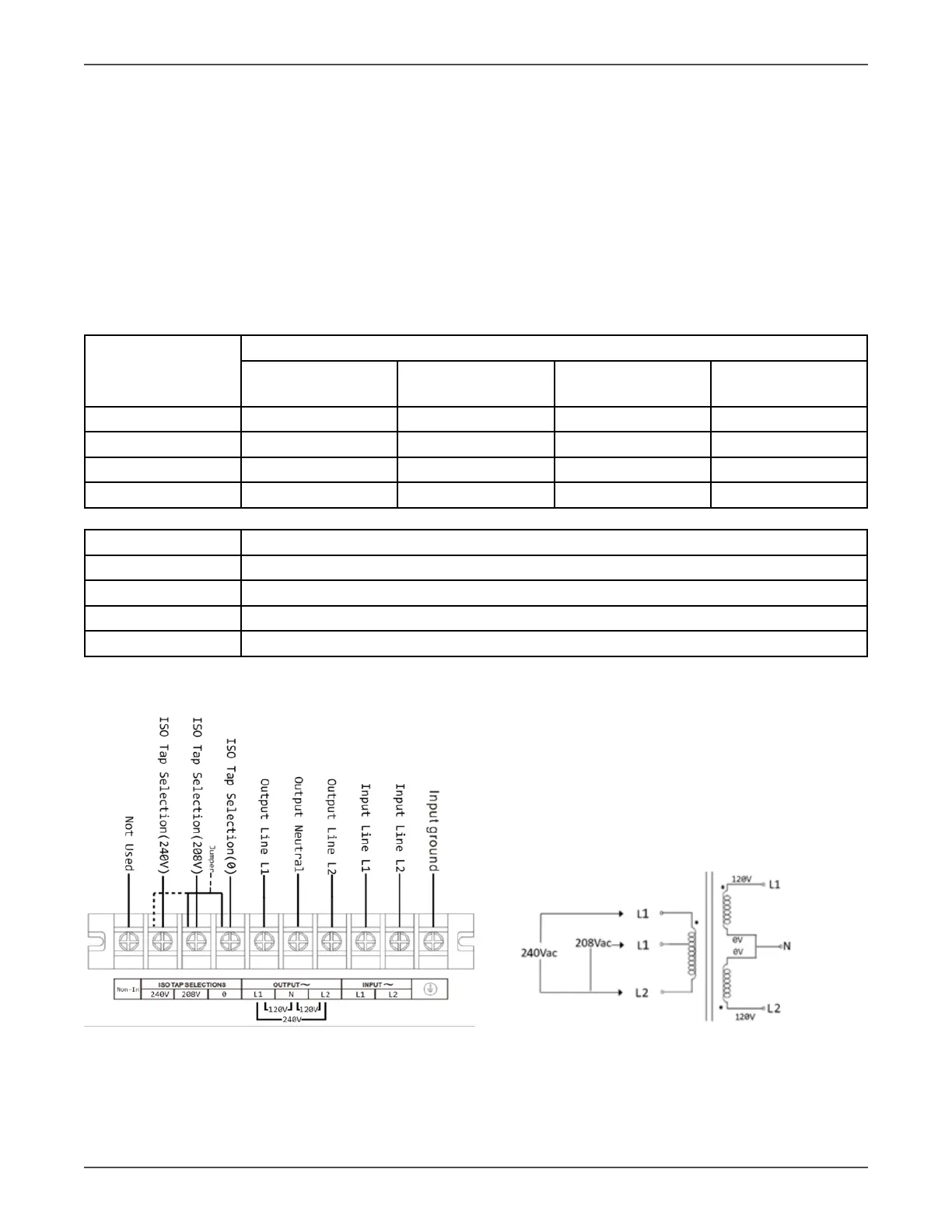
5.Remove the terminal block cover on the rear panel of UPS
UPS Terminal Block Wiring Diagram UPS Transformer Diagram
Figure 2-3 Figure 2-4
1. Connect input L1 wire to UPS input L1 terminal.



 To Next Page