en - Original instructions
Genyo plus, Additional Installation, Operation and Maintenance Instructions 11
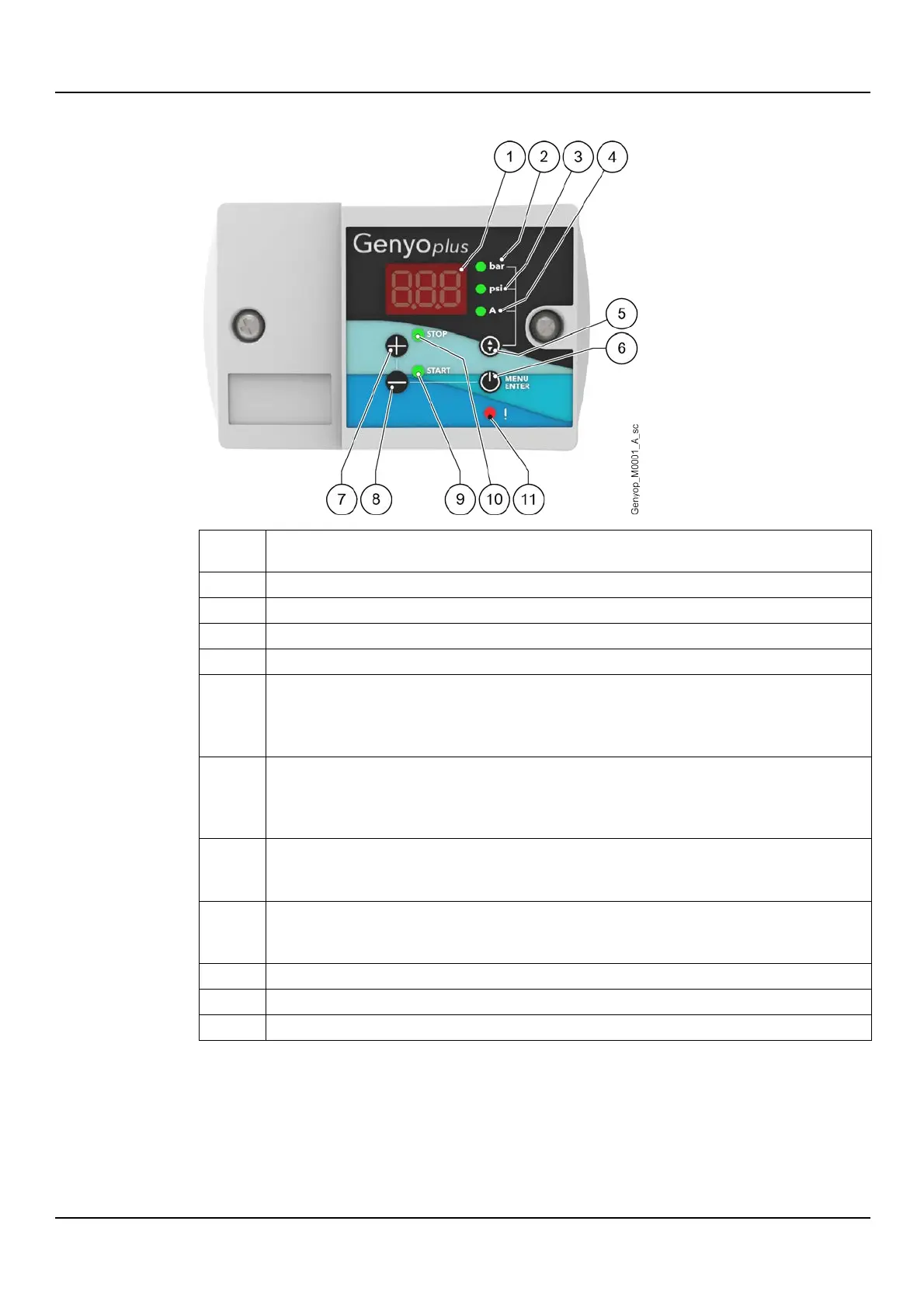
3.4.1 Control panel
LED indicator of the pressure (bar) measurement unit, see also LEDs description
LED indicator of the pressure (psi) measurement unit, see also LEDs description
LED indicator of the current (A) measurement unit, see also LEDs description
Button for viewing on the display:
•
pressure in bar, or
•
pressure in psi, or
•
absorbed current in Ampere
•
selecting the operating mode (automatic or OFF), or
•
confirming a change, or
•
•
increasing a value, or
•
selecting the stop pressure
•
decreasing a value, or
•
selecting the start pressure
Start pressure LED, see also LEDs description
Stop pressure LED, see also LEDs description
Alarm LED, see also LEDs description


 To Next Page