TUNER Operation
Switch to Radio Tuner source
Press the SRC button on the front panel or on the remote control to switch to the Tuner source.
You can also access the tuner mode from the MAIN menu directly.
Select FM/AM Band
Touch the icon on the screen, press the BAND button on the remote control or press the
on the front panel to change among the following bands: FM-1, FM -2, FM-3, AM1 and AM2.
Auto Tuning
Press the button ( ) on remote control or touch the icon on the screen to seek the next
available channel by increasing the tuning frequency. Press the button again to stop searching.
Press the button ( ) on the remote control or touch the icon on the screen to seek the next
available channel by decreasing the tuning frequency. Press the button again to stop searching.
Manual Tuning
Touch the or icon to increase or decrease the tuning frequency in one step.
Using Preset Stations
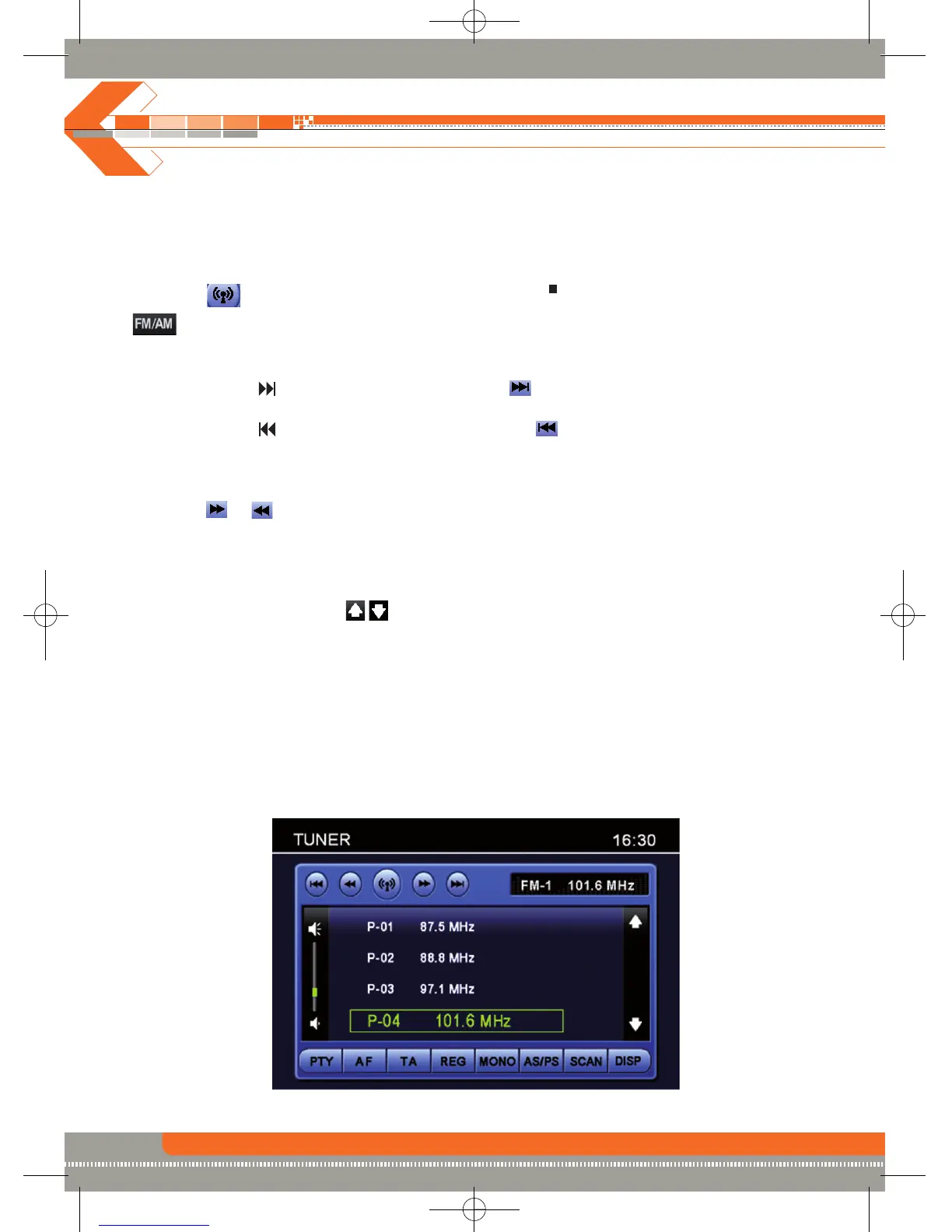
6 numbered preset buttons store and recall stations for each band. 6 stored stations (P01-P6) for
the current band appear on the screen, touch the channel directly to select.
You can touch the arrow icons on the screen to select other stations.
Storing a station
1. Select a band (if needed), then select a station.
2. Touch and hold an preset button (4) for three seconds. The preset number appears at the top of
the screen.
Recalling a station
1. Select a band (if needed).
2. Touch an on-screen preset button (4) to select the corresponding stored station.
/
BAND
22


 To Next Page