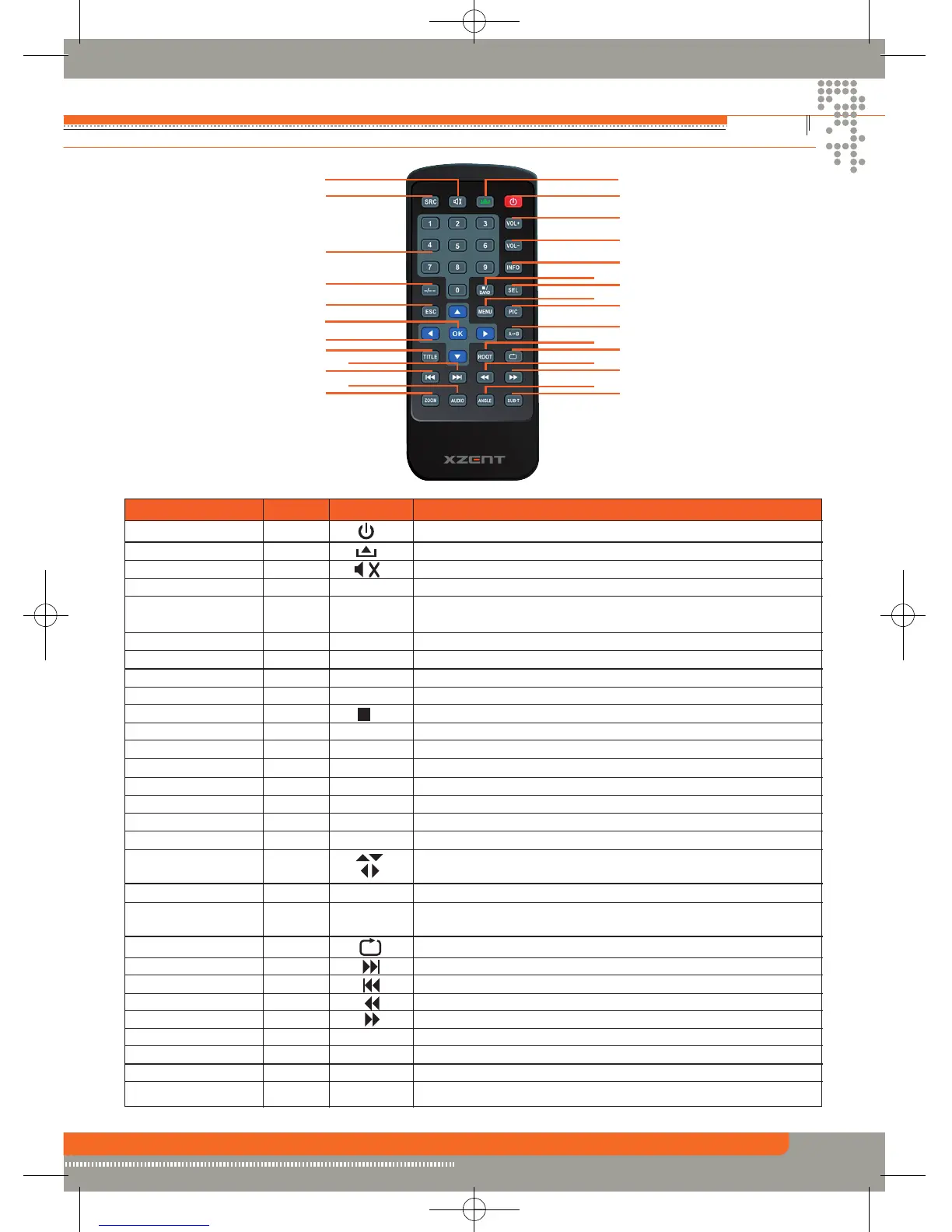
REmote Control
9
Name Ref # Signal Function
Power 1 Turn the power on/off.
Open 2 Open/close the TFT monitor.
Mute 3 Toggle on/off audio output.
SRC 4 SRC Select playing mode.
Numeric button 5 1.2.3.4.5. Directly access certain chapter / track / preset station in
6.7.8.9.0 current band.
VOL up 6 VOL+ Increase the volume.
VOL down 7 VOL- Decrease the volume.
Information 8 INFO Display playing information.
GOTO search 9 -/-- Position search function on VCD/DVD mode.
Stop/Band 10 / Select FM/AM band on Tuner mode.
BAND Stop playback in other mode.
Select 11 SEL Enter the audio settings.
ESC 12 ESC Exit the current menu.
Menu 13 MENU Enter the main menu of system.
Picture 14 PIC Adjust the parameter of TFT settings.
Repeat A>B 15 A B Set start point A and end point B to repeat continually.
OK 16 OK Start or pause playback and confirm settings.
Direction buttons 17 Up/down/left/right to select items for setting.
Title 18 TITLE Enter the title menu of current source.
Root 19 ROOT Enter the main menu of the disc.
Turn on PBC while playing VCD.
Repeat 20 Repeat playback for current chapter.
Next 21 Select the next chapter/track for playback.
Previous 22 Select the previous chapter/track for playback.
Fast Reverse 23 Fast reverse the disc content.
Fast Forward 24 Fast forward the disc content.
Audio 25 AUDIO Change the audio language for disc playback.
Zoom 26 ZOOM Zooming in/out on an image.
Angle 27 ANGLE Playback in different angel for a scene(if it is applicable).
SUB Title 28 SUB-T Language selection for subtitle.
©
2
10
8
3
16
1
6
7
11
13
14
15
19
20
2321
24
27
28
4
5
9
12
17
18
22
25
26


 To Next Page